
AI Director of Customer Support: how it works
Support Leadership Intelligence: the Command Center and its KPI definitions, the support organization and coverage gaps, SLA and backlog, reports and schedules, continuous improvement, permissions, seats and what it can and can’t see.
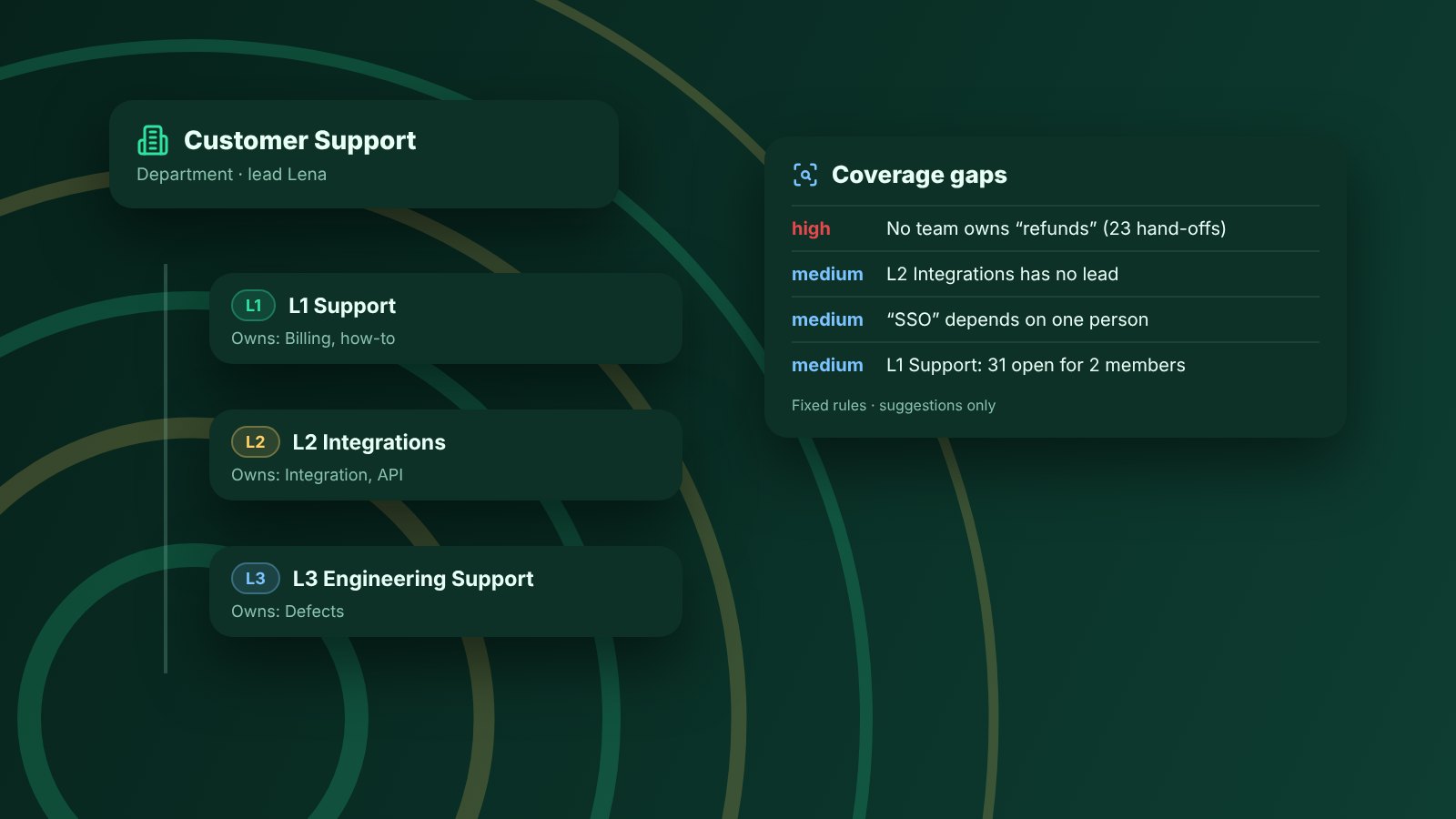
Support Leadership Intelligence — the AI Director of Customer Support — is a leadership layer over your support operation. It reads the support records TicketResolve already keeps and calculates every number with fixed rules; nothing on these pages is produced by AI. It is an add-on to Customer Support AI at $149 per seat a month, part of the 7-day free trial. Open it from Support Leadership in the dashboard. The existing support dashboards (Command centre, Manager dashboard, SLA risk, Capacity) stay in every plan.
Support Command Center
Every number shows its definition, source, the previous period, your target where you set one, and — for counts — the tickets behind it. Filter by period (7, 30 or 90 days), by a team (the categories it owns) or by one category.
| Number | How it is counted |
|---|---|
| Tickets received | Distinct tickets TR-AI processed in the period; follow-up replies on the same ticket count once. |
| Resolved by TR-AI | Tickets where TR-AI posted an answer. Sent is not verified. |
| Handed to people / Escalated | Tickets TR-AI sent to your team for review, triage or escalation; escalated is a subset. |
| Solved by people / Reopened | Tickets your team solved in the help desk in the period, and how many of those the help desk reports as reopened. |
| Median first response / time to resolution | For tickets people solved in the period, in calendar time as the help desk reports it. |
| Open hand-offs, without an owner, waiting on the customer | Hand-offs from the last 30 days not yet solved; no owner means nobody picked it up in a TR-AI queue; waiting means the SLA clock is paused. |
| With Level 3 / Awaiting engineering | Unsolved Level 3 tickets; open hand-offs grouped into a problem linked to an engineering issue that isn’t fixed. |
| SLA breached / at risk | Open hand-offs past a target, or predicted at high risk, under your SLA policy, business-hours calendar, holidays and pauses. |
| SLA compliance | Share of tickets people solved whose resolution met the target of the policy that applied. Not split by category. |
| TR-AI answers that held | Of TR-AI resolutions with a known 48-hour outcome, the share with no reopen, customer reply, low CSAT or near-identical new ticket. |
| Verified AI resolutions | Of tickets TR-AI resolved, the share Resolution Assurance verified: the customer confirmed, a person verified, or a technical check passed. |
| Customer satisfaction | Average survey score of responses received in the period. Not split by category. |
Organization & teams
- Departments and teams in a hierarchy, each with a tier (L1, L2, L3, premium, enterprise, technical account, escalation, operations or knowledge), a lead, the ticket categories and queues it owns, the time zones it covers and a note.
- Members are workspace members and/or the name each person has in your help desk, so their solved tickets count for the team; a role (lead or member) and skills.
- Coverage gaps, found with fixed rules: teams without a lead or members; Level 3 work but no L3 team, or hand-offs but no L1/L2 team; categories with 5 or more hand-offs in 30 days that no team owns; teams that own a category none of their members solved in 90 days; a category one person solves almost alone (only for people who may see individual performance); teams whose open hand-offs per member are at least twice the average.
Gaps are suggestions. Nothing here decides anything about hiring, pay or discipline.
SLA & backlog
Open tickets ordered by SLA urgency with the policy that applied, first-response and resolution status and breach risk; queues with arrivals and clears per day and the projected backlog in 7 days; open work by age. Projections are estimates and are labelled so. SLA policies and calendars are changed where they are today, under Configuration → SLA.
Ticket operations
For tickets your team solved in the period: how long each stage took — reaching TR-AI, waiting to be picked up, first response, Level 3, waiting on the customer, active work and total — with medians, how many tickets passed each stage, each stage’s share of all the open time and the bottleneck (a stage with 15% or more). Also by category and by week. Look up any ticket for one timeline from the resolution log, queues, Level 3, SLA pauses and events, Resolution Assurance and the help desk.
Escalations
Escalation volume and rate with a weekly trend; the escalation, lead and manager queues with entries, open items, median time to pick up and the oldest open item; escalations by category and reason; customers who escalated more than once; and enterprise or VIP customers (from Customer 360 tiers) who escalated.
L1 / L2 / L3 intelligence
| Tier | Means |
|---|---|
| L1 | Resolved by TR-AI (it answers Level 1 itself). |
| L2 | Solved by people without Level 3. |
| L3 | Sent to the Level 3 queue. |
- Should have been L1: categories TR-AI resolves 70% or more of (10+ tickets), where 5 or more still went to people.
- Routine work at L3: Level 3 tickets in categories people at L2 solve 80% of the time.
- Late escalation: tickets that reached Level 3 a day or more after they arrived.
- Quick L3 solves: three or more Level 3 tickets solved within an hour — possibly L2 work; check before changing routing.
- Repetitive L2 work: 20 or more tickets in a category solved by people while TR-AI resolves under 30%.
Team performance
For each team — by its members’ help-desk names, or by the categories it owns when it has none — and, with “See individual support performance”, each person with at least 5 solved tickets: solved, median first response, median active hours (waiting on the customer excluded), reopen and SLA-breach rates, CSAT, Level 3 share, main categories and a complexity index: the median of each ticket’s active time divided by the typical time for its category across your team. 1.0 is typical for that mix of work.
Teams and people are listed alphabetically and never ranked. Suggestions are about coaching, training and coverage — a reopen rate well above the team’s, first response above target, or a category taking twice the typical time.
Customer experience & quality
CSAT (1–5) with its distribution, response rate and TR-AI versus people; low scores by category; repeat contact within 7 days; customers asking for a manager or lead; TR-AI answers that didn’t hold and reopen reasons (to people who can view tickets); and Agent QA review scores by criterion and flag. “What the records show” lists the patterns that stand out — associations, not proven causes.
AI resolution performance
Measured by outcomes, not activity. Each step is its own number, rated against the step before it:
| Step | Counts |
|---|---|
| Evaluated | Distinct tickets TR-AI processed. |
| Answer drafted | TR-AI wrote an answer — sent on its own or held for review (involvement). |
| Sent automatically | Posted with no person reviewing it. |
| Reviewed by people / accepted as written | Drafts a person decided on, and the share sent unchanged (acceptance); edited and rejected drafts count as overrides. |
| Held for 48 hours | Sent answers older than 48 hours with no reopen, “didn’t work” reply, low CSAT or near-identical new ticket. |
| Verified resolution | Resolution Assurance verified the outcome: the customer confirmed, a person verified, or a technical check passed. |
Alongside: tickets people still solved after TR-AI answered, tickets that went to Level 3 after it answered, answers people corrected and the reasons answers didn’t hold. A sent answer is never counted as a success on its own.
What to automate next ranks categories by tickets people handled that TR-AI doesn’t resolve yet, and names what is in the way — open knowledge gaps, drafts people change or reject 30% or more of the time, or answers that hold less than 85% of the time (then quality comes first). Hours are an estimate: tickets × your average handle time. Nothing is automated from this page.
Knowledge and self-service lists the articles behind TR-AI answers with how often those answers held, the weakest ones, knowledge proposals by status, and chat-widget containment — conversations answered without a hand-off or ticket. Containment is not presented as deflection: TicketResolve can’t see whether the visitor would have written in, so it is never added to resolutions or savings.
Engineering escalations
Engineering tickets raised from support: open by status, median time to acknowledge (first moved to in progress or closed) and to done, how long open ones have waited, the support requests and customers attached to each, support tickets waiting on engineering, merged duplicates, and defects that came back after a fix. Hand-off completeness scores each engineering ticket on description, steps to reproduce, expected and actual results, environment and component, and lists what is missing.
The feedback loop
Every recurring problem moves through detected → cause confirmed → with engineering → fixed. For fixed problems, tickets per week in the 28 days before the fix are compared with up to 28 days after it (at least 7 days must have passed). Problems affecting two or more customers with no engineering link are listed, and knowledge published from proposals is shown alongside.
Product support
Support effort by the product Resolution Assurance recorded for each ticket — or by category where no product is recorded: tickets, TR-AI rate, escalation rate, tickets for people, Level 3, median resolution time, reopen rate, open problems and knowledge gaps (matched by name, so indicative).
Capacity and cost
The next 30 days from the staffing forecast — tickets for people, hours needed and available (scheduled hours minus approved time off), people short or spare and the backlog trend — and scenarios: one more person, TR-AI taking 10% more, handle time 10% shorter, and your own mix. Assumptions are listed with the results.
Cost estimates (for people with “View AI cost”) use your hourly cost, average handle time and plan price: cost per ticket, per resolution by people and by TR-AI, and by category and tier, with Level 3 at twice the handle time as a stated assumption. They are allocated estimates for planning, not audited accounting figures; payroll and software costs aren’t read here.
The AI Support Director
Ask in your own words. Questions it recognises — today’s report, SLA risk, backlog by product, the oldest tickets, enterprise customers needing attention, AI effectiveness, what to automate next, reopen rates, engineering delays, this month against last, cost, and what to prioritise this week — are answered by calculation from the views above, with measured figures, estimates and recommendations kept apart and links to the records. No AI, no limit.
Anything else, or Write it up, is written by AI: one call over the calculated figures (never ticket text), with every fact citing its evidence and uncited statements dropped. Written answers use the AI Support Director’s own daily limit — 30 per workspace by default, 0–100 under Settings — reserved before the call and given back if it fails. They need a Support Leadership seat. It never ranks people or suggests hiring, pay or disciplinary decisions.
The page also shows SLA predictions and the queue forecast for the next 24 hours, 7 and 30 days with 80% ranges and their assumptions — forecasts, not confirmed events.
Actions
Suggestions come from fixed rules over the records: give at-risk tickets without an owner an owner, take recurring problems with no engineering link to engineering, route categories handled at the wrong tier, close knowledge gaps or propose automation for the top categories, plan down growing queues, and add coverage for overloaded teams. Drafting one sends it to a named approver who holds “Approve support leadership actions” — never the person who asked.
| Kind | When approved |
|---|---|
| Notify managers | The named members are notified in the app and by e-mail (per their settings). |
| Engineering hand-off | An engineering ticket is created in Engineering tickets; sending it to your tracker stays a separate step there. |
| Rebalance, routing change, automation proposal, knowledge update, schedule change, backlog plan | Recorded as an approved decision for its owner to carry out in the relevant settings — TicketResolve changes nothing automatically. |
Every action keeps its history. It never changes automation, routing, SLA policies, schedules or queues itself and never contacts customers.
Alerts
Checked every hour for the people an administrator chooses: critical or high-priority tickets without an owner, tickets likely to breach SLA, tickets waiting on engineering longer than the hours you set (72 by default), and enterprise or VIP customers’ tickets at SLA risk — once per ticket per day.
Reports
The daily support report: inflow and resolutions in the last 24 hours, backlog, SLA risks, critical escalations, team capacity and customer-impacting problems. Each section lists the tickets or problems behind it. Reports are calculated with the creator’s access, kept for them, and can be downloaded as CSV or printed. The weekly performance report, the monthly operations report and the quarterly strategy report cover the previous 7, 30 and 90 days against the period before: volume and service, team performance, backlog, escalations, customer experience, AI automation, engineering, and — monthly and quarterly — problems fixed, product challenges, knowledge gaps, capacity, cost (only for people who may see costs) and recommendations.
Scheduled reports
People with Support Leadership settings can schedule any report for workspace members: daily, every Monday, on the 1st of the month or on the 1st of the quarter, at 07:00 UTC. Each recipient gets a notification and an e-mail. Every copy is calculated with that recipient’s own access, so someone who can’t see costs or individual performance doesn’t get them by schedule. Up to 20 schedules per workspace.
Continuous improvement
Each action marked done is followed up with the measure it was meant to move, comparing the 28 days before its decision with up to 28 days after, from 7 days on: tickets per week for its problem, or the share of its category TR-AI resolved (at least 5 tickets each side). Other actions show as done, with the outcome recorded. Results are associations — other changes in the same weeks can contribute.
In the AI Ops Copilot
For people with access, the Copilot’s support overview adds Support Leadership: the share of TR-AI resolutions verified, open hand-offs, those without an owner or past SLA, and tickets waiting on engineering, linking here.
Permissions and seats
| Permission | Allows |
|---|---|
| View Support Leadership Intelligence (sd.view) | Every page, read-only; create reports. |
| Work in Support Leadership (sd.manage) | Maintain teams and members, get written answers from the AI Support Director and draft actions. Needs a seat. |
| See individual support performance (sd.people) | Names of people in drill-downs, SLA ownership and single-specialist gaps. |
| Approve support leadership actions (sd.approve) | Approve or reject actions where you are the named approver — never your own. |
| Support Leadership settings (sd.admin) | Targets, alerts, the AI Support Director’s daily limit (30 by default, 0–100) and seats. |
Built-in roles: Support Leadership · Director (all of the above) and Support Leadership · Manager (view, work, individual performance). Workspace Executive, Auditor and Viewer can read it. Ticket subjects appear only for people who can view tickets.
What it sees, and what it never does
- It sees tickets that pass through TR-AI and the human-solved metrics your help desk reports. Tickets that never reach TR-AI, and assignments made only in the help desk, aren’t visible — the Command Center says so.
- It never changes your help desk, automation, routing, queues or SLA policies, and never sends anything to customers.
- It never ranks people by closures and never produces hiring, pay or disciplinary output.