
AI CFO: how it works
Importing your books; account mapping, entities, periods and data quality; statements and the command center; revenue and expenses; budgets and approvals; forecasts; receivables and payables; permissions.
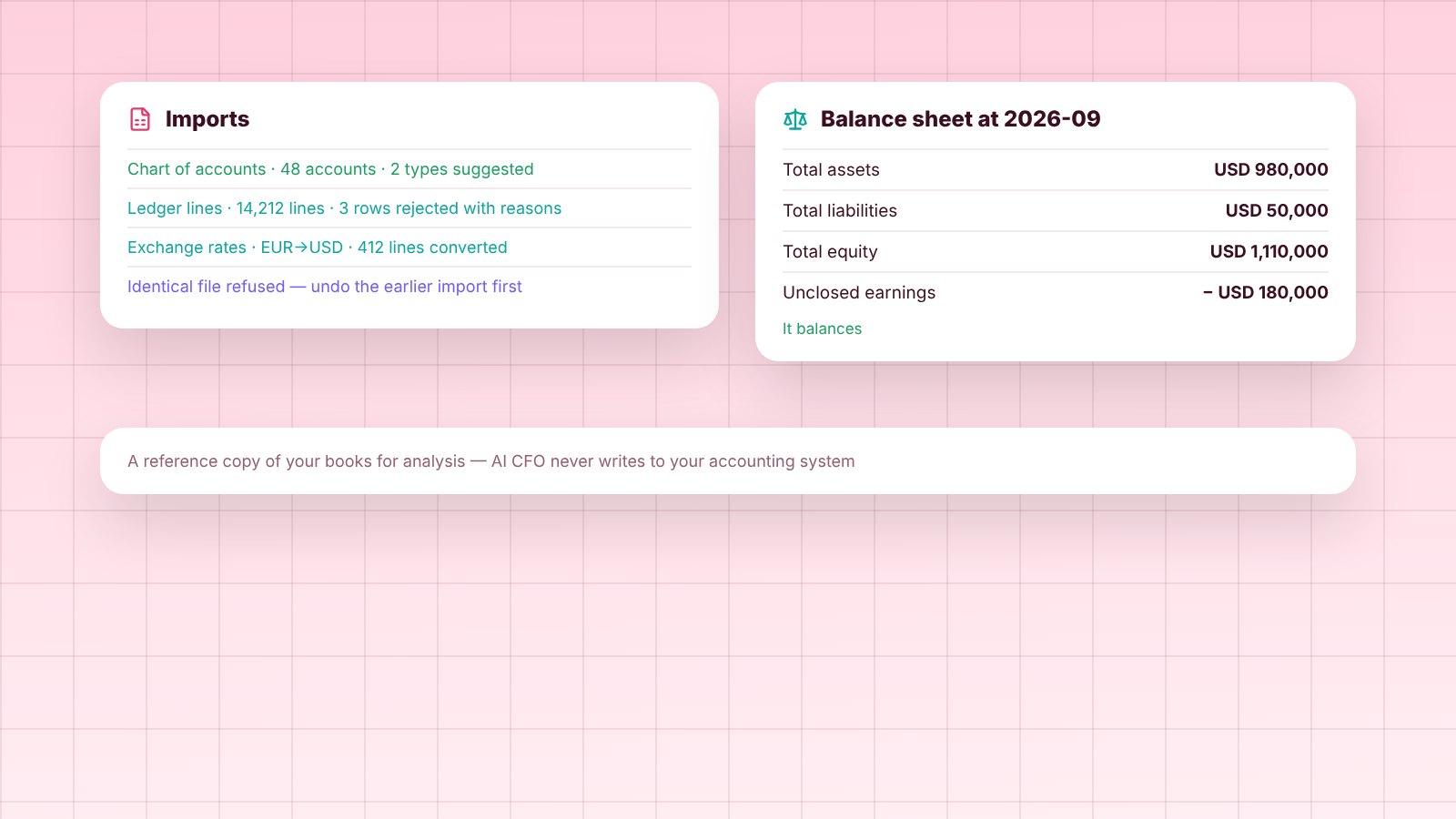
AI CFO (Financial Intelligence) calculates a financial view of the business from your own books. It is an add-on at $199 per finance seat a month and part of the 7-day free trial. Open it from AI CFO in the dashboard.
Bringing in your data
In Data & accounts → Import, upload or paste CSV exports. Column names are matched loosely (for example Account code, account or GL account).
| File | Columns | Notes |
|---|---|---|
| Chart of accounts | code, name; optionally type, subtype, category, entity | A type missing from the file is suggested from the account’s name and marked as a suggestion until someone confirms it. A mapping made by hand is kept when the chart is imported again. |
| General-ledger lines | date, account code, debit and credit (or one signed amount); optionally currency, journal, description, counterparty, department, product, customer, reference, entity | Lines on codes not in the chart create unmapped accounts so nothing is dropped. Dates as YYYY-MM-DD or day/month/year. |
| Exchange rates | date, from, to, rate | The latest rate on or before a line’s date converts it into the reporting currency. Lines imported before their rates are converted when rates arrive. |
- Every rejected row is listed with its reason. An identical file is refused; undo the earlier import first to bring it in again.
- A ledger import can be undone — its lines are removed, and nothing changes in your accounting system.
- Each line keeps its original currency and amount; the reporting amount and the rate used sit beside it. Lines with no rate are left out of figures and counted.
- The first import creates Main entity in your reporting currency. Add more legal entities in Entities and name them in an entity column.
Mapping accounts
Every account needs a type — asset, liability, equity, revenue, cost of sales, operating expense, other income or other expense — to count in the statements. Subtypes drive specific figures: cash for cash, burn and runway; receivable, payable and deferred revenue for those balances; others group the cash flow into operating, investing and financing. Categories (software, cloud, marketing, payroll and others) group expenses.
Periods
Someone with Approve financial workflows can close a month for an entity. Ledger imports with lines in a closed month are refused, and imports with lines in it can’t be undone, until it is reopened. Closing is recorded in the audit trail.
Data quality
| Check | Severity |
|---|---|
| Journals whose debits and credits differ (per currency) | High |
| Accounts with lines but no type | High |
| Lines without an exchange rate | High |
| The balance sheet doesn’t balance | High |
| Account types suggested from names, not confirmed | Medium |
| Possible duplicate lines across imports | Medium |
| Months with no ledger lines | Medium |
| Exchange rates older than 35 days | Low |
Statements
- Income statement for any range of months with the prior period of the same length: revenue, cost of sales, gross profit, operating expenses, operating profit, other income and expense, net income, and margins.
- Balance sheet cumulative to the end of the range. Profit not yet closed into retained earnings is shown as unclosed earnings. If it doesn’t balance, it says by how much and how much unmapped accounts hold.
- Cash flow by the indirect method, grouped by subtype; it says whether it explains the change in cash accounts exactly.
Select an account to see its ledger lines.
The command center
| Figure | Definition |
|---|---|
| Revenue, operating expenses, net income | For the month, with the change on the month before |
| Revenue, fiscal year to date | From the first month of your fiscal year |
| Gross margin | Revenue less cost of sales, as a share of revenue |
| Cash | Balance of accounts with the cash subtype |
| Monthly burn | Average monthly fall in cash over the last 3 months; zero when cash grew |
| Runway | Cash divided by burn; shown only when cash is falling |
| Receivables, payables, deferred revenue | Balances at the end of the month |
Every figure opens the ledger lines behind it. Revenue shows recognised revenue beside billings and collections from Billing Intelligence and bookings from RevOps Intelligence — different measures, never added together. Expenses groups six months by category with the accounts that changed most.
Budgets
- Someone with Work in AI CFO creates a budget for a fiscal year (named by the calendar year it starts in), optionally for an entity and department, with an owner. It starts blank or from last year’s actuals, optionally changed by a percentage.
- Edit cells directly, or import a CSV with an account code and either period and amount columns or one column per month. Budgets cover revenue and expense accounts.
- Draft → submitted → approved. The approver needs Approve financial workflows, can’t be the person who prepared, submitted or owns the budget, and the budget’s spending must be within their approval limit (set per person in Settings; the workspace owner has none). Sending back needs a reason.
- An approved budget is read-only. Owners with Department budgets see only their own budgets, with actuals, and propose changes with a reason; an approver other than the proposer and owner decides, within their limit. An admin can reopen an approved budget as a draft, with a reason.
- Budget against actual compares approved budgets with the ledger to the last month with lines. Over means spending more than 10% above budget, or revenue more than 10% below it.
Forecasts
Forecasts are estimates made from your actuals, with the method shown beside them:
| Forecast | Method |
|---|---|
| Cash | Each month changes cash by the average change over the last 3, 6 or 12 months, optionally grown each month, plus one-off adjustments you enter. Shows the month cash would run out within the horizon and the lowest point. |
| Profit and loss | Revenue from its trailing average, grown by its recent average monthly growth (capped at ±20%) or a rate you set; cost of sales and operating expenses from their trailing averages, flat or grown by a rate you set; adjustments added to operating expenses. |
Saved forecasts are compared with actuals as their months arrive, with the average error.
Receivables and payables
- Import open receivables or payables as CSV: customer or vendor, amount, due date, and optionally document number, date, open amount and currency. Each file replaces the previous open items of that kind.
- Without an imported file, receivables come from open invoices in Billing Intelligence.
- Ageing by days past due, what falls due in the next 7 and 30 days, the customers with the most overdue, and days sales and payables outstanding from the ledger’s balances and the last three months.
- Possible duplicate bills — the same vendor and amount issued within 14 days — are listed to check before paying. AI CFO never collects or pays.
Month-end close
- Start the close for an entity and month to create the standard checklist: bank reconciliation, receivables review, supplier accruals, payroll, deferred revenue, depreciation, currency revaluation, intercompany (with more than one entity), data quality and the income-statement review. Add your own tasks.
- Each task has an assignee and a due date in working days after month end. Where AI CFO has evidence — reconciliations, data-quality findings, exchange rates — it is shown on the task.
- One person marks a task prepared; someone else reviews it. Sign-off needs Approve financial workflows, every task reviewed, and a signer who prepared none of them. It locks the month against imports.
- Assignees are reminded of overdue tasks daily.
Bank reconciliation
- Import a bank statement CSV for an account with the cash subtype: date and amount (or money in and money out), and optionally description and reference. The same statement isn’t imported twice.
- Statement lines are matched to ledger lines on that account with the same amount within 3 days, one to one, preferring a matching reference. Unmatched lines on both sides are listed; match or unmatch them by hand.
- Prepare the reconciliation with the statement’s closing balance — a difference needs a note — and someone else reviews it.
Journals and payments
Propose an adjusting journal (balanced lines in one entity) or a payment run (open bills in the reporting currency) with a reason. Someone other than the preparer approves it within their approval limit, or rejects it with a reason. An approved proposal is exported as CSV for your accounting system or bank, with a reference such as TR-JNL-12. AI CFO never posts a journal or pays a bill.
Risk and anomalies
| Anomaly | Rule |
|---|---|
| Unusual amount | On revenue and expense accounts: more than 3 standard deviations above the mean of the account’s lines in the previous year (at least 8 lines) |
| Duplicate posting | Same account, date, amount, description and counterparty in different journals |
| Round amount | Expense lines of 10,000 or more in exact thousands |
| Weekend posting | Expense lines of 1,000 or more dated on a Saturday or Sunday |
| New counterparty | A first payment of 5,000 or more to a counterparty not seen in the previous year |
| Account spike | An expense account’s month more than 1.5 times its 6-month average |
Findings cover the last three months and are marked explained or dismissed with a note. Risk indicators — runway, customer concentration, overdue receivables, budget overruns, gross-margin trend and data quality — show their value and thresholds; the risk register records risks with likelihood, impact, owner and mitigation.
Tax
Balances and monthly movements on accounts with the tax subtype, and a tax calendar of filings and payments with owners; owners are reminded 14 days before a due date. AI CFO doesn’t give tax advice or file returns.
Ask the AI CFO
- Short questions about a figure AI CFO already calculates — cash, runway, burn, revenue, margins, expenses, receivables, payables, budgets, risk — are answered from the calculation, with no AI.
- Other questions get a written answer from one AI call, which counts against the AI CFO’s daily limit (30 by default, 0–100 in Settings) and needs Work in AI CFO and a finance seat.
- The model sees only a numbered set of calculated figures and must cite them. A point without a valid citation is dropped; numbers in the answer that aren’t in the figures are flagged for you to check. Payroll detail is never in the figures.
- It doesn’t give tax, legal or investment advice, and explanations are worded as possibilities — the figures show what changed, not why.
Reports
A monthly report holds the calculated figures and the month’s statements, with an optional executive summary written by AI that cites them (one call from the daily limit). Someone other than the author approves it; download it as Markdown. Drafts are marked as drafts.
Scenarios
Levers on the profit-and-loss forecast — a change in monthly revenue growth, a price change, hires with a start month and monthly cost, a change in operating expenses — with the effect on net income, revenue and the month cash would run out, against the base case. Cash moves with net income; the timing of collections and payments isn’t modelled. Save scenarios to compare them later.
Entities and consolidation
Each legal entity’s income statement and balance sheet side by side and consolidated in the reporting currency. Each line is translated at the rate on its own date, and the consolidated balance sheet shows the translation difference that leaves. Balances on accounts with the intercompany subtype are eliminated; an intercompany difference means the entities’ balances with each other don’t agree.
Investments and treasury
A register of deposits, money-market funds, bonds, funds and other holdings: cost, current value and its date, rate and maturity. Totals are kept per currency, with unrealised gain or loss and what matures in the next 90 days; values older than 45 days are flagged. AI CFO doesn’t give investment advice or trade.
Permissions and seats
| Permission | Allows |
|---|---|
| View AI CFO | Statements, the command center, revenue, expenses, data quality and import history |
| Work in AI CFO | Imports, account mapping, budgets, forecasts, close tasks, reconciliations, proposals, reports, scenarios, the investment register and written AI answers — needs a finance seat |
| Payroll and compensation lines | Payroll accounts and their lines. Without it, payroll is one total and its lines don’t open. |
| Approve financial workflows | Closing and reopening periods, signing off a close, approving budgets, budget changes, journals and payment runs within your approval limit — never your own |
| AI CFO settings | Reporting currency, fiscal year, accounting basis, legal entities, finance seats, the daily AI limit |
| Department budgets | The budgets you own, with actuals, and proposing changes — nothing else in finance |
Built-in roles: CFO, Controller, Finance manager, Accountant, Accounts receivable, Accounts payable, Budget owner and Financial auditor. Executives and auditors can view. Seats are counted for people with Work in AI CFO; viewers don’t need one.