
AI Chief People Officer: how it works
The workforce command center, people and org, privacy rules, hiring, the headcount plan, pay bands and pay, performance reviews, engagement, development, initiatives, the AI CPO and permissions.
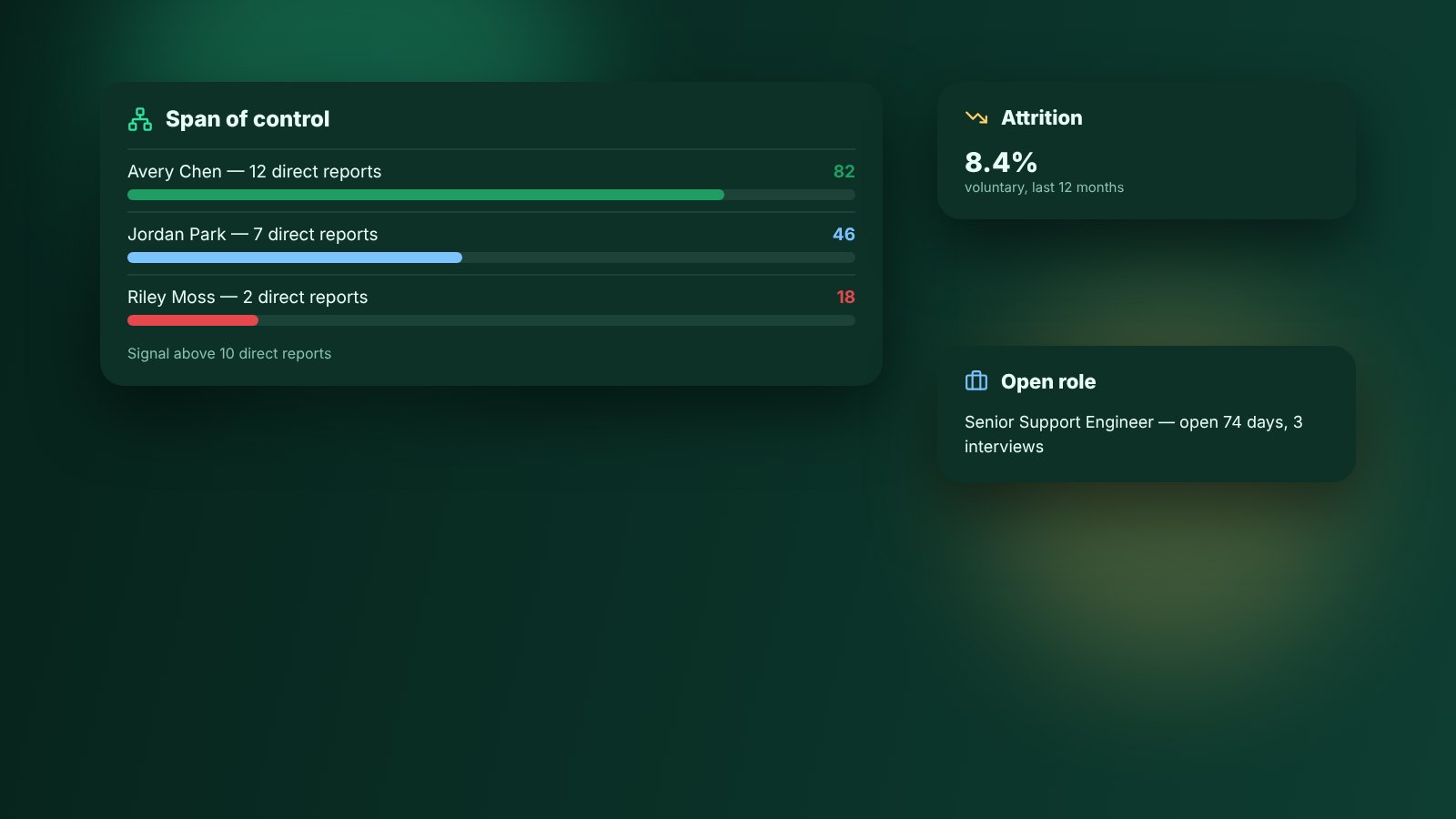
The AI Chief People Officer brings headcount, hiring, attrition, org design, pay and performance into one people view. It is an add-on at $149 per CPO seat a month and part of the 7-day free trial. Open it from AI Chief People Officer in the dashboard.
People and org
Each person has a name, employee ID, title, department, team, level, location, employment type, FTE, manager, start date and — when they leave — the end date, whether it was voluntary, involuntary or other, a reason without personal details and whether it was regretted. Import from any HR system as CSV, matched by employee ID; managers are matched by their employee ID too, and reporting loops are refused.
Link a manager to their TicketResolve user and give them the People Manager role: they see the people in their own reporting line, all the way down, and nobody else.
The workforce command center
| Figure | Method |
|---|---|
| Headcount and FTE | People whose start date is on or before today and who haven’t left |
| Hires and exits | Start and end dates in the last 12 months; exits split voluntary, involuntary and regretted |
| Attrition | Exits in the last 12 months ÷ the average of headcount today and a year ago; voluntary attrition the same for voluntary exits |
| Tenure, levels, locations | Current people grouped |
| Span of control | Current direct reports per manager |
| Plan against actual | Planned FTE for the fiscal quarter against current FTE and open roles |
Signals: voluntary attrition above the threshold in a department (15% by default), regretted exits, spans of control above the maximum (10), roles open longer than the limit (60 days) and departments over plan.
Hiring
- A requisition is a new role or a backfill, with department, level, location, hiring manager and — with “Compensation” — the yearly budget range.
- Draft → awaiting approval → approved or rejected → open → filled or cancelled. It’s approved by someone with “Approve people decisions” who didn’t request it, within their limit, with a reason; a budget above the level’s band needs the reason to justify the exception. Each decision is logged.
- Only funnel counts — candidates, interviews, offers — are kept. Candidate details stay in your recruiting system. Time to fill is from opening to filling.
Pay
With “Compensation”: pay bands per level, optionally per job family and location, with a minimum, midpoint and maximum; each person’s base pay history; the compa-ratio (base ÷ midpoint) and band position (0% at the minimum, 100% at the maximum) against the most specific band; who is outside their band; and base pay totals per department and currency. Nobody records their own pay. Currencies are never converted.
Performance
A review cycle has a name, the end of its period and a 3, 4 or 5-point scale. Managers rate the people in their own reporting line, with a summary; nobody rates themselves. Someone with “Performance” other than the rater can calibrate a rating, with a reason. Distributions per department are shown only for groups at or above the minimum size. Closing a cycle freezes it.
Engagement, development and people initiatives
- Engagement keeps survey results per team and theme — favourable % and the number of responses — never individual answers or comments, which are refused. Results from fewer respondents than the minimum group size are hidden. The change against the previous survey is shown.
- People initiatives (retention, learning, wellbeing, org change, ways of working, recognition, hiring process) go from a hypothesis and business case through approval to execution, and are verified by someone other than the owner with the outcome actually measured and its evidence. Engagement actions follow up a survey theme.
- Development plans belong to one person, with goals, skills, support and milestones. Their manager and the people team see them; nobody else does.
- The decisions log records requisition and initiative approvals and verifications automatically, and decisions recorded by hand. Decisions are never edited — a new one replaces them.
The AI CPO, scenarios and the people report
- Ask in AI CPO. Status questions — headcount, attrition, hiring, the plan, engagement, approvals, signals — are calculated with no AI. Other questions use one written answer from the daily limit (30 by default) and every point cites numbered figures; uncited points are removed and numbers that aren’t in the figures are flagged. Pay totals and rating distributions are included only for people with “Compensation” or “Performance”.
- Scenarios take hires per department, a change in attrition and (with “Compensation”) a pay increase, and show headcount and yearly base pay a year out per department and currency. Departments below the privacy threshold are left out. Estimates only — nothing changes.
- The people report (Markdown) covers the workforce, departments, the plan, hiring, engagement, signals and initiatives — and pay only for readers with “Compensation”.
- Each day, people who can view people are told about high signals and approvers about requisitions and initiatives waiting — once each.
Permissions and seats
| Permission | Allows |
|---|---|
| View people | The command center, everyone, hiring and the plan — without pay or ratings |
| Work in the AI CPO | Recording and importing people, the plan and requisitions — needs a seat |
| Compensation | Individual pay, bands and requisition budgets — sensitive |
| Performance | Every rating and review, calibration and distributions — sensitive |
| People manager | Your own reporting line and rating them — no seat |
| Approve people decisions | Requisitions and people initiatives within your limit — never your own |
| AI CPO settings | Seats, privacy and alert thresholds, approval limits and the daily AI limit |
Built-in roles: Chief People Officer, People Partner, Compensation Analyst and People Manager. Executives and auditors see the workforce figures, not pay or ratings. Every view of the settings and every change is in the activity log.