
Customer Support AI
Part of Customer Experience · Plans from $3,000 a month
Resolve tickets with answers your team already trusts
TicketResolve learns from your knowledge base and from tickets your agents resolved — never from its own replies. It drafts or sends the answer inside your help desk, checks it before it goes out, and hands the rest to a person with the evidence attached.
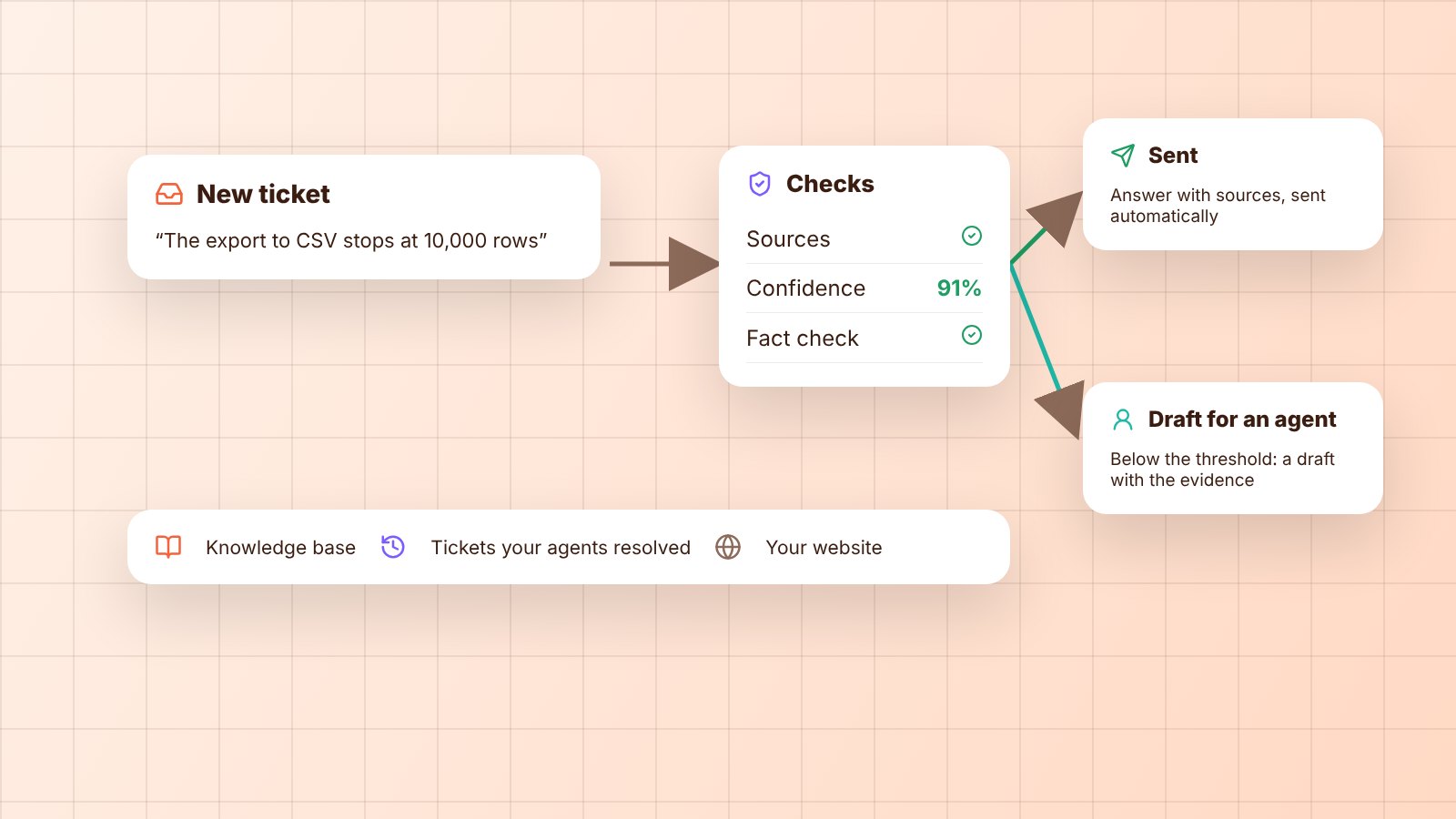
How it works
Built so a wrong answer is caught before a customer sees it
Learns only from human-resolved tickets
Answers come from your knowledge base and the tickets your agents solved. Replies TicketResolve wrote itself are never used as evidence.
A confidence score on every reply
Each answer gets a score from the checks it passed. Above your threshold it can send; below it, it becomes a draft for an agent.
Fact checks before sending
Replies above the threshold still go through a fact check; if it finds a wrong fact, the reply is held for a person.
Test before you go live
The Simulation Lab replays your past tickets so you see what would have been sent before anything reaches a customer.
What’s included
Everything a support team needs on top of its help desk
Ticket resolution
Answers from your knowledge base and resolved-ticket history, sent automatically above your confidence threshold or drafted for an agent.
How it worksAI Assistant for agents
Drafts, summaries and suggested next steps inside the ticket, with the sources shown.
How it worksSimulation Lab
Replay past tickets to measure answer quality and set thresholds before go-live.
How it worksTriage and routing
Category, priority and sentiment on arrival, with escalation rules you control.
How it worksTR Investigate
For technical tickets: production errors, deployments and API tests behind the problem, with a root cause and evidence.
How it worksResolution methodology
How a ticket counts as resolved, and how we measure it, published openly.
How it worksWorks where your team works
Inside your help desk, not beside it
TicketResolve connects to the help desk you already use and writes replies, notes and tags there. Your agents keep their queues, macros and reports.
- Zendesk, Freshdesk, Intercom, Salesforce, ServiceNow, Jira Service Management, HubSpot and Zoho Desk
- Knowledge from your help centre, Google Drive, SharePoint and past tickets
- Search order: your knowledge and history first, then your own website, then the web
- Customer Success, Renewal and other products read the same customer and ticket data
Pricing
Flat monthly plans from $3,000 a month
Starter, Bronze and Growth Pro. No per-seat fees for agents. Annual billing saves 20%. Every plan starts with a 7-day free trial.
Plans from $3,000 a month — from the price list on the pricing page
- Fixed monthly price — no per-resolution charges
- Add-ons such as Customer Success are bought separately
- Change or cancel your plan under Billing
- The full plan comparison is on the pricing page
Safety
A person stays in charge of what goes out
You choose which categories can be answered automatically and at what confidence. Everything below it is a draft. Every reply records the sources it used.
Safety controls
- Confidence threshold per workspace, with automatic sending switched off until you turn it on
- Fact check before every automatic reply
- Tickets, logs and customer messages are treated as untrusted input
- Tenant isolation: one workspace never sees another’s data
Frequently asked questions
Try it on your own tickets
Start the 7-day free trial and replay your past tickets in the Simulation Lab before anything goes live.