
TR Security Intelligence: how it works
Assets, sources (GitHub Dependabot and code scanning, SARIF, CSV), the risk score, SLAs, verification, risk acceptance and false positives, remediation plans, the AI investigator, the assistant and permissions.
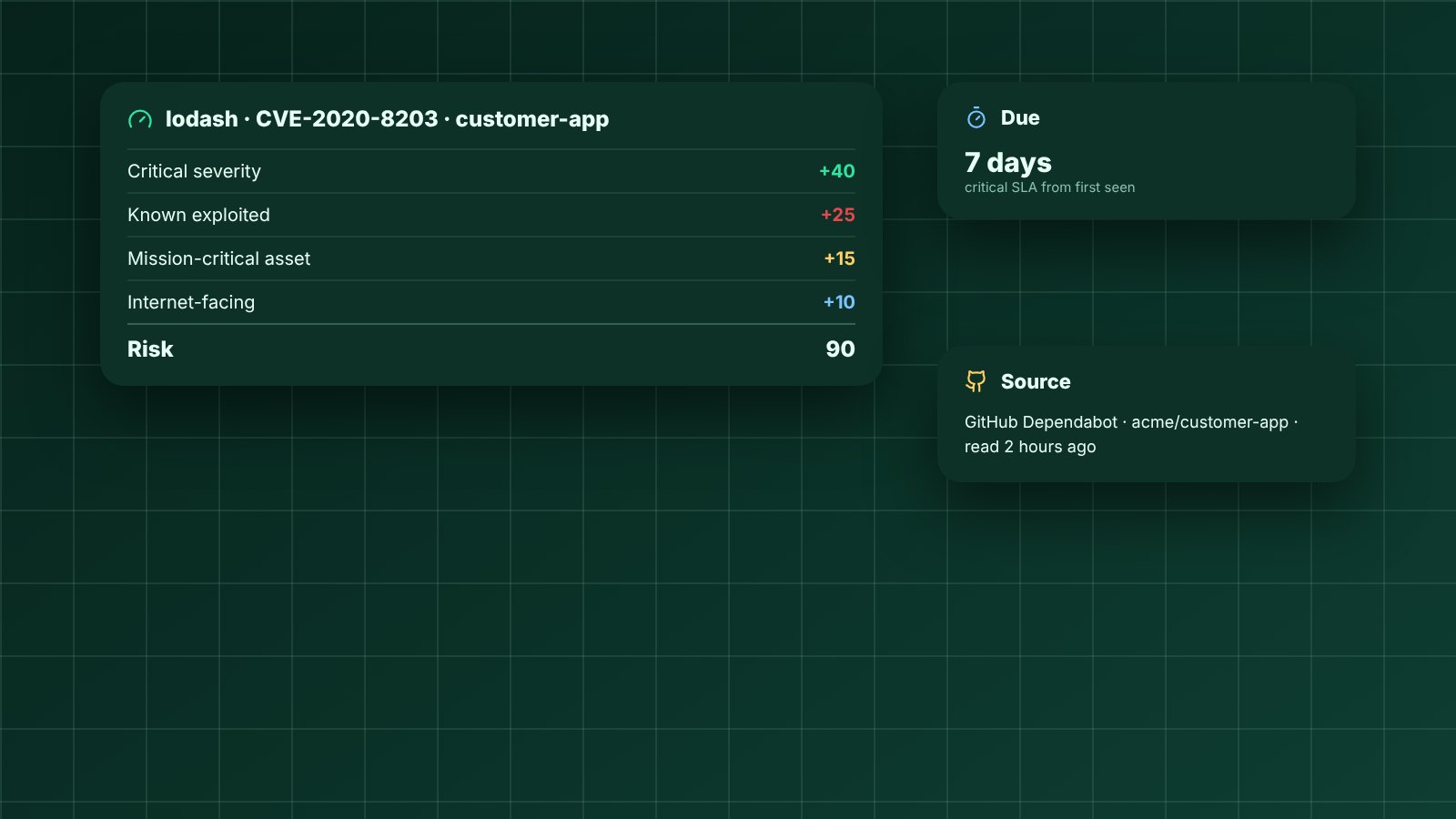
TR Security Intelligence brings your assets and the findings your scanners already produce into one inventory, ranks them by a risk score you can read, and counts a fix only when it’s proven. It is part of Your Company Data Protection, at $500 a month or $4,800 a year per company — no charge per user, asset, finding or investigation — and part of the 7-day free trial. Open it from TR Security Intelligence in the dashboard.
Assets
An asset is anything you protect: an application, web application, API, domain, IP range, cloud account or resource, virtual machine, container image, Kubernetes cluster or workload, repository, package, database, storage, identity, service account, role, certificate, secret or third-party dependency. Each has an identifier, environment (production, staging, development), criticality from low to mission critical, exposure (internet-facing or internal), data classification and technical and business owners. Repositories are added automatically when their alerts are read.
Sources
| Source | How it’s read |
|---|---|
| GitHub Dependabot | Open alerts for each connected repository, through the read-only code connection under Engineering intelligence → Code; every 6 hours once read the first time |
| GitHub code scanning | Open alerts from CodeQL and any tool that uploads to GitHub code scanning, the same way |
| SARIF | Upload or paste a SARIF 2.1.0 file from Semgrep, Snyk, Trivy, CodeQL, Checkov, SonarQube or another scanner, for one asset |
| CSV | A title, cve or rule column, plus optional severity, cvss, epss, kev, package, version, fixed_version, location, cwe, tool, url and id |
A repository where Dependabot or code scanning isn’t enabled, or the token can’t read it, is reported as such — nothing is guessed. GitLab and Bitbucket alerts aren’t read directly; export SARIF from your pipeline instead. Nothing is scanned beyond what you connect or import.
Security integrations
Under Integrations, connect your security tools with read-only credentials you create. Credentials are encrypted, never shown again and never sent to the AI; only people with “Security settings” can connect or change them. Each connection runs every 6 hours (or with Run now), in the background.
| Integration | What it reads | Access it needs |
|---|---|---|
| Amazon Web Services | EC2 instances, Inspector and GuardDuty findings, Security Hub failed controls, the IAM credential report (root and user MFA, old or unused keys), IAM authorization details (who holds admin-equivalent privileges through managed, inline or group policies; roles anyone or another account can assume without an external ID; privileged roles unused for 90 days), S3 account Block Public Access, root and no-MFA console sign-ins (CloudTrail, 7 days); write management events from the last 24 hours as changes for correlation (not findings) | SecurityAudit and AmazonInspector2ReadOnlyAccess |
| Microsoft Azure | Subscriptions, resources, unhealthy Defender for Cloud recommendations; successful write, delete and action operations from the Activity Log (24 hours) as changes for correlation | Reader and Security Reader |
| Google Cloud | Active, unmuted Security Command Center findings | Security Center Findings Viewer |
| Microsoft Entra ID | Users, MFA registration (admins first), accounts unused for 90 days; app registrations whose client secrets or certificates expired, expire within 30 days or are valid for over two years (dates only, never values) | User.Read.All, AuditLog.Read.All, UserAuthenticationMethod.Read.All, Application.Read.All |
| Okta | Users without an active factor, admins, inactive accounts, admin grants and MFA resets (System Log) | Read-Only Administrator API token |
| Google Workspace | Users not enrolled in 2-Step Verification, inactive accounts | Domain-wide delegation of admin.directory.user.readonly |
| CrowdStrike Falcon | Hosts, new and in-progress alerts, Spotlight open vulnerabilities with CISA known-exploited flags | Hosts, Alerts and Vulnerabilities: Read |
| Microsoft Defender for Endpoint | Machines, unresolved alerts, vulnerabilities per machine | Machine.Read.All, Alert.Read.All, Vulnerability.Read.All |
| SentinelOne | Agents and unresolved threats | Viewer API token |
| Microsoft Sentinel | Incidents that aren’t closed — severity, status, alert count, MITRE tactics, owner, and the hosts in the 50 newest | Microsoft Sentinel Reader on the workspace’s resource group |
| Splunk Enterprise Security | Notable events from the last 30 days that aren’t closed, from one fixed search | A token for a role that can search the notable index |
| Qualys VMDR | New, active and re-opened host detections with KnowledgeBase titles and CVEs | Reader with API access |
| Rapid7 InsightVM | Assets and their vulnerabilities (console reachable over https) | Read access to the sites |
| Tenable Vulnerability Management | Open and re-opened vulnerabilities through the export API, with CVEs, CVSS, VPR and exploit availability | API keys of a Basic-role user with Can View on the asset groups |
| Snyk | Projects and open issues — dependencies, code, containers and infrastructure as code (ignored issues left out) | A service account token with Org Viewer |
| Wiz | Open and in-progress issues on cloud resources, with the rule that raised each | A service account with read:issues |
| Kubernetes | Workloads, load-balancer exposure, privileged containers, host namespaces and paths, root, privilege escalation, capabilities, unpinned images | The built-in view ClusterRole |
| ServiceNow | CMDB servers and business applications; incidents when someone asks | cmdb_read, and itil to create incidents |
| SecurityScorecard, BitSight | Your rating and the issues behind it | A read API token |
| Shodan, VirusTotal, GreyNoise | For your internet-facing IPs and domains: risky open ports and reported CVEs, malicious flags, and whether your IPs are seen scanning | An API key |
| Jira | An issue for a finding or plan when someone asks | Permission to create issues in the project |
| Slack, Microsoft Teams, PagerDuty | Security signals, each sent once | An incoming webhook or Events API v2 key |
| Webhook | Findings any tool POSTs to the connection’s address | A token generated for the connection |
GitHub also reads secret scanning alerts (the kind of secret and where — never the value) and, with an organization owner’s token, members without two-factor authentication. GitLab reads the vulnerability report (Ultimate).
- One machine is one asset, whichever tools report it (matched by host name).
- Each run has parts — for example AWS Inspector in one region. Only a complete part closes what the tool no longer reports: verified fixed by re-scan, or, for alerts, closed at the source. A part that fails changes nothing and is shown with its error.
- Event-based alerts (CloudTrail sign-ins, Okta System Log) are never closed automatically — a person reviews them.
- Microsoft Sentinel, Splunk Enterprise Security, Tenable, Snyk and Wiz (added 18 Nov 2026) are built and tested against each vendor’s documented API, not yet against a live customer account. Their status in Integration Intelligence stays below “production verified” until a live connection is confirmed.
- Closing a Jira issue or ServiceNow incident never closes the finding.
- Nothing is written to your tools except a ticket someone asks for and the messages you set up; no containment, isolation or response actions are sent.
Normalising and de-duplicating
- Severities are mapped to critical, high, medium, low and info (moderate is medium; SARIF error and warning are high and medium, or the security-severity score when there is one).
- Each finding has a fingerprint from its asset, identifier (CVE or GHSA), rule, package, version and location. The same CVE in two repositories, or the same rule in two files, is two findings; the same one reported again is updated, not duplicated.
- The original record is kept as evidence, with fields that could hold a secret (secret, token, password, credential, private key, code snippets) removed before storing.
Risk score and SLAs
| Input | Points |
|---|---|
| Severity | Critical 40, high 28, medium 15, low 6, info 1 |
| Known exploited | 25 when the finding is marked as on the known-exploited list |
| Exploit probability (EPSS) | EPSS × 20, when the source provides it |
| Asset criticality | 5 for each step above low (up to 15) |
| Internet-facing | 10 |
| Past its SLA | 5 |
The score is capped at 100 and every finding shows its inputs. SLA due dates are counted from first seen: 7 days for critical, 30 for high, 90 for medium, 180 for low and 365 for info by default — change them in Settings.
Fixing and verifying
- Mark fixed with what was changed — a commit, pull request or configuration. The finding becomes “Fixed — awaiting verification”.
- Verified by re-scan: a complete scan from the same source (every GitHub read, and imports marked complete) that no longer reports it verifies it. A partial import never does.
- Verified by a person: someone other than the person who fixed it, with “Approve security decisions”, records the evidence — a re-test, scan result or the configuration now in place. “Deployed” alone is refused: a successful deploy isn’t evidence the risk is gone.
- If a source reports a fixed or verified finding again, it’s reopened, counted and flagged.
Risk acceptance and false positives
- Accept the risk of an open finding with a reason, compensating controls and an expiry date — at most 180 days ahead by default (Settings). Someone with “Approve security decisions” who didn’t submit it approves it, with a note. The finding is then “Risk accepted” and leaves the open count. When the expiry passes, the acceptance expires and the finding reopens on its own; approvers are told 14 days before.
- Mark a false positive with why it isn’t a real risk and the evidence. It’s approved the same way, and the finding becomes “False positive”.
- An approver can revoke either, with a reason; the finding reopens. Only one decision per finding can wait for approval at a time.
Remediation plans
A plan groups open findings with a title, an owner, a due date and steps. Someone else approves it; the team starts it and marks it done — which is refused until every finding in it is verified fixed, by a re-scan or by a second person (or approved as a false positive). Plans past their due date are flagged.
The AI investigator and the assistant
- Investigate with AI on a finding uses one written output from the daily limit (30 by default, 0–100; set 0 to turn it off). It returns a summary, hypotheses — each labelled “not confirmed”, with a confidence — remediation to review and how to verify the fix. Every item cites the finding’s numbered facts; uncited items are removed and numbers that aren’t in the facts are flagged. If the call fails, nothing is counted.
- The assistant answers status questions — open findings, exploitation, SLAs, verification, sources, decisions — from the calculation with no AI. Other questions use one written answer from the limit, cite the figures and show any numbers to check.
- The security report (Markdown) covers the summary, highest-risk findings, riskiest assets, remediation plans, approved exceptions, signals and sources.
- Each day, people who can view security are told about high signals, and approvers about decisions waiting and acceptances about to expire — once each.
The command center
Open findings by severity, known-exploited findings, findings past SLA, fixes awaiting verification, the highest-risk findings, the riskiest assets (sum of open risk), found and verified per week for eight weeks, time to verified fix (first seen to verified, over the last 90 days, split by re-scan and person) and the health of every source. Signals flag known-exploited findings, critical findings past SLA, other overdue findings, reopened findings, fixes waiting for verification, failed source runs and GitHub reads older than 3 days. All of it is calculated — no AI.
Security posture across domains
Posture shows one picture across nine domains — vulnerability management, application and code, cloud, identity, endpoint and workload, security operations, attack surface and ratings, AI security and data security — from the findings and connectors in the workspace. Each domain shows its sources, open findings by severity, known-exploited and overdue findings, fixes verified in 30 days and failed reads. A domain with no source says so; nothing is estimated. Each finding’s domain comes from the tool that reported it. AI security counts AI Data Safeguards events (personal data, prompt injection, replies) on TicketResolve’s own model calls. Data security is not covered yet.
Below it, open findings on business-critical systems lists critical, high and medium findings on an asset that a business service depends on — directly, or through the service the asset protects or the service built from a repository — with the business services, their tier and the customers who reach it, through the operations twin. The risk score is shown beside it and isn’t changed by it.
Identities
Identities lists every identity your identity and cloud tools report — people, guests, service accounts, cloud roles and root accounts — with the facts each source states: whether it is privileged and why (an Okta, Entra or Google admin role; AdministratorAccess or a policy allowing every action, directly or through a group), MFA, last use, credential ages and expiry, and roles that can be assumed from outside the account. Facts from several sources are merged on the same identity; anything no source states shows as unknown. Filters: privileged, privileged without MFA, non-human, unused or old credentials, assumable from outside.
The page also lists TicketResolve’s own AI agents from the AI Control Plane registry: what each may do (read-only, drafts, or proposes actions) and how its actions are approved.
Attack paths
Attack paths connects what is recorded into paths an attacker could take to something that matters. An exposure path starts at an internet-facing asset with an exploitable open finding (critical or high and known exploited, EPSS of at least 0.1, or an exposure or misconfiguration on an internet-facing asset), follows the operations twin’s link from that asset to the service or server it is the security record of, and ends at the business services that depend on it and the data stores it reaches. An identity path starts at a privileged identity that is weakly protected (no MFA, an access key older than 90 days, or a role that can be assumed from outside) and reaches the assets read from that provider account; it is medium confidence because permission boundaries and SCPs aren’t evaluated. Every step shows its evidence and confidence, and paths are ranked by the business tier they reach, then exploitability. Exposed, exploitable assets that map to nothing are listed separately rather than guessed.
Known exploited vulnerabilities
The public CISA Known Exploited Vulnerabilities catalogue is refreshed daily. Open findings whose CVE is in it are marked known exploited, labelled “CISA KEV”; findings your scanner already marked keep its label. Each marking is recorded in the audit log. A failed refresh keeps the previous catalogue. A Security admin can refresh it now from the Attack paths page.
Data security
Data brings together three things. Data stores: databases and storage read from your cloud and security tools, plus the operations twin’s data stores, with exposure (internet-facing, or an open exposure or misconfiguration finding), the classification you set (public, internal, confidential, restricted) and the business services that depend on them. TicketResolve doesn’t scan their contents. Sensitive data reaching TicketResolve’s AI: per data class — payment cards, IBANs, US SSNs, UK NI numbers, secrets and API keys, emails, phone numbers — how many tickets carried it and how often it was masked, blocked or recorded. Only the kind of data is stored, never the value.
Data protection policies add protection on top of AI Data Safeguards, which already replaces every detected value with a reversible token before the model sees it. Before the AI model, Mask for good removes the value so it can’t be restored into the reply. Before an AI reply is sent, Block the reply stops a reply that contains a raw value of that class and hands the ticket to a person. Record only logs a match at either boundary. Changing policies needs Security admin and is recorded in the audit log; every enforcement writes an event, and both are chained into the evidence ledger. Add recommended blocks replies carrying card, bank or ID numbers or secrets and masks card numbers and secrets for good. Test a policy runs the detectors on sample text without storing it.
Apps and APIs
The API inventory compares the endpoints your services actually serve — trace spans named like “GET /orders/42” from your connected telemetry over the last 7 days — with the OpenAPI 3 or Swagger 2 specs you upload per service (JSON or YAML, up to 8 MB). Numbers, UUIDs and path parameters are grouped as {id}. Each endpoint is documented, shadow (served but not in the service’s spec), documented with no traffic while the service had some (a possible zombie API — check before removing it) or no telemetry (the service sent no traces, so nothing can be said). Deprecated operations that are still called are counted.
Supply chain reads the dependency inventories Reliability Intelligence keeps — SBOMs you upload (CycloneDX or SPDX JSON) and the manifests in the code index — so there is one inventory, not two. Licences are what the SBOM states, classed as permissive, weak copyleft, strong copyleft or unknown (“A OR B” takes the more permissive, “A AND B” the more restrictive); the class is a guide for review, not legal advice. Vulnerable components are matched to open scanner findings and open advisory matches on the same package and version, known exploited first. Uploading a spec or SBOM needs Security settings and is audited with the document’s SHA-256.
Security incidents and response
Correlated signals group open alerts from your SIEM, EDR and identity tools with other open findings on the same asset. A group is raised for alerts from two or more tools within 24 hours (high confidence), an alert on an asset that also has a known-exploited or critical finding, or an alert on a privileged identity. A single alert on its own stays an alert. Opening an incident from a group recomputes it on the server; an open incident covers a group once. Incidents move open → investigating → contained → resolved → closed, with a timeline of every step and note.
Response actions — isolate a host, remove internet exposure, patch, close alerts, disable an account or remove its privileges, require MFA, rotate credentials — apply to the asset types they fit. A request (Security settings) is approved or rejected by someone else with “Approve security decisions”. An approved action is carried out either by your automation — the signed outbound webhook event security.response_action, to your SOAR or automation tool (Settings → Webhooks, Growth Pro), which workflows can also listen to — or by hand, recording what was done. TicketResolve’s security connectors are read-only, so it never changes your systems itself. An action is then awaiting verification until the source says so: alerts closed, findings no longer open, MFA reported on, the identity disabled or no longer privileged, credentials newer than the action, or the asset no longer internet-facing. It is checked every 15 minutes and on demand, and marked not verified after 7 days without proof. Closing an incident with actions still pending needs a note. Every step is audited and chained into the evidence ledger.
AI security
AI security is a security view over what already runs TicketResolve’s AI — the AI Control Plane, AI Data Safeguards, the MCP server and the memory stores — not a second policy engine. The inventory lists every AI agent from the Control Plane registry with what it may do (read, draft, or propose actions that need approval), its tools and its model calls over 30 days; anything that called a model without being catalogued is listed as not in the registry. It also lists the models in use and every external AI client — the API keys AI tools such as Claude, ChatGPT or Cursor use over MCP — with their scopes and MCP calls.
A Security admin can block an MCP tool for external AI clients: it disappears from their tool list and calls to it are refused before it runs, each refusal audited. Pausing agents and switching tools off for TicketResolve’s own agents stay in the AI Control Plane. Threats shows prompt-injection attempts (in tickets and in retrieved knowledge, with the knowledge sources they came from), replies blocked by the output guard and by data protection policies. Behaviour baselines compare each agent’s and each client’s calls yesterday and today with the 14 days before: a volume spike (at least 20 calls, over twice the usual and three standard deviations), a failure rate 20 points above usual, or activity with no history. With fewer than 7 active days it is still learning and never flagged. Memory governance lists the customer, operations-copilot and technical memory stores, how each is governed, and entries that hold raw card, bank or ID numbers or secrets — by kind only — which a Security admin can redact in place.
Assurance
Assurance checks your security controls every day and on demand. Exercised controls run synthetic, harmless values — a published test card number, a fake key, known injection phrases — through the same code that protects live traffic, without writing evidence events: every “block the reply” and “mask for good” policy, personal-data tokenisation, prompt-injection screening, the output guard, and every MCP tool you blocked. Observed controls are judged from your records: the evidence ledger re-verified, every connected source read in the last 48 hours, no privileged identity with MFA off, no critical finding past its SLA, and no response action left unverified. A control that can’t be checked yet is not applicable — never counted as passed. A control that passed last time and fails now is a regression: it is audited and sent to your security signal channels.
Remediation retest lists fixed findings awaiting verification; Retest reads the tool that reported the finding again now, and that read verifies the fix or reopens the finding. The report (downloadable as JSON) shows each control’s latest result, what was checked, its evidence and recent history. It describes how controls operated — it is not an audit, an attestation or a certification.
Evidence ledger
Every security record is chained into a per-workspace ledger: finding status changes, security source reads, security actions in the audit log and AI Data Safeguards events. Each entry stores the SHA-256 of the record (every column, keys sorted, dates in UTC) and a hash chained to the entry before it: SHA-256(prev_hash | seq | source | source_id | digest), starting from 64 zeros. The records stay in their own tables; the ledger holds pointers and hashes only. New records are chained every 10 minutes and before every read.
Verify now re-reads every record and recomputes the chain. It reports each record changed after it was chained (altered), deleted (missing), and any entry changed or removed from the ledger (chain broken, gap). Every verification is itself audited and chained. Security admins can export the ledger with the algorithm, the entries and the result, so anyone can re-check it. The ledger proves records weren’t changed after they were chained — not that the original source was right.
Permissions
| Permission | Allows |
|---|---|
| View security | The command center, assets, findings, risk scores and source health |
| Work in Security Intelligence | Reading GitHub alerts, importing, keeping the inventory and marking findings fixed |
| Security evidence | The original scanner record behind each finding, and the evidence ledger (read and verify) |
| Approve security decisions | Verifying fixes, and approving or revoking risk acceptances, false positives and remediation plans — never your own |
| Security settings | SLAs, repositories to read, the longest risk acceptance and the daily AI limit; exporting the evidence ledger |
Built-in roles: Security Lead, Security Analyst and Engineer. Executives and auditors can view security. Every change is in the activity log.