
Migration assurance
Know what a database migration will do before it runs.
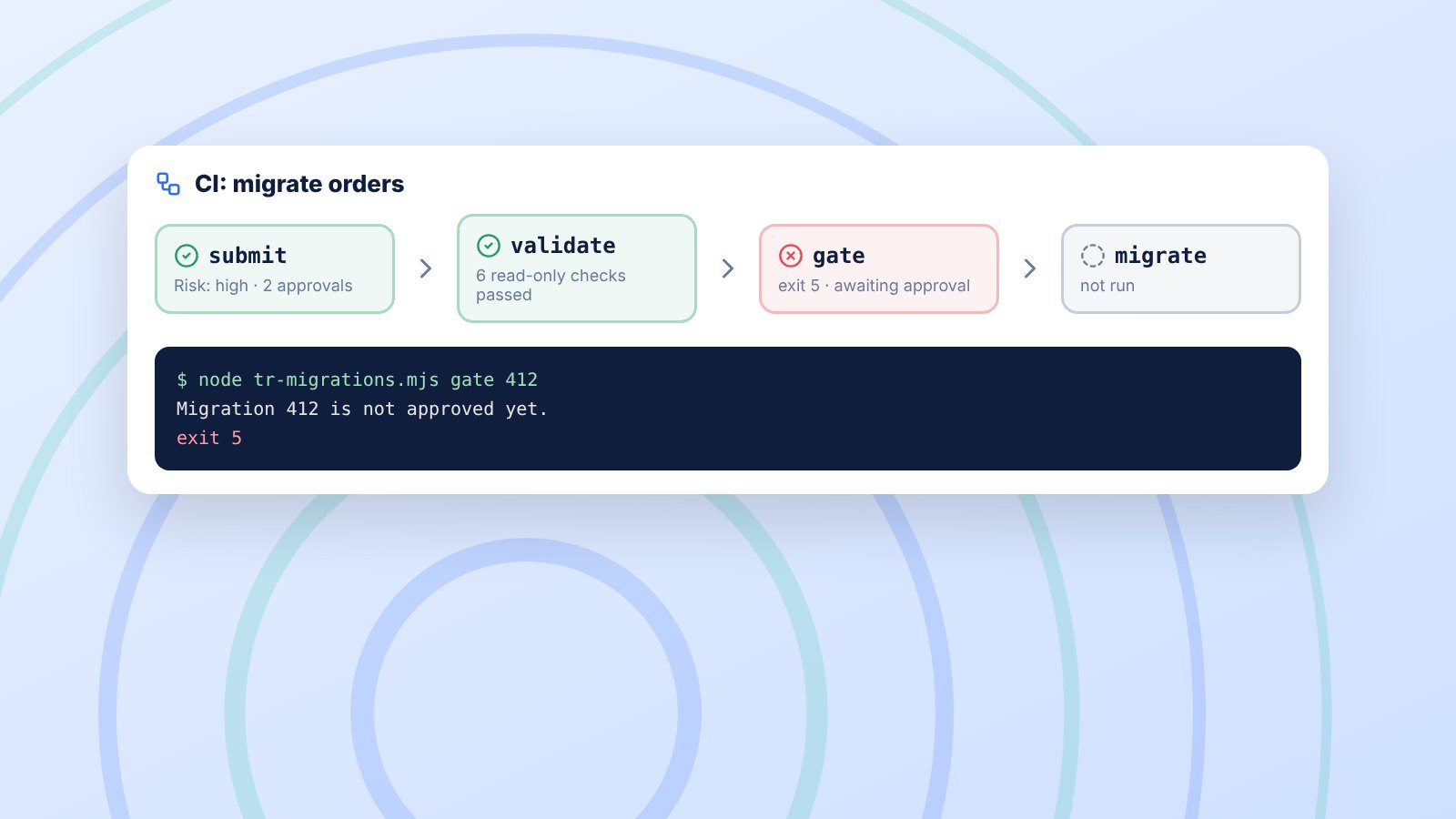
Open Reliability Intelligence → Migration assurance. The analysis is rule-based and makes no AI model calls.
Submit a migration
Choose Check a migration and paste or upload the files, or send them from CI with the CLI (below). Supported formats:
| Format | What is read | Rollback taken from |
|---|---|---|
| Plain SQL (PostgreSQL, MySQL, SQL Server) | Every statement, including multi-action ALTER TABLE and GO batches | A rollback script you supply |
| Flyway | V…__name.sql files | A matching U…__ undo file |
| Liquibase (XML, YAML) | Each change in each changeSet, and embedded SQL | rollback blocks, or changes Liquibase can reverse itself |
| Prisma Migrate | migration.sql | None: Prisma has no down migrations |
| Alembic | op.* and batch_op.* calls in upgrade(), and op.execute SQL | A downgrade() that does something |
| Django | migrations.* operations, and RunSQL | Automatic for schema changes; RunSQL and RunPython need a reverse |
| Entity Framework Core | migrationBuilder.* calls in Up(), and Sql() | A Down() with operations |
| Rails, Knex, TypeORM | Schema calls and raw SQL | down methods, or reversible change steps (Rails) |
Give the service, environment and repository so TicketResolve can check the code that’s deployed. Secrets in the files are masked before they’re stored. Submitting the same files again returns the same migration.
What the analysis shows
- Each operation, with its file and line, classified as additive, destructive (drops or deletes data), breaking (old code fails, such as a rename or a NOT NULL column without a default), locking (index builds, foreign keys, type changes), a data change, or something to review by hand. Each one says what it affects and a safer way to do it.
- Code that still uses it: for dropped or renamed tables and columns, the places in your indexed code that still reference them. The deployed commit is used when your deployments report it; otherwise the latest index, and the page says so. Test files are left out.
- Rollback readiness: ready, partial or not ready, with the reasons. Steps that delete data can’t be undone by a down migration; only a backup brings the data back.
- Risk score, 0–100, with every factor and its points. For example: +30 for dropping a column, +25 if the code still uses it, +25 for a NOT NULL column without a default, +10 for an index build that blocks writes, +15 with no working rollback, +10 in production. Low below 20, medium below 45, high below 70, critical from 70.
Validation
For each migration, TicketResolve writes read-only queries that return one number: rows in each table, NULLs where a column becomes NOT NULL, duplicates where a unique constraint is added, rows pointing to a missing parent for a new foreign key, values too long for a narrower column, and data a dropped column still holds. Blocking checks must find nothing before the migration can be approved.
After the run, the post-migration checks compare row counts with the numbers from before. A table that lost rows it shouldn’t have fails the check.
Every query must be a single SELECT that returns one aggregate (COUNT, MAX or MIN). It can contain no strings, comments or functions that write, wait or read files. The server applies this rule, and so does the CLI before it runs anything.
Approvals and the workflow
| Step | What happens |
|---|---|
| Detected → Analysed | Files received and analysed. |
| Validated | Pre-migration results recorded. |
| In review → Approved | Approvers can’t be the person who submitted it, and each person counts once. Critical risk, or high risk or data loss in production, needs two approvals. Medium risk, or anything in production, needs one. Low risk outside production needs none. |
| Scheduled | Optional: when it will run. |
| Running → Ran | Reported by your pipeline (or recorded by hand). |
| Checked → Completed | Post-migration results recorded, then completed. Completing without them, or with failures, needs a reason. |
- A blocking validation failure stops approval. An administrator can override it with a reason of at least 10 characters.
- A high- or critical-risk migration can’t be approved without validation unless the approver confirms it.
- If validation fails after approval, the approvals are withdrawn. If a new analysis raises the risk, they are withdrawn too.
- A run reported without the required approvals is still recorded, and raises a critical finding that goes to the owner and administrators.
- Findings are also raised for high-risk migrations waiting for approval, conflicts with the code, failed validation and failed runs.
- The release check lists unapproved high-risk migrations for the service and recommends caution.
From CI
Download tr-migrations.mjs (Node 18+) and set TR_API_KEY:
node tr-migrations.mjs submit --service api --env production --repo acme/api --ref $GIT_SHA db/migration/V12__x.sqlprints the id and risk. Add--fail-on highto stop the pipeline at that level.TR_DB_URL=postgres://readonly:…@db/app node tr-migrations.mjs validate 42runs the checks in a READ ONLY transaction with a 15-second timeout and sends back only the numbers. Use a database user that can only read. On SQL Server there is no read-only transaction, so the user must bedb_datareaderonly.node tr-migrations.mjs gate 42exits non-zero unless the migration is approved. Put it right before the step that runs the migration.node tr-migrations.mjs report 42 --status succeeded(orstarted,failed,rolled_back), thenvalidate 42 --phase post.
API: GET|POST /v1/reliability/migrations, GET /v1/reliability/migrations/:id, GET …/:id/plan?phase=pre|post, POST …/:id/validation, POST …/:id/execution. Approvals stay in the dashboard. See the API reference.