
AI Control Plane: agents, evaluation, releases and emergency switches
The agent registry, executions, health and reliability, cost per verified outcome, model routing, the Evaluation Lab and its ground truth, gated releases with canary and rollback, quality alerts, emergency switches, permissions and the API.
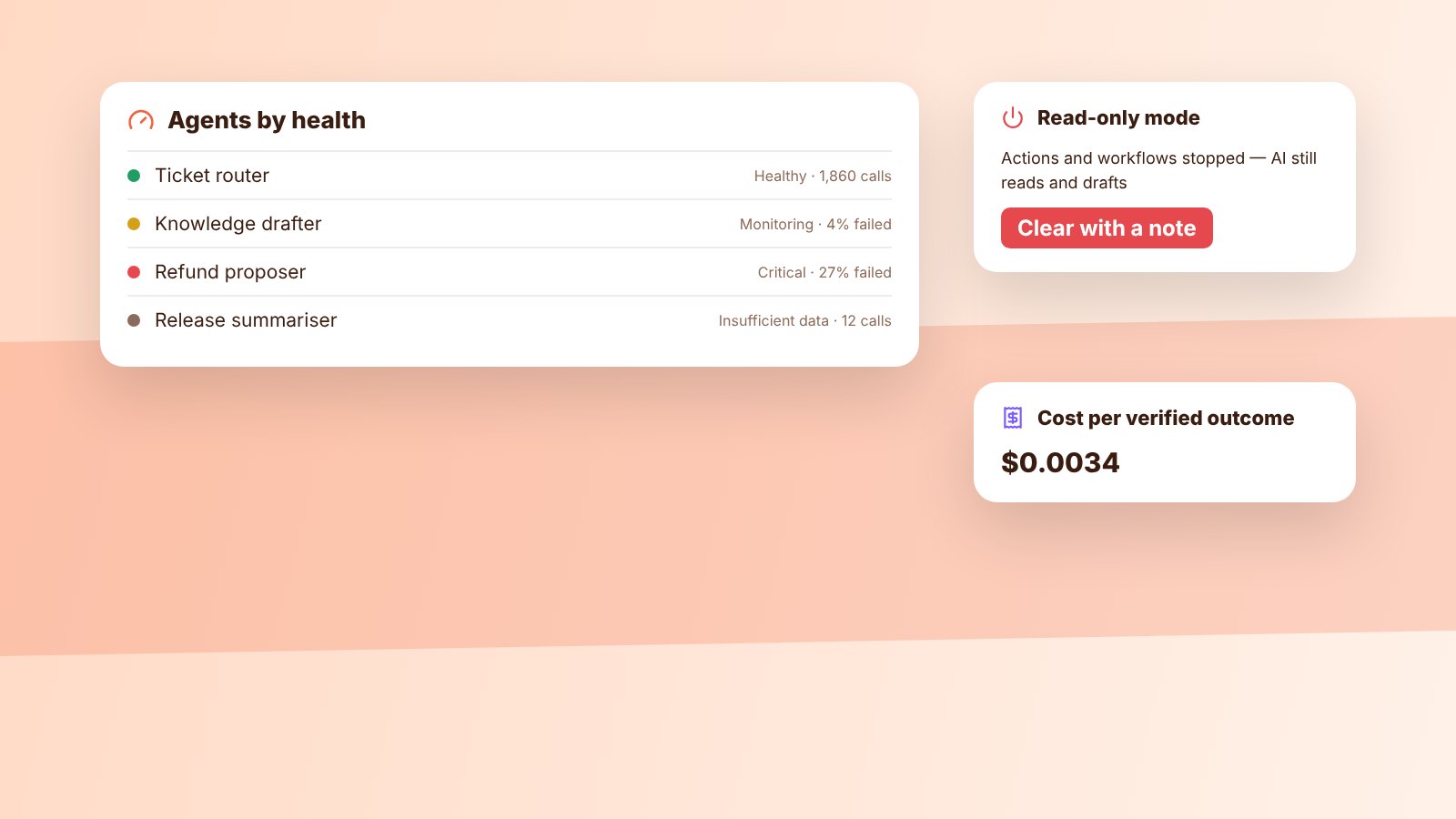
The AI Control Plane shows every AI agent working in your workspace: what it does, how reliably it runs, what it costs and which model it uses. It also lets you stop any of it. It’s part of every plan at no extra charge. Open it from Advanced → AI Control Plane.
The agent registry
Every kind of model call TR-AI makes belongs to an agent: the resolution writer, the router, the investigators, each product copilot and more. Each agent shows its category, what it can do, its risk level and what needs a person’s approval.
If a call arrives from an agent that isn’t in the catalogue, it is listed as discovered so nothing runs unseen.
Executions and traces
Each model call is recorded with:
- the agent, model and workspace;
- the ticket it served, when there is one;
- latency, number of attempts and whether a fallback model answered;
- success, or the kind of error (rate limit, timeout, server error, blocked by a switch);
- tokens and estimated cost;
- the version of TR-AI that made it.
Open an execution to see the ticket’s full trace: the decision steps, the other calls made for it, and its outcome from Outcome Assurance.
Health
Health shows whether an agent runs reliably. It doesn’t show whether its answers are right — for that, see verified outcomes.
| Health | When (defaults) |
|---|---|
| Insufficient data | Fewer than 20 attempted calls in the period |
| Critical | 25% or more failed, or p95 latency of 60 seconds or more |
| Degraded | 10% or more failed, or 20% or more answers cut off |
| Monitoring | 3% or more failed, or 10% or more answered by the fallback model |
| Healthy | No threshold crossed |
| Suspended / Paused | An emergency switch blocks it, or an administrator paused it |
Admins with “Manage the AI Control Plane” can change these thresholds in Settings. Failure thresholds must rise from monitoring to degraded to critical.
Reliability score
The reliability score combines eight dimensions. Default weights:
| Dimension | Weight |
|---|---|
| Task completion | 20 |
| Verified outcomes | 20 |
| Evidence quality | 15 |
| Accuracy | 15 |
| Policy compliance | 10 |
| Execution reliability | 10 |
| Human intervention | 5 |
| Consistency | 5 |
A dimension with too little data scores zero and is marked unmeasured, and the score shows its confidence. An agent can’t look reliable just because nobody has measured it.
Costs
Cost is estimated from tokens and a price book, by agent, model and day, per ticket and per verified outcome. Prices come from the model list with effective dates, or from the deployment defaults. Unusual spikes are flagged, and recommendations point at agents whose cost per verified outcome stands out.
Model routing
For any agent, or for the whole workspace (“*”), you can choose:
- a model, from the models TicketResolve has approved;
- a fallback model, or no fallback;
- Never downgrade: if the chosen model fails, the call fails rather than using a weaker model.
Policies are versioned, every change is logged, and deleting one returns the agent to the default model.
Routing suggestions
The Routing tab suggests a model for an agent when the measurements support it. It compares only models that ran the same agent in this workspace in the last 30 days, each with at least 30 successful calls:
- A cheaper model did as well: it costs at most 70% per call, succeeds as often (within 2 points), is cut off no more often, and, when ticket outcomes are known for both, verifies as often (within 5 points). Not suggested when the policy says Never downgrade.
- A more reliable model: it succeeds at least 5 points more often.
Each suggestion shows the numbers, the estimated monthly cost change and its caveats (for example when most of a model's calls were fallbacks). A suggestion changes nothing: an admin can fill in the policy form from it and save, or create a release when the workspace requires releases.
Evaluation Lab
The Evaluation Lab runs the resolution engine on questions whose right answer a person has recorded, and shows how often it gets them right. Open it from AI Control Plane → Evaluation Lab.
A dataset holds cases of two kinds:
- Past tickets resolved by people: the customer’s question and the human agent’s own reply. Each waits for a reviewer, who approves it, corrects the expected answer or rejects it.
- Cases a reviewer writes: a question with the expected answer, or “a person should handle this” when the right result is a hand-off.
A reviewer approves the dataset once it has enough approved cases (10 by default). Any change after that starts a new version, which must be approved again before it can gate a release.
A run answers every approved case as a dry run: nothing is sent to customers, learned, cached or billed, and the engine can’t see anything resolved after the original ticket. The model you choose applies only to the run.
| Measure | How |
|---|---|
| Quality | (correct + ½ partly correct) ÷ graded cases |
| Grade of one case | Meaning (embeddings), key facts, yes/no and numbers compared with the expected answer — no model call. A reviewer’s grade replaces it. |
| Hallucination indicators | Answers with a number that contradicts the expected answer |
| Used a source | Answers that cited a retrieved article or past ticket |
| Latency and cost | Measured time per case; estimated model cost from its token counts |
| Confidence | High from 100 graded cases, medium from 30, low from 10 |
Compare models runs the same cases on 2–3 approved models, each with no fallback so every answer is that model’s own. Each workspace has a daily limit on case runs (200 by default) and a limit per run (50 by default).
The latest run on an approved dataset fills in the accuracy and evidence quality dimensions of each agent it exercised.
Releases
A release changes which model, fallback or “never downgrade” setting an agent uses. It moves through these stages:
| Stage | What happens |
|---|---|
| Draft | Someone with “Manage the AI Control Plane” proposes the change |
| Evaluating | A baseline run with the current routing and a candidate run with the release, on the same approved dataset |
| Awaiting approval or Gate failed | The gate checks every mandatory condition (below) |
| Approved | By a signed-in person other than the proposer, unless the workspace has a single member |
| Canary | Optional: 1–50% of the agent’s live calls use the release, tagged so you can watch them |
| Production | The release becomes the agent’s routing; the previous routing is kept |
| Rolled back | The exact previous routing is restored and read back to confirm it’s in force |
Mandatory gate checks: the dataset version is approved; enough graded cases; the agent actually ran on the cases; quality didn’t drop by more than 3 points; hallucination indicators didn’t rise by more than 2 points; under 5% of cases failed to run; the models are approved. Cost and latency rises are warnings unless you make them blocking. Security testing isn’t covered yet — it’s part of AI Security Validation & Assurance, which is planned.
No agent or API key can approve, activate or roll back a release. In Settings you can require that routing only changes through releases.
Quality alerts
Every hour, each agent’s last 24 hours are compared with the 7 days before. An alert opens when failures, p95 latency, cost per call or fallback use rise past the thresholds, or when more tickets go to people. Both periods need at least 20 calls.
Alerts recommend what to do: roll back a release that went live in the last 14 days, check the provider, or re-run an evaluation. An agent is paused automatically for 24 hours only if an admin turned on the critical-failure rule.
Emergency switches
| Switch | What it stops |
|---|---|
| All AI | Every model call in the workspace |
| One agent | That agent’s model calls |
| Model provider | Every call to that provider |
| Tool execution | Backend actions and investigation actions |
| Workflows | Workflow runs. Runs due while paused are rescheduled. |
| Read-only mode | All actions and workflow runs; AI can still read and draft |
Each switch needs a reason and can have an expiry. It applies within seconds across every server. A blocked call is recorded as blocked, with the reason, so you can see what didn’t run. Clearing a switch needs a note, and the history keeps who set and cleared each one.
If the switch state can’t be read, calls are allowed and the failure is logged, so a database hiccup doesn’t stop support. TicketResolve can also set switches for every workspace.
Permissions
| Permission | Allows |
|---|---|
| View the AI Control Plane | Everything above, read-only |
| Manage the AI Control Plane | Routing policies, weights and thresholds, and pausing an agent |
| Use AI emergency controls | Setting and clearing emergency switches |
| Run AI evaluations | Datasets, adding cases, evaluation runs and model comparisons |
| Review AI evaluations | Approving, correcting and rejecting ground truth, grading results, approving datasets |
| Approve and roll back AI releases | Approving (never your own), canary, production and rollback |
Executives, auditors and team leads can view by default, and team leads can review evaluations. Admins have all six.
API
Everything in the dashboard is available under /api/trial/:trialId/aicp/: overview, agents, agents/:key, executions, trace, costs, models, policies, switches, settings, eval/datasets, eval/runs, eval/comparisons, releases and alerts. The same permissions apply.