
Renewal Intelligence: how it works
Step by step: switch on Renewal Intelligence, get renewals in, work the pipeline, read readiness and risk, manage stakeholders, plans, proposals and contracts, record outcomes, forecast — and how every score and number is calculated.
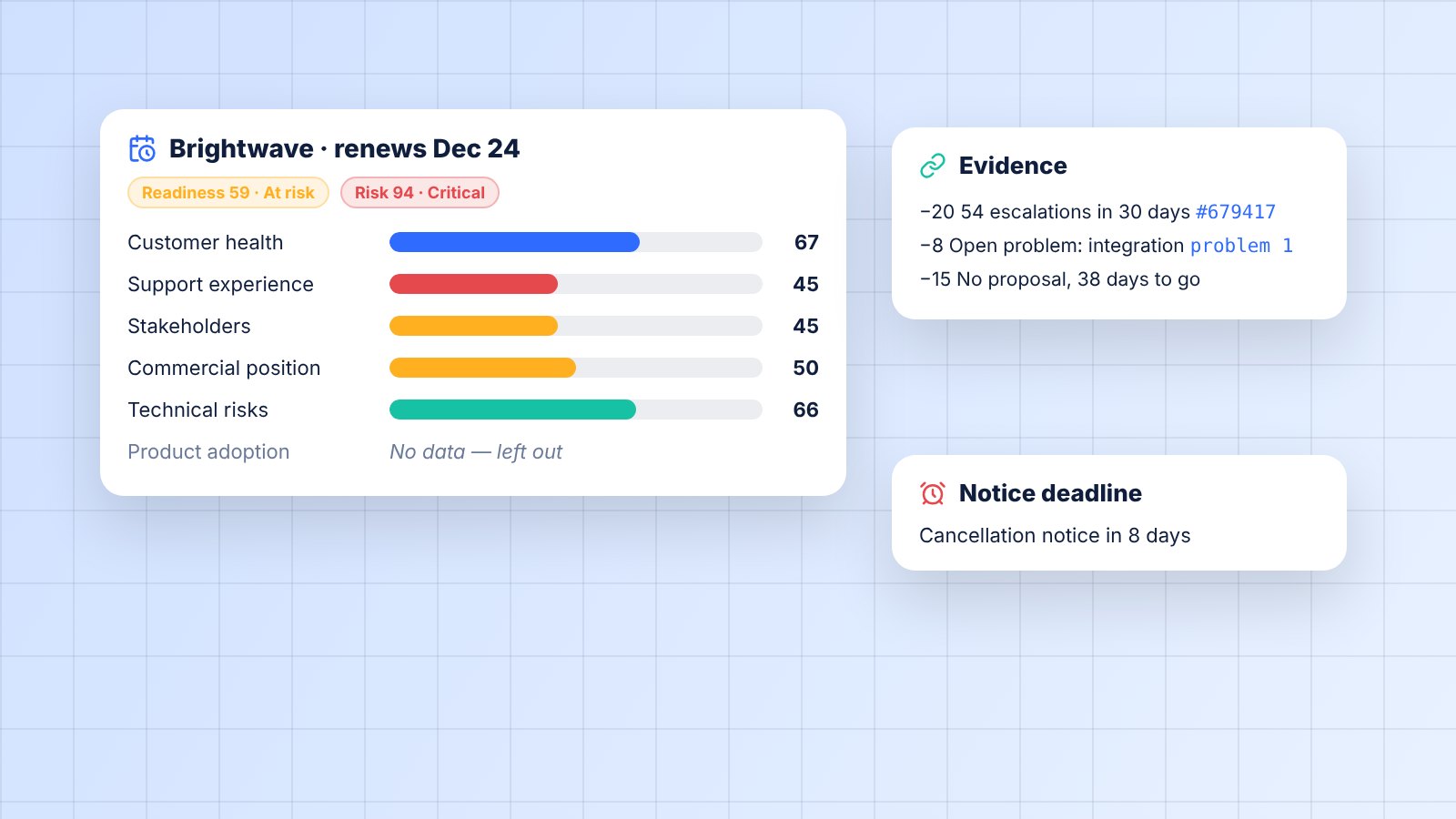
Renewal Intelligence manages every renewal from the first reminder to the signed outcome, and ties each one to what your support team already knows about the customer: escalations, SLA misses, repeated problems, open investigations, health and engagement. It uses the same accounts, contacts, subscriptions and health scores as Customer Success, so nothing is entered twice. It is sold separately, per renewal seat.
Before you start
- Turning it on: the 7-day free trial includes it. After that, add Renewal Intelligence under Billing → Add-ons and choose the number of renewal seats ($79 per seat a month).
- Who needs a seat: anyone who changes renewal data. Viewing doesn’t need one. If more people can change renewals than you have seats, choose who has them in Renewals → Settings → Renewal seats.
- Roles: the built-in Renewal manager, Renewal admin and Finance approver roles cover most teams. The permissions are View renewals, Manage renewals, Approve renewal proposals, Manage renewal contracts and Renewal settings. Revenue figures also need “See revenue figures”.
- Customer Success isn’t required. Accounts are shared; if you have Customer Success too, its health scores and success plans appear on each renewal.
1. Get renewals in
- 1Automatically from accountsEvery account with a renewal date gets a renewal opportunity a set number of days before it (120 by default, Settings). It is created once per account and period, so running it again never duplicates.
- 2From your CRMWith Salesforce or HubSpot connected (shared with Customer Success), renewal opportunities or deals come in with their amount, close date, stage and owner. Closed-won and closed-lost deals become recorded outcomes.
- 3From billingWith your own Stripe key connected, each active subscription gets a renewal before its period ends, with its MRR turned into ARR.
- 4By handAll renewals → New renewal: pick the account (or create it), the renewal date, current ARR, currency and term. Add the cancellation notice deadline if you know it.
2. Work the pipeline
The stages are: Upcoming, Preparation, Internal review, Customer engagement, Proposal preparation, Proposal sent, Negotiation, Verbal commitment, Contract processing, then Renewed, Churned or Closed – lost. You can rename them, change their order and probability, switch stages off, and say what a renewal needs before it enters a stage (an owner, a value, a contract, a notice deadline, a next action, stakeholders, a proposal, an expected close, or an approved proposal).
- Pipeline: drag a renewal to another stage, or use its Move to menu. If something is missing the move is refused and you are told what.
- Closing: moving to Renewed, Churned or Closed – lost opens the outcome form instead (step 7).
- Reopening a closed renewal needs a Renewal admin and a reason; the recorded outcome is cleared and the reopening is in the history.
- Every move is recorded with who, when and why, and is on the renewal’s Activities tab.
3. Read readiness and risk
Each open renewal is assessed every day (and when you press Re-assess now). Nothing here calls an AI model: readiness and risk are calculated with fixed rules from your records, and every factor shows the tickets, investigations, problems, activities or plan items behind it.
Readiness (0–100)
| Dimension (default weight) | What counts |
|---|---|
| Customer health (20) | The latest Customer Success health score for the account — read, never recalculated. |
| Support experience (12) | Escalations and SLA breaches in 30 days, critical open tickets. |
| Sentiment (10) | Word-based tone of recent customer messages and cancellation language. An indicator, not measured satisfaction. |
| Adoption (10) | Active users and usage trend, when you send usage events. |
| Relationship (10) | Last interaction, overdue follow-ups, open commitments to the customer. |
| Success plan (6) | Share of plan items done. |
| Commercial position (10) | Proposal status against days to go, a linked contract, price changes. |
| Stakeholders (8) | Economic buyer, executive sponsor and champion mapped; single-contact dependency. |
| Technical risks (9) | Open problems, repeated unresolved issues, open investigations. |
| Renewal history (5) | How this account’s earlier renewals ended. |
A dimension with no data is left out and the others re-weighted; missing data lowers the confidence, never the score. The bands are Ready (80+), Mostly ready (65+), Needs attention (50+), At risk (35+) and Critical, and readiness is capped by the risk level.
Risk (0–100)
Risk is the sum of the risk signals found — for example many escalations, a repeated unresolved issue, a notice deadline close with no decision, no proposal late in the cycle, no executive sponsor, falling health, cancellation language. Each signal has a severity (low 5, medium 10, high 18, critical 28 points). Watch starts at 20, At risk at 40, Critical at 65 by default.
Risk records
Each signal opens a risk record you can work: Detected → Assessed → Assigned → Intervention required → In progress → Monitoring → Resolved. Give it an owner, comment, record a decision, create a task or escalate it to the workspace owners and admins. Resolving needs a note. If a signal disappears before anyone has picked its record up, the record is closed automatically; one being worked stays open with a note in its history. A resolved record reopens if the signal returns.
4. Map stakeholders
On a renewal’s Stakeholders tab add the economic buyer, executive sponsor, technical decision-maker, procurement, legal, finance, champion and day-to-day users — from the account’s contacts or by name — with their authority, influence, relationship and next action. Coverage (0–100) and the gaps show on the renewal and across all renewals on the Stakeholders page. E-mail addresses are masked unless you can see personal data.
5. Plans and tasks
A renewal plan holds the milestone schedule (by default 120, 90, 60, 45, 30, 15 and 0 days before the renewal date, each with its tasks) plus the template’s extra tasks. There are nine templates — standard, enterprise, at-risk, high-value strategic, auto-renewal, expansion, contract downsizing, renewal recovery and cancellation prevention — and you can add your own. Renewal plans shows my tasks, the team’s, overdue and due in 14 days.
6. Proposals and approvals
- 1DraftCommercial tab → New proposal: current and proposed ARR, discount, price increase, term, expansion items, terms and whether they are non-standard. Each new proposal is a new version.
- 2SubmitThe approvals needed are worked out from your rules: internal review always; finance above a discount or ARR threshold; management above a higher discount or ARR, for a large price increase, a strategic segment or non-standard terms.
- 3Approve or rejectPeople with “Approve renewal proposals” see it in their queue. Nobody approves a proposal they prepared (the workspace owner excepted). Rejecting needs a note.
- 4SendMark an approved proposal as sent; the renewal moves to Proposal sent. Nothing is e-mailed to the customer from here.
7. Contracts
On Contracts & subscriptions add a contract and upload the signed PDF, Word or text file (up to 8 MB; stored encrypted). The document is read by AI once per version — one call — for the start, end and renewal dates, auto-renewal, notice period, value and what kind of value it is (ARR, MRR, total contract value or one-time), currency, billing, price escalation, discounts and renewal conditions. Every value shows the exact words it came from, and a value whose words aren’t in the document is dropped. Nothing is applied until a person ticks the terms and confirms them; confirmed terms set the notice deadline and auto-renewal of the contract’s open renewals. A scanned PDF without text isn’t sent to the AI at all.
Contract alerts list expirations and auto-renewals in 90 days, notice deadlines in 60, missing terms or documents, and renewals within 120 days with no contract.
8. Record the outcome
Outcomes are fully renewed, renewed with expansion, renewed with contraction, partially renewed, downgraded, churned or cancelled. Give the original ARR and (unless lost) the final ARR; expansion, contraction and lost ARR are calculated. A lost or reduced renewal needs the reason and at least one of the customer’s feedback, the technical issues involved or the lessons learned. Renewing moves the account’s term on; churning marks the account churned.
9. Forecast, analytics and reports
| Figure | How it is calculated |
|---|---|
| Renewal ARR | Proposed ARR, else current ARR, else the renewal value. Annual recurring only — never one-time fees or total contract value. |
| Probability | The stage’s probability; an owner’s override with a reason; or, if you choose it and at least 30 renewals have closed, your historical renewal rate per stage. |
| Weighted ARR | Renewal ARR × probability, for every renewal not omitted. |
| Committed / best case / at risk | From the stage’s forecast category (or a manual one); a renewal assessed at risk or critical counts as at risk. |
| Renewal rate | Renewals due in the period that renewed ÷ those due and closed; the ARR rate is retained ARR ÷ original ARR, per currency. |
| GRR / NRR | From the shared revenue layer, the same definitions as Customer Success: recurring revenue kept after churn and contraction (GRR), and after expansion too (NRR), over 12 months. |
| Forecast accuracy | 1 − |forecast − actual| ÷ forecast, using the weekly snapshot taken before the month. |
Currencies are never added together: each currency is shown on its own. A snapshot is taken every week (or by hand) so you can see what moved. There are twelve reports with CSV export, print / save as PDF, saved views and weekly or monthly e-mails.
10. Renewal Copilot
Questions it can answer exactly — which renewals are at risk, which have no economic buyer, which notice deadlines are close — are calculated from your records, with no AI and no limit. Briefings, strategies, readiness reports, action plans, remediation plans, negotiation notes, executive escalation summaries and customer e-mail drafts are written by AI from one renewal’s evidence, with facts, calculated indicators and hypotheses kept apart. Written answers share one daily limit with the Success, Billing and RevOps Copilots (10 a day per workspace by default, adjustable from 0 to 50 in Renewals → Settings, Billing → Settings or Customer Success → Settings). Drafts are never sent from here.
11. Playbooks, notifications and the API
- Playbooks run on the workflow engine: eleven templates (new renewal → assess and notify the owner, notice deadline → confirm intent, risk increased → intervention, critical ticket before renewal → escalate, renewal lost → lessons-learned review …), created switched off for you to review. Every run is recorded and retried; customer-facing steps only write drafts.
- Notifications for renewals approaching, notice deadlines, readiness or risk changes, overdue tasks, approvals waiting and proposals sent — grouped with a count.
- Webhooks:
ri.*events (renewal created, stage changed, risk detected, readiness changed, notice approaching, proposal submitted or decided, outcome recorded, contract uploaded). - API:
GET /api/v1/renewalswith a read-only key.
What it never does
- It never marks a renewal renewed or lost by itself — a person records the outcome (or your CRM does).
- It never sends anything to a customer, never writes back to your CRM or billing, and never changes prices.
- It never presents a hypothesis as a fact, and never treats a support problem as the cause of a churn.