
Operations twin: dependencies, change impact and simulations
How the operations twin builds a dependency model from your connected records, how confidence and name matching work, change impact, labelled failure simulations, history as of a date, execution previews before high-risk workflow steps, permissions and the API.
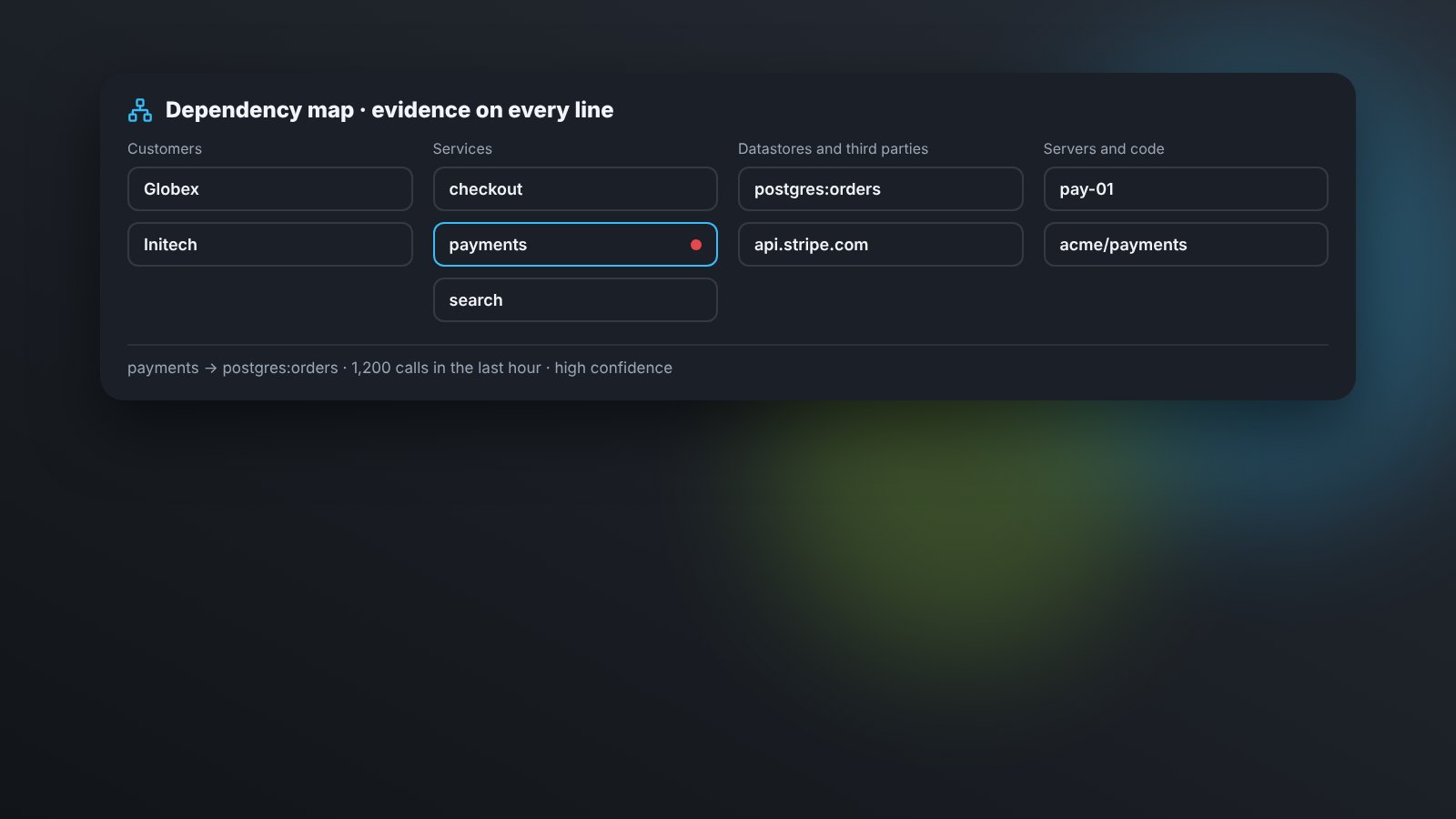
The operations twin is a live model of how your services, servers, datastores, third parties, deployments, incidents and security assets depend on each other. Use it to see what a change would reach before you make it, and to rehearse failures without touching production. It’s included in every plan. Open it from TR Investigate → Operations twin.
Where the model comes from
| Source | What it adds | Confidence |
|---|---|---|
| Traces (OpenTelemetry, Datadog APM and others) | Service-to-service calls, datastores and third parties, with call counts, errors and p95 latency | High when observed in the last 24 hours with 20+ calls; low when older than 72 hours or rarely seen |
| Server inventory (DevOps & SRE) | Which services run on which servers, team ownership, last CPU, memory and disk | High for an exact name, medium when matched after normalising |
| Deployment events | Deployments in the last 14 days, their status, version and commit | High, or medium when the service name was normalised |
| Incidents | Open and recent incidents, the services and servers they affect | High from incident links |
| Security inventory | Repositories that build a service, assets that protect it, open critical and high findings | Medium or high by name match |
| Investigations | Customers who reported problems on a service in the last 90 days | High with 3+ investigations |
Every relationship lists its evidence: the source, what it says and when it was seen. Select a component on the map to read it.
Matching names
Different tools often name the same service differently, such as payments, payments-service and acme/payments-svc. The twin matches names exactly, then after removing case, punctuation, a repository owner and suffixes such as -prod or -service. Anything else stays unmatched.
On Service names, someone with “Manage the operations twin” can confirm that a name is a known service. Confirmed names are used from then on and recorded in the audit log.
Change impact
Choose a component and the kind of change. The twin shows:
- services that depend on it directly, and indirectly up to four steps away, each with the path and the weakest link’s confidence;
- customers who reported problems on those services, and their SLA clocks at risk this week;
- connections that would be interrupted and third parties it uses;
- conflicts: open incidents, deployments and configuration, infrastructure or feature-flag changes in the last 24 hours (from pushes, LaunchDarkly, AWS CloudTrail and the Azure Activity Log), and workflow runs in progress;
- open security findings and internet-facing assets in scope;
- monthly revenue of the exposed customers, only when a verified amount is cached from your billing tool or CRM. It is never estimated.
Operational risk is worked out from explicit rules, and each reason is listed, such as “production environment” or “1 failed deployment in the last 3 days”. Dependents can be affected; the twin doesn’t claim they are broken.
Simulations
| Simulation | Applies to |
|---|---|
| Deployment failure | Services — suggests rolling back to the last successful deployment, by version and commit |
| Infrastructure outage | Servers |
| Database performance degradation | Datastores |
| Service dependency failure | Services, datastores, third parties |
| Security incident | Services, servers, repositories, assets |
| Traffic increase | Services — scales measured call volume by a factor you set; CPU headroom is a linear estimate |
| Capacity shortage | Servers — shows the last measured CPU, memory and disk |
| Configuration change | Services, servers, datastores |
| Proposed remediation action | Services, servers, datastores, repositories |
Each result lists its assumptions, likely consequences, affected services and customers, risk with reasons, confidence, evidence, mitigations and any missing data. Save simulations to compare two to four side by side.
History
The twin takes a snapshot every day it has data and keeps 180 days. On History, pick a date to see the twin as it was and which components and connections were added or have gone since.
Execution previews in workflows
When a workflow’s approval step guards a privileged, destructive or production-impacting action, the twin adds an execution preview to the approval: the target, what depends on it, exposed customers, open incidents, recent deployments, open critical findings, the operational risk and safer alternatives. The preview appears on the run and in the approval notification.
The preview informs the approver. It doesn’t approve or block anything, and a successful action still has to pass its verification step before the run counts as verified.
Permissions
| Permission | Allows |
|---|---|
| View the operations twin | The map, evidence, change impact, running simulations, saved simulations and history |
| Manage the operations twin | Confirming service names and saving simulations |
Team leads, executives and auditors can view by default. Admins have both.
What it needs
Connect traces for the dependency graph. Without traces, the twin still models servers, deployments, incidents and security assets, and says that service-to-service calls are unknown.
API
Under /api/trial/:trialId/twin/: GET graph, GET node?id=, POST impact, POST simulate (with save: true to keep it), GET scenarios, GET scenarios/:id, GET compare?ids=, GET history, GET as-of?date=, and GET, POST and DELETE aliases.