
Outcome Assurance: how outcomes and ROI are measured
The outcome ledger and its states, what counts as verified, how hours and savings are credited once per ticket, measured versus estimated figures, period comparisons and benchmarks, opportunities, the improvement loop, exports, permissions and the API.
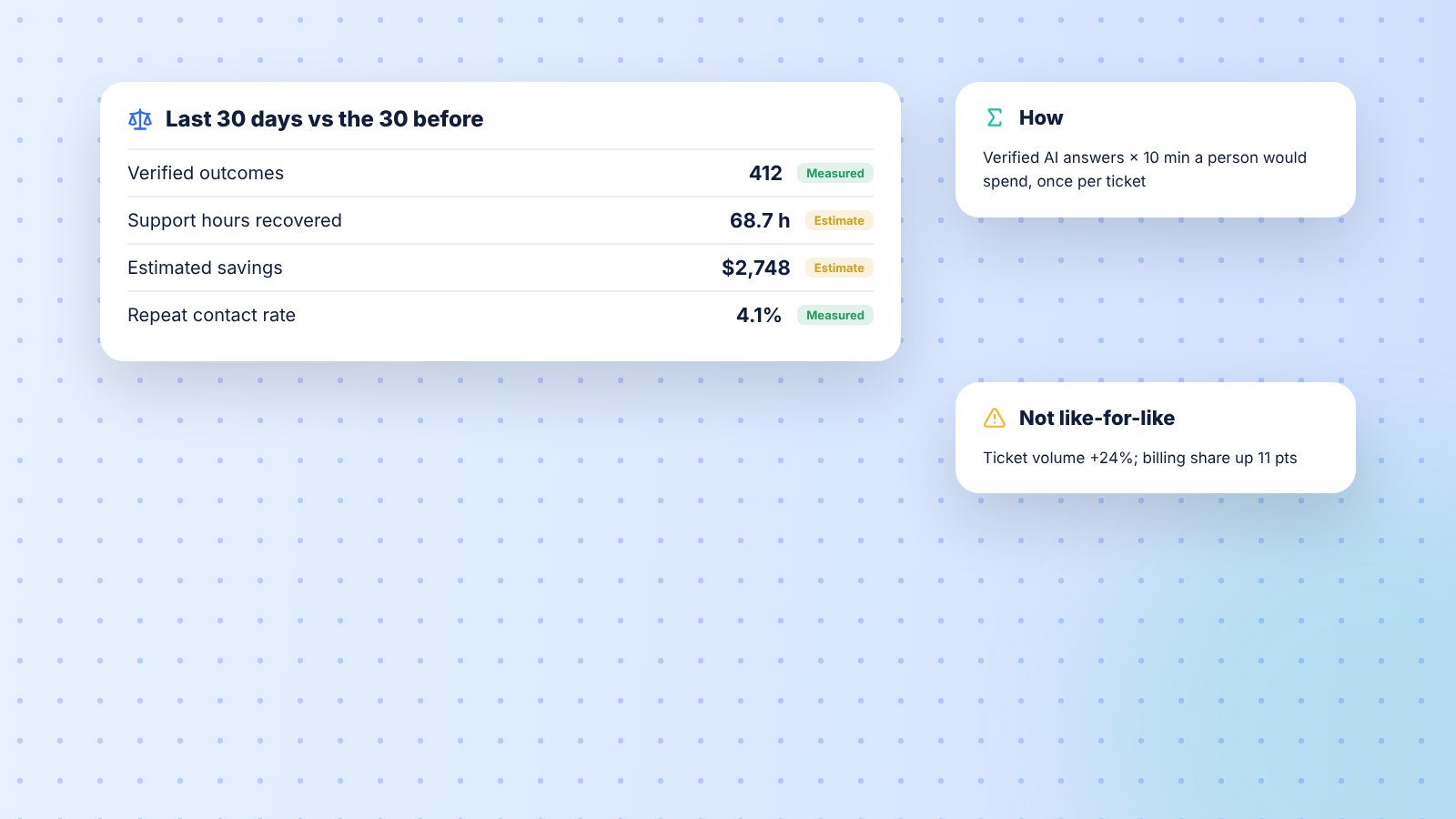
Outcome Assurance measures what TR-AI’s work actually achieved. It follows every AI answer, investigation, action, workflow run and security fix from proposal to verification. Hours and savings are credited only to verified outcomes, once per ticket, and every figure shows its formula. It’s part of every plan at no extra charge. Open it from TR Investigate → Outcomes and ROI.
The outcome ledger
The ledger has one record per piece of work. It points to the original record and doesn’t copy it.
| Record | Verified when | Other endings |
|---|---|---|
| AI answer | Resolution verification passes, or the customer or a person confirms it | Failed: reopened, the customer came back, or said it didn’t work |
| Investigation | The fix is verified in production and the customer confirms, or the customer confirms | Partially verified: technically verified only. Inconclusive: likely resolved, which is inferred. Failed: failed, reopened or recurring. |
| Backend action, investigation action | Completed, and the ticket or investigation it served was verified | Rejected by a person; failed |
| Workflow run | All steps completed, and the ticket it ran on was verified | Failed; cancelled. Test runs are left out. |
| Security fix | A later scan stops reporting it, it is closed at the source, or a second person verifies it with evidence | Failed: reported again after it was fixed |
States move Proposed → Approved → Executed → Verified. Records can also end as Rejected, Failed, Partially verified, Reversed or Inconclusive.
Each change is appended to the record’s history with:
- when it happened;
- who approved it;
- whether it came from the source system or a person.
The ledger updates every 30 minutes and when you open the page. A person with “Administer outcomes” can set a state the source can’t express, such as a fix that was rolled back. A reason is required. The source’s own state stays in the history, and the change can be undone.
The routing decision
Every ticket shows how it was routed, in Ticket 360 and on its outcome record. It is read from what the engines recorded for that ticket; nothing is decided again.
| Part | What it shows |
|---|---|
| Path | TR Resolve sent it, a person approved a draft, or your team took it; then TR Investigate and engineering when they were involved, each with the recorded reason |
| Evidence missing | No help article close enough (with the best match), sources that disagree, and sources or evidence the investigation still needs |
| Risk of acting | The workflow risk class: read-only, write (a reply to the customer), privileged (account or billing details) or production-impacting (a high-risk remediation) |
| Approval | Whether a person had to approve, and why: a held draft, a remediation waiting, or a ticket your team handles |
| AI cost | This ticket’s calls against the average of tickets that took the same route in the last 30 days. Both are estimates at your model rate; money needs “Outcome financials”. |
| Stop and escalate | The send rules, the investigation budget with what was used, and when work goes to your team, TR Investigate or engineering |
An investigation has a budget in the investigation policy: runs a day, runs in total and minutes of run time in total. A run over the total budget is refused, and the stop is recorded on the investigation and shown in its routing decision until a person raises the limit.
Outcomes in the Decision Inbox
| Item | When | Leaves the inbox when |
|---|---|---|
| Verification failed | A record from the last 14 days whose evidence says it didn’t work | A person sets its state or class |
| Not verified | It ran, but no evidence arrived before its window ended (last 14 days) | A person sets its state or class, or evidence arrives |
| Recurring defect | A confirmed recurrence (last 14 days) with no investigation on either ticket | An investigation covers it |
| Unusual AI use | A ticket (last 7 days) with at least 6 AI calls and 3× the workspace median per ticket over 30 days | It ages out after 7 days |
| Budget stop | An investigation refused a run over its total budget | A run starts after the limit is raised |
Hours and savings
| Value | Credited to | How |
|---|---|---|
| Support hours | Verified AI answers | Minutes a person would spend on the ticket, minus draft review time when a person approved a draft |
| Engineering hours | Fully verified investigations | Your engineering hours per verified investigation (default 2) |
| Savings (estimate) | The same outcomes | Hours × your hourly cost. For support, the Workforce average pay rate is used when you haven’t set a cost. |
| Savings (measured) | Verified AI answers | Your measured cost per human-handled ticket, from Workforce tracked time × pay rate |
Each value is credited once per ticket and metric. When two answers, an investigation and a workflow run all concern the same ticket, only one record is credited, and the others show where the credit went.
If a verified outcome later fails, its credit is withdrawn. Changing an assumption recalculates every credited value on the next update.
Support assumptions are shared with Resolution intelligence → Costs.
Metrics and comparisons
Each metric shows:
- its formula;
- the records it came from;
- its assumptions;
- its sample size and confidence;
- whether it is measured (counted from records) or an estimate (uses an assumption).
Confidence is high from 100 records, medium from 30 and low from 10. Below 10, the metric isn’t shown.
The metrics are:
- verified outcomes;
- support and engineering hours recovered;
- estimated and measured savings;
- resolution effectiveness;
- automation reliability;
- first-contact resolution;
- repeat contact and reopen rates;
- time to verified resolution;
- SLA breach rate, when SLA policies exist;
- incident recurrence;
- customers with a verified outcome.
Compare the last 30, 60 or 90 days with the period before, or with a baseline you set. The page warns you when the periods aren’t like-for-like:
- volume changed by 20% or more;
- the category mix shifted by 15% or more;
- outcome data is missing for a fifth of tickets or more.
Comparisons show what changed, not why. A lower SLA breach rate is not proof that breaches were prevented.
Benchmarks
Benchmarks show the same measures by:
- handling: AI answered, AI draft sent by a person, or person only;
- category;
- channel;
- urgency;
- customer plan;
- for investigations, the integrations whose evidence they used.
Tickets a person handled usually have no independent verification, so their rates are often missing. That is a gap in the data, not a result.
Opportunities and the improvement loop
Opportunities are ranked by expected impact, confidence, effort and risk. They cover:
- categories people handle where TR-AI’s answers are verified;
- knowledge gaps behind hand-offs;
- workflows that keep failing;
- investigations with too little evidence;
- actions operators keep rejecting;
- fixes that don’t hold on a service;
- integrations that never contribute;
- repeat contacts.
Each opportunity lists its evidence, its estimated impact, the approval it needs and how to validate it.
The improvement loop shows how verified outcomes feed TR-AI, TR Investigate, TR Predict, incident and engineering intelligence, and Integration Intelligence. Nothing changes a policy, threshold or permission automatically.
Exports and permissions
| Permission | What it allows |
|---|---|
| View outcomes | The ledger, hours, comparisons, benchmarks, opportunities and the loop, without money figures |
| Outcome financials | Savings in money and the hourly costs |
| Export outcomes | The executive report as PDF and CSV, and the ledger as CSV |
| Administer outcomes | Assumptions, the baseline, updating the ledger and setting a state |
Admins and owners have all four. Executives and finance auditors can view, see financials and export. Support leads can view. Exports, settings changes and person-set states are recorded in the activity log.
API
| Method and path | Returns |
|---|---|
| GET /api/trial/:id/outcomes/ledger?kind=&state=&ticket=&days= | Ledger records |
| GET /api/trial/:id/outcomes/ledger/:outcomeId | History, values, evidence, other records on the same ticket and the ticket’s routing decision |
| GET /api/trial/:id/intelligence/ticket/:ref | Ticket 360, including the routing decision |
| POST /api/trial/:id/outcomes/ledger/:outcomeId/state | Set or clear a person’s state (a reason is required) |
| GET /api/trial/:id/outcomes/compare?days=&mode= | Metrics against the previous period or the baseline, with disclosures |
| GET /api/trial/:id/outcomes/benchmark?by=&days= | Measures by group |
| GET /api/trial/:id/outcomes/opportunities | Ranked opportunities |
| GET /api/trial/:id/outcomes/loop | The improvement loop |
| GET /api/trial/:id/outcomes/executive | The executive view |
| GET /api/trial/:id/outcomes/export.csv?what=ledger|metrics · export.pdf | Exports |
| PUT /api/trial/:id/outcomes/settings · POST /sync | Assumptions and baseline · update the ledger now |
Limits
- The ledger covers the last 180 days, up to 20,000 answers and 5,000 records of each other kind per update.
- Handling time per ticket isn’t measured unless you use Workforce time tracking. Until then, hours recovered are estimates.
- Security fixes are counted as outcomes but aren’t given a money value.