
Turn Support Conversations Into Pipeline: AI Lead Qualification and Meeting Booking
Prospects often ask their first question in your support chat. AI can answer it first, then ask your qualification questions one at a time, score the lead, write it to HubSpot or Salesforce and book a meeting on a rep’s calendar in the visitor’s time zone, and take payments only through hosted links, without turning support into a sales pitch. With an illustrative prospect, start to finish.
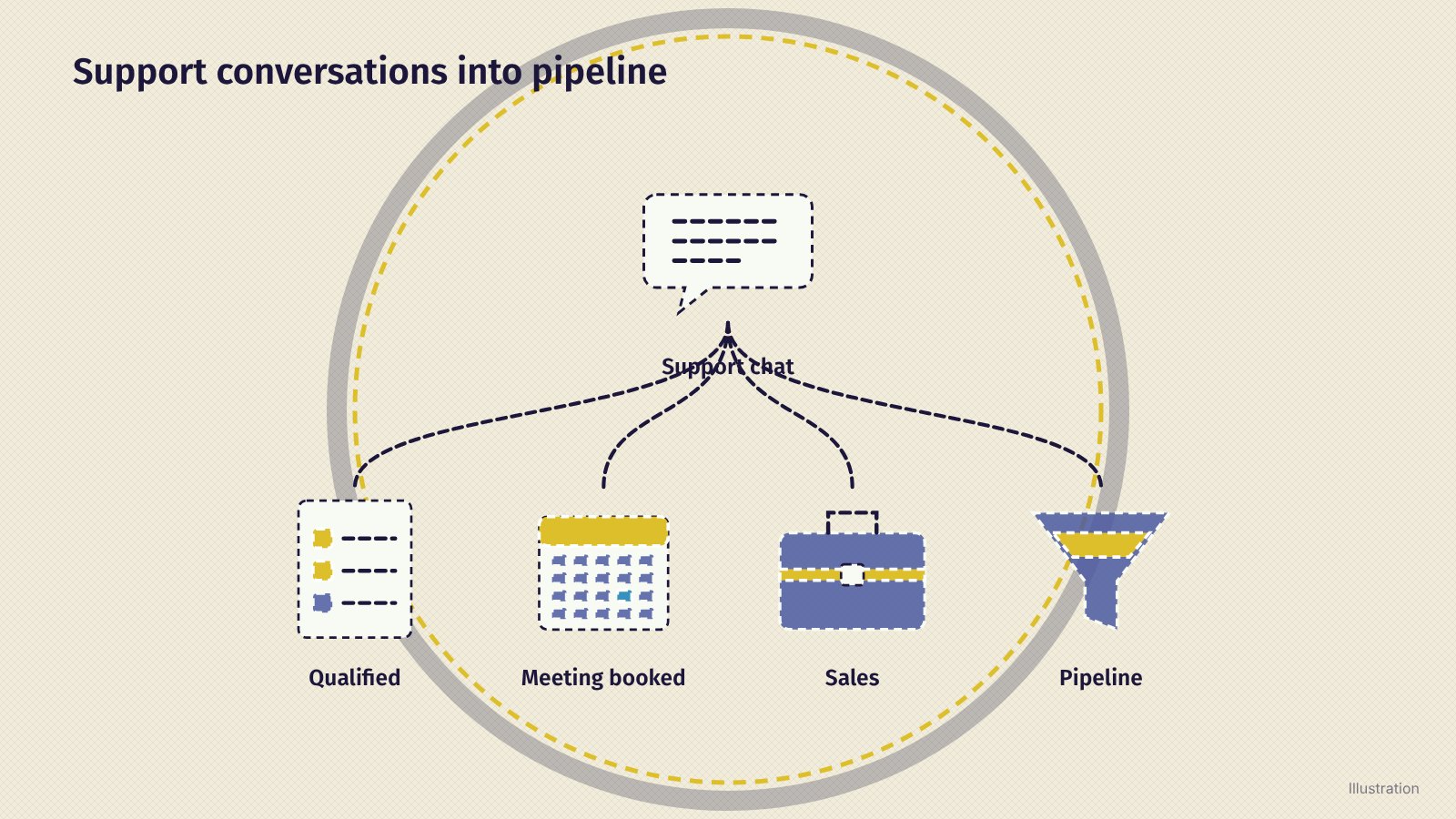
Your website chat, WhatsApp number and support inbox don't only get questions from customers. They also get "do you integrate with Salesforce?", "how much for 40 seats?" and "can I see a demo?" from people who aren't customers yet. In many companies these land in the support queue, get a polite answer a day later, and go nowhere.
That's pipeline leaking out of support. This post covers how AI can catch it without turning your support channels into a sales funnel.
Here's the leak at a company that sells a field-inspection app to construction firms:
- Tuesday 16:40: a visitor asks in chat: "Do you integrate with Procore? We have about 60 inspectors."
- Tuesday 16:41: the chat bot links the integrations page.
- Wednesday 10:00: a support agent replies by email with "yes, here's how". It's a good answer.
- Wednesday: nobody tells sales. No CRM record exists.
- Two weeks later: the visitor's company signs with a competitor that booked a demo the same afternoon.
A 60-seat prospect asked a clear buying question. Support answered it; nobody caught the lead.
First, the basics
- A prospect is someone who isn't a customer yet but is considering buying.
- Qualification means learning enough to decide whether a prospect is a good fit, such as company size or timeline.
- A lead score combines answers into a number, here 0–100, with hot, warm and cold bands.
- Round-robin shares meetings fairly between reps.
- Free/busy is calendar availability without meeting details.
- A CRM (customer relationship management system) is where sales keeps leads and deals, such as HubSpot or Salesforce.
- A hosted payment link is a secure page from your payment provider where customers pay, so card numbers never pass through chat.
Why does this matter? Buying questions are time-sensitive. Answering them well and booking a meeting while the prospect is still there turns a support conversation into pipeline, and writing it to the CRM means sales actually sees it.
The problem, in plain terms
- Buying questions are answered like support questions, and nothing follows.
- Sales never hears about them.
- "Someone will contact you" comes too late.
- Pushy qualification puts prospects off.
- Payments in chat risk card details.
Answer first, qualify second
The cardinal rule: a prospect asked a question, so answer it first. Only then ask the questions your sales team needs. A chat that opens with "What's your company size?" before answering anything loses the visitor.
Good qualification in support:
- Spots a prospect from the conversation itself: asking for a demo, pricing or a trial, or saying they're evaluating.
- Answers their question as usual, from your knowledge base.
- Asks your qualification questions one at a time, and stops if they'd rather not say.
- Treats an unanswered question as "unknown", not as a bad answer.
Scoring that sales trusts
Give each question a short label, what a great answer looks like ("50 or more employees") and a weight. Combine the answers into a score from 0 to 100, with bands for hot, warm and cold. Sales teams trust scores they can read, so show the answers alongside the score, not just a number.
Meetings, not "someone will contact you"
For good leads, the best next step is a booked meeting while the prospect is still in the conversation:
- Read each rep's free and busy times and offer three slots inside their working hours, spread across days, in the visitor's own time zone.
- Share meetings fairly between reps (round-robin).
- Book only when the visitor picks a time, and check the slot is still free first.
- Add a video link and invite the visitor.
Calendars should be connected through the company's own Google Workspace or Microsoft 365, set up once by an admin, so reps don't need to sign in.
Write it to the CRM
A lead that only exists in a chat transcript is lost. Find or create the contact in HubSpot, or a Lead in Salesforce, with the answers, the score and the booked meeting attached.
Payments without card details in chat
Sometimes the support conversation is about money: an overdue invoice, an upgrade, a deposit. The safe way to take payment is a hosted payment link (Stripe, Shopify or Chargebee), never a card number typed into chat or read out on a call.
How TR-AI handles revenue conversations
Lead qualification and meeting booking (Growth Pro), in Revenue agent (/dashboard/revenue):
- Spots prospects in chat, SMS, WhatsApp, Messenger, Instagram and email. It answers their question, then asks up to 8 weighted questions you write, one at a time, plus their email if it doesn't have it.
- Scores leads 0–100 into hot, warm and cold. With HubSpot it finds or creates the contact and adds a note. With Salesforce it creates a Lead with Rating Hot/Warm/Cold. Your sales team is told.
- Books meetings from Google Workspace or Microsoft 365 calendars: 3 slots in working hours, in the visitor's time zone, round-robin across reps, with a Google Meet or Microsoft Teams link. Reps without a connected calendar can share a Calendly or HubSpot Meetings link instead.
Payment links (Growth Pro): procedures can send a hosted page for an open Stripe or Chargebee invoice, or a one-off Stripe Checkout or Shopify draft-order checkout. TR-AI never asks for or accepts card numbers. Open-invoice links go straight to the verified customer. Custom amounts always need a teammate's approval and are capped. Paid links are checked every 10 minutes for up to 30 days.
The Revenue page shows leads by score and channel, meetings booked, saves versus cancellations, and payment-link conversion and revenue. Cancellations are covered in save offers before cancellation.
A worked example, start to finish
Here's the field-inspection company with lead qualification and meeting booking. The names are illustrative.
Set-up. Hugo, the head of sales, writes four questions in Revenue agent → Lead qualification:
- Team size · "How many inspectors would use it?" · great answer: "50 or more" · weight 5.
- Current tool · "What do you use for inspections today?" · great answer: "paper or spreadsheets" · weight 3.
- Timeline · "When are you hoping to start?" · great answer: "within 3 months" · weight 4.
- Integration · "Which project tools do you use?" · great answer: "Procore" · weight 2.
Hot from 70, warm from 40. HubSpot is connected. An IT admin connects Google Workspace organisation-wide (a service account with domain-wide delegation), so the three reps never sign in. Meetings are offered to hot and warm leads; 30 minutes; 15-minute buffer.
Tuesday 16:40. A visitor asks: "Do you integrate with Procore? We have about 60 inspectors."
16:40. Answer first. "Yes, we integrate with Procore: inspections sync to the matching project, and issues can create Procore observations. Here's how it works…"
16:41. Qualify, one at a time. "Happy to help further. What do you use for inspections today?" → "Spreadsheets and photos in a shared drive." "And when are you hoping to start?" → "Before our next project in about two months." Team size (60) and integration (Procore) were already in the first message.
16:42. Score: 92, hot. "Would a 30-minute call with our team help? Here are three times that work: Wed 10:00, Thu 14:30, Fri 09:30 (your time)." The slots are inside reps' working hours, spread across days, in the visitor's time zone, round-robin.
16:43. The visitor picks Thursday 14:30 and gives their work email. TR-AI checks the slot is still free, creates the event with a Google Meet link, and invites the visitor.
16:43. CRM. In HubSpot, TR-AI creates the contact and adds a note with the answers, the score and the meeting. The assigned rep is told.
Thursday 14:30. The demo happens while the prospect is still comparing options.
Later. After the contract is agreed, the deposit invoice is sent through a Stripe hosted payment link. No card numbers in chat.
What changed: the same good answer, plus a booked demo within three minutes and a CRM record sales could act on.
Five more real-world scenarios
1. An existing customer
Situation. A customer asks how to export inspections.
How TR handles it. Qualification only runs for prospects; customers just get help.
2. A prospect who won't say
Situation. A visitor skips the team-size question.
How TR handles it. It's treated as "unknown", not a bad answer.
3. A rep without a connected calendar
Situation. One rep uses Calendly.
How TR handles it. Reps without a connected calendar can share a Calendly or HubSpot Meetings link instead.
4. Salesforce instead of HubSpot
Situation. Your CRM is Salesforce.
How TR handles it. TR-AI creates a Lead with Rating Hot, Warm or Cold.
5. A custom payment amount
Situation. A procedure needs to send a link for a one-off amount.
How TR handles it. Custom amounts always need a teammate's approval and are capped.
Before and after
Before. An integrations-page link, a good answer the next day, no CRM record, and a lost 60-seat deal.
After. The question answered first, three short questions, a hot score, a demo booked in the visitor's time zone, and a HubSpot contact with the answers and meeting.
How to tell it's working
- Meetings booked from support channels each week.
- Leads appear in the CRM with answers and scores.
- Customers don't get qualified.
- No card numbers in chat.
Who it's for
- B2B companies whose prospects ask in chat or email.
- Sales teams who want leads with context.
- Support teams who'd rather not be the sales inbox.
How it fits with the rest of TicketResolve
Lead qualification runs in the chat widget and messaging channels, alongside the shopping assistant for consumer stores and retention offers for cancellations. Payment links run inside procedures. The Revenue page reports all of it together.
Keeping support feeling like support
- Keep the question list short: three or four questions beat eight.
- Never qualify existing customers asking for help. Prospects only.
- Let people skip questions without penalty.
- Offer a meeting only to leads worth a rep's time.
Why organisation-wide calendars
Asking every rep to sign in to connect their calendar works until someone forgets, leaves or changes password. An organisation-wide connection, set up once by an admin through Google Workspace or Microsoft 365, reaches every rep's free/busy by email. New reps are added with their email, time zone and working hours; that's all.
Mistakes to avoid
- Qualifying before answering.
- Eight questions when three would do.
- "Someone will contact you" instead of a booked meeting.
- Card details in chat.
Do it in TicketResolve, step by step
Where: Revenue agent (/dashboard/revenue). You'll need: Growth Pro; HubSpot or Salesforce (optional); an admin for Google Workspace or Microsoft 365. Full guides: Lead qualification and meeting booking, Payment links and Website chat widget.
- Write your questions with a label, the question, a great answer and a weight (up to 8).
- Set the hot and warm score bands.
- Connect your CRM (optional).
- Connect your company calendar organisation-wide, or per rep.
- Add sales reps with work email, time zone, working days and hours.
- Choose who is offered a meeting, meeting length, buffer, minimum notice and how far ahead.
- Switch on lead qualification and meeting booking, and test with a prospect question.
How to check it worked: a prospect question gets an answer first, then questions one at a time, a score, three slots in the visitor's time zone, and a CRM record.
Frequently asked questions
Can a support chatbot qualify sales leads? Yes, if it answers the prospect's question first and then asks a few qualification questions one at a time. Leads can be scored hot, warm or cold and written to your CRM.
How does AI book sales meetings from chat? It reads reps' availability from your company calendar, offers a few free slots in the visitor's time zone, and creates the event with a video link once the visitor picks one, after checking the slot is still free.
Is it safe to take payments in a support chat? Only through a hosted payment page from your payment provider. Card numbers should never be typed into chat or read out on a call.
Will lead qualification annoy existing customers? It shouldn't run for them. Qualification should only start when the conversation shows a prospect, such as a demo or pricing question from someone who isn't a customer.
Which channels does it work in? Chat, SMS, WhatsApp, Messenger, Instagram and email.
How many questions can I write? Up to 8, each with a weight.
Which calendars are supported? Google Workspace and Microsoft 365, with Calendly or HubSpot Meetings links as an alternative.
How are paid links checked? Every 10 minutes for up to 30 days.
Which plan includes it? Growth Pro.
Explore Topics
Written by
Ghulam Shabbir
Content creator and writer sharing insights and stories.