
Reduce Subscription Cancellations With Save Offers in Support (Without Being Pushy)
Many cancellation requests arrive as support tickets. Ask why once, offer one alternative that fits the reason (pause, skip, downgrade or a discount you approved), cancel promptly if the customer still wants to, and learn from every reason, without being pushy. With an illustrative month of cancellations, start to finish.
"Please cancel my subscription." For subscription businesses, this is one of the most valuable tickets in the queue. It's also one of the easiest to get wrong. Cancel at once without a word and you lose customers who only needed a pause. Push three offers and a survey at them and you get an angry review, and maybe a regulator's attention. Several jurisdictions now expect cancelling to be as easy as signing up.
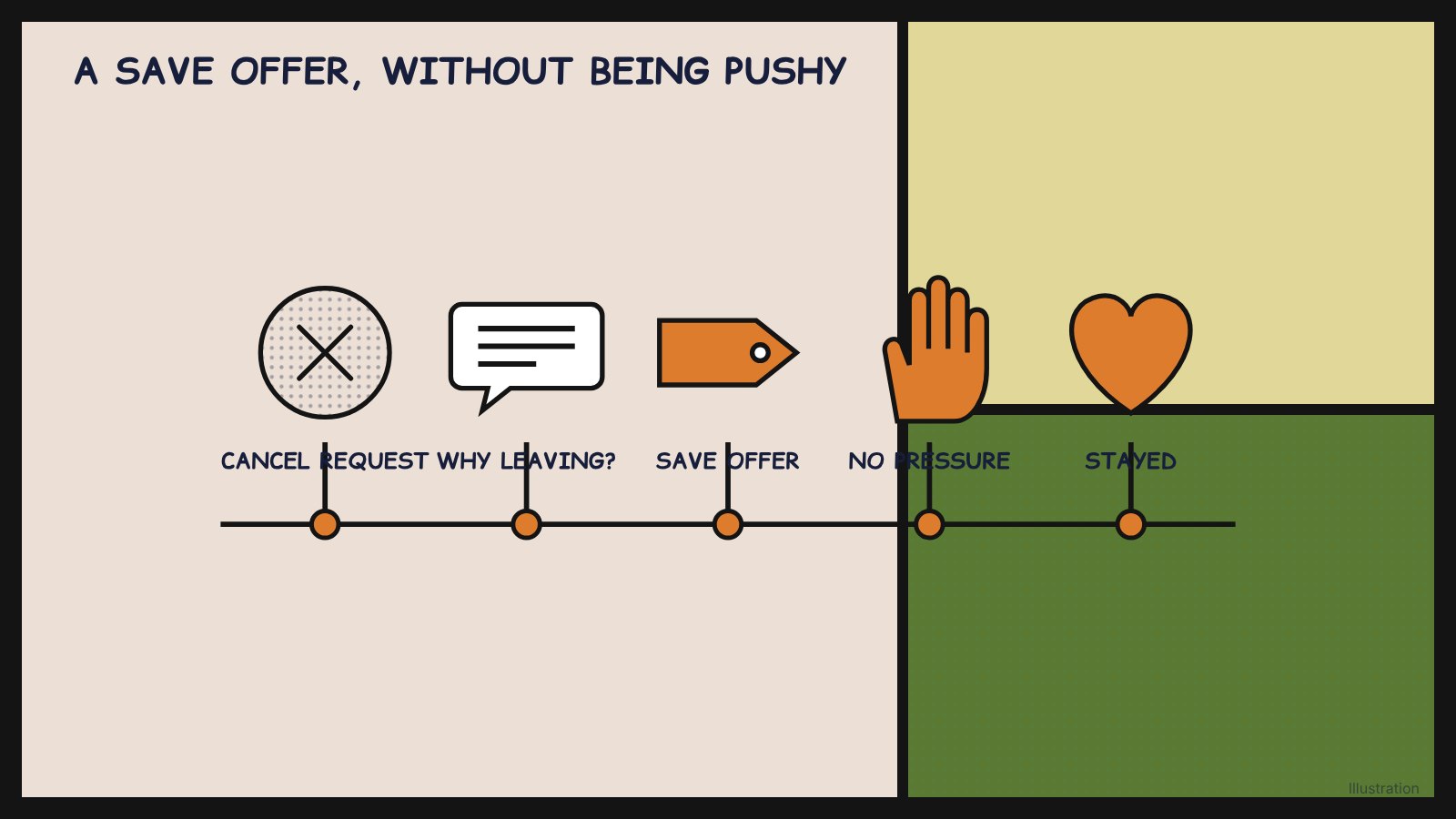
The approach that works is simple and honest: ask why once, offer one alternative that fits, and cancel promptly if they still want to.
Here's how both extremes go wrong at a company that sells coffee-bean subscriptions:
- Before: every "cancel" ticket was cancelled immediately. Among them: a customer going travelling for a month, another with too many beans in the cupboard, a third worried about price after a rise.
- After a change: a new manager adds a scripted flow. Customers get three offers, then a survey, then "are you sure?".
- Week 2: a one-star review: "Took four emails to cancel a coffee subscription."
- Week 3: a customer complains to a consumer body that cancelling was harder than signing up.
- Month end: the save rate is up, but so are complaints, and nobody knows why customers were leaving in the first place.
The first approach gave away customers who wanted to stay. The second kept some by annoying everyone.
First, the basics
- A save offer is an alternative offered when a customer asks to cancel.
- A pause stops billing and deliveries for a while.
- Skipping misses the next order without cancelling.
- A downgrade moves to a cheaper plan.
- A discount coupon reduces the price for a time.
- Save rate is saved ÷ (saved + cancelled).
- A cancellation procedure is the AI procedure that cancels subscriptions through your billing system.
Why does this matter? Many cancellations are about timing, not dissatisfaction. Offering the right alternative once keeps those customers. Cancelling promptly when they still want to keeps your reputation, and the reasons you collect tell you what to fix.
The problem, in plain terms
- Cancelling instantly loses customers who needed a pause.
- Pushing several offers angers customers and regulators.
- Offers don't match reasons.
- Discounts are given away when a pause would do.
- Reasons aren't recorded, so nothing improves.
Why customers cancel (and what fits each reason)
| Reason | A fitting alternative |
|---|---|
| "I'm not using it right now" | Pause, or skip the next order |
| "It's too expensive" | Downgrade, or a time-limited discount |
| "I have too much product" (e-commerce subscriptions) | Skip or change frequency |
| "It doesn't do what I need" | Hand to a person who can help, or cancel |
| "I'm switching to a competitor" | Usually cancel. Note the reason |
Many cancellations are about timing, not price. Offering a pause before a discount saves revenue you'd otherwise give away.
Rules that keep it honest
- Once per ticket. One kind question with the offers in the same message. Never repeat it.
- Easy to say no. "If you'd still like to cancel, just reply and I'll do it now."
- Cancel promptly when the customer confirms, with no further hoops.
- Only real offers. Use only the discounts and alternatives you've approved, within limits you set.
- Record the reason. Repeated reasons are product feedback, not just churn statistics.
Measuring it
Track the save rate (saved ÷ (saved + cancelled)) and the reasons over time. A rising save rate is good. A rising count of the same reason is a roadmap item.
How TR-AI handles cancellations
Retention offers (Growth Pro) work inside your cancellation procedure:
- The first time a procedure tries to cancel a subscription (Stripe, Chargebee, Recharge, Skio, Paddle or Recurly) for a ticket, TR-AI asks once, kindly, why, and offers your alternatives in the same message.
- You configure up to 5 offers: pause, skip the next order, or a Stripe discount coupon (you set the coupon and its percentage, at most 50%). "Downgrade" and "Other" offers are handed to your team.
- If the customer accepts, TR-AI applies it under your normal approval rules. If they still want to cancel, it cancels.
- Only one offer per ticket, never repeated. Only coupons you've listed can be applied.
- The Revenue page (
/dashboard/revenue) shows the save rate and every reason.
A worked example, start to finish
Here's the coffee subscription company doing it honestly. The names and numbers are illustrative.
Set-up. Valentina, the support lead, opens the cancel procedure and makes sure it includes the alternative tools: pause_subscription, skip_next_order and stripe.apply_retention_coupon. In Revenue agent → Retention offers she writes three offers:
- Pause for 1–3 months.
- Skip the next delivery.
- 15% off the next three deliveries (her Stripe coupon id, 15%).
She switches on Retention offers and keeps "Ask the reason for cancelling" on.
Monday. A traveller. "Please cancel, I'm away for six weeks." TR-AI replies once: "Of course. Before I do, would a pause suit you better? I can pause your subscription for up to three months, or skip your next delivery. If you'd still like to cancel, just reply and I'll do it now." The customer chooses a two-month pause. Saved; reason recorded: not using it right now.
Tuesday. Too many beans. "Cancel please, I've got three bags unopened." The offer includes skipping the next delivery. Accepted.
Wednesday. Price. "Your price went up, I'm cancelling." The offers come in one message; the customer takes 15% off three deliveries. Applied under normal approval rules.
Thursday. Switching. "I'm moving to a local roaster, please cancel." TR-AI asks once, offers the alternatives in the same message. The customer replies "No thanks, just cancel." TR-AI cancels straight away and confirms. No second offer, no survey.
Friday. An unusual request. A customer wants a different roast every week. That's "Other": handed to the team, who set up a custom mix.
Month end. The Revenue page shows the save rate and the reasons. "Not using it right now" and "too much product" are the biggest groups. Valentina suggests to product a flexible delivery schedule in the account page. No complaints about cancelling.
What changed: customers who needed a pause or a skip stayed, customers who wanted to leave left with one reply, and the reasons became a product idea.
Five more real-world scenarios
1. A second cancellation request
Situation. A customer who declined an offer last month asks to cancel again.
How TR handles it. Offers are once per ticket and never repeated; a new ticket can include them once.
2. A discount larger than allowed
Situation. Someone asks for 70% off.
How TR handles it. Only coupons you've listed can be applied, at most 50%.
3. Recharge or Skio subscriptions
Situation. Your store uses Recharge.
How TR handles it. Cancellations through Stripe, Chargebee, Recharge, Skio, Paddle or Recurly can include retention offers.
4. A downgrade request
Situation. A customer wants a cheaper plan.
How TR handles it. "Downgrade" offers are handed to your team.
5. A missing tool
Situation. An offer's tool isn't in the procedure.
How TR handles it. Offers whose tool isn't in the procedure aren't shown.
Before and after
Before. Instant cancellations for customers who only needed a pause, then a pushy flow with three offers and a survey, a one-star review and a complaint.
After. One kind question with offers that fit, prompt cancellation when they still want to, saves from pauses and skips before discounts, and reasons that became a product idea.
How to tell it's working
- Save rate rises without complaints.
- Pauses and skips outnumber discounts.
- Cancellations take one reply after the offer.
- Reasons lead to product changes.
Who it's for
- Subscription businesses: coffee, meal kits, software, memberships.
- Support leads handling cancellation tickets.
- Product teams looking for churn reasons.
How it fits with the rest of TicketResolve
Retention offers sit inside procedures with live billing data, follow approval rules for discounts, and report on the Revenue page next to lead qualification and payment links. Customer health shows at-risk customers before they ask to cancel.
Are save offers a dark pattern?
Not when done honestly: one offer, asked once, with a clear way to cancel right away. Repeated offers, hidden cancel options or forced calls are what make a cancellation flow manipulative. The test is simple: could the customer cancel as easily as they signed up?
Which save offer works best?
It depends on the reason. Pauses and skips work well when customers aren't using the product right now. Discounts or downgrades fit price concerns. Matching the offer to the reason matters more than the offer itself.
Learning from reasons
The reasons are worth more than the saves. Read them monthly. If many customers pause because they have too much product, a flexible schedule might stop them asking. If many leave over price after a rise, a cheaper plan might keep them. If many switch to a competitor for one feature, that's a roadmap conversation. The cancellation queue is one of the most honest sources of product feedback a subscription business has.
Mistakes to avoid
- More than one offer per ticket.
- Hiding the cancel option.
- Leading with discounts when a pause fits.
- Not recording reasons.
Do it in TicketResolve, step by step
Where: Revenue agent → Retention offers (/dashboard/revenue) and your cancel procedure (/dashboard/procedures). You'll need: Growth Pro; a cancellation procedure connected to your billing system. Full guides: Retention offers before a cancellation, Procedures with live-data connectors and Custom API actions and approvals.
- Add the alternative tools to your cancel procedure:
pause_subscription,skip_next_order,stripe.apply_retention_coupon. - Write up to 5 offers: pause, skip, or a Stripe coupon (at most 50%); "Downgrade" and "Other" go to your team.
- Switch on Retention offers, with "Ask the reason for cancelling" on.
- Check approval rules for discounts.
- Watch the first cancellations to see the message customers get.
- Read the save rate and reasons on the Revenue page monthly.
How to check it worked: a cancellation ticket gets one message with the reason question and offers, and a customer who still wants to cancel is cancelled straight away.
Frequently asked questions
What is a save offer? An alternative offered when a customer asks to cancel, such as a pause, a skipped order, a downgrade or a discount, so they can stay on terms that suit them better.
Are save offers a dark pattern? Not when done honestly: one offer, asked once, with a clear way to cancel right away. Repeated offers, hidden cancel options or forced calls are what make a cancellation flow manipulative.
Which save offer works best? It depends on the reason. Pauses and skips work well when customers aren't using the product right now. Discounts or downgrades fit price concerns. Matching the offer to the reason matters more than the offer itself.
Can AI cancel subscriptions automatically? Yes, through a procedure connected to your billing system, with the approval rules you set. A good setup cancels promptly once the customer confirms.
Which billing systems are supported? Stripe, Chargebee, Recharge, Skio, Paddle and Recurly.
How many offers can I set? Up to 5.
What's the largest discount? At most 50%, using coupons you list.
Is the offer repeated? No, once per ticket.
Which plan includes it? Growth Pro.
Explore Topics
Written by
Ghulam Shabbir
Content creator and writer sharing insights and stories.