
AI Phone Agents for Customer Support: How Voice AI Answers Calls From Your Knowledge Base
AI phone agents can take a real share of routine calls if they answer from your own knowledge, keep it short, let callers interrupt and hand over to a person the moment it matters. What a support phone agent should do, when to transfer, texting links, voicemail, outbound limits and honest measurement. With an illustrative evening of calls.
Phone support is expensive and hard to staff, and it's still the channel many customers pick when something is urgent. Most phone queues are full of the same questions that fill email: "where is my order", "how do I reset my password", "what are your hours", "how do I connect X". The difference is that every one of them ties up an agent for the whole call.
AI phone agents (voice AI that answers calls in natural speech) have become good enough to take a real share of those calls. Not all of them, and not every caller. This guide covers what a support phone agent should do, where it should hand over to a person, and the setup details that decide whether callers trust it.
Here's a phone line before any of this at a company that sells home broadband. The events are illustrative:
- 17:55: the queue holds 14 callers. Most want to know whether there's an outage in their area or how to restart their router.
- 18:10: an IVR asks callers to "press 1 for billing, 2 for technical support…". A caller with a router question presses 2, waits 20 minutes, and is told how to restart it.
- 18:30: a frustrated caller says "agent" repeatedly; the IVR doesn't understand.
- 20:00: the line closes. Callers hear "please call back during business hours". Nobody records why they called.
- The next morning: the same callers ring again.
Agents spent the evening reading the same help article aloud. The callers with real problems waited behind them.
First, the basics
- A voice agent answers calls in natural speech.
- Speech recognition turns the caller's speech into text.
- An IVR is a menu ("press 1 for…"); a voice agent isn't one.
- A transfer number is where calls go when a person is needed.
- A pronunciation glossary tells the agent how to say product names.
- Frustration scoring rates how upset each caller sentence sounds.
Why does this matter? Routine calls tie up an agent for the whole call. Answering them well, and transferring quickly when a person is needed, frees your team for the calls that need them, as long as callers trust the agent.
The problem, in plain terms
- Routine questions fill the queue.
- IVR menus route people badly.
- Callers can't reach a person.
- After hours, calls are lost.
- Nobody learns why people called.
What an AI phone agent actually does
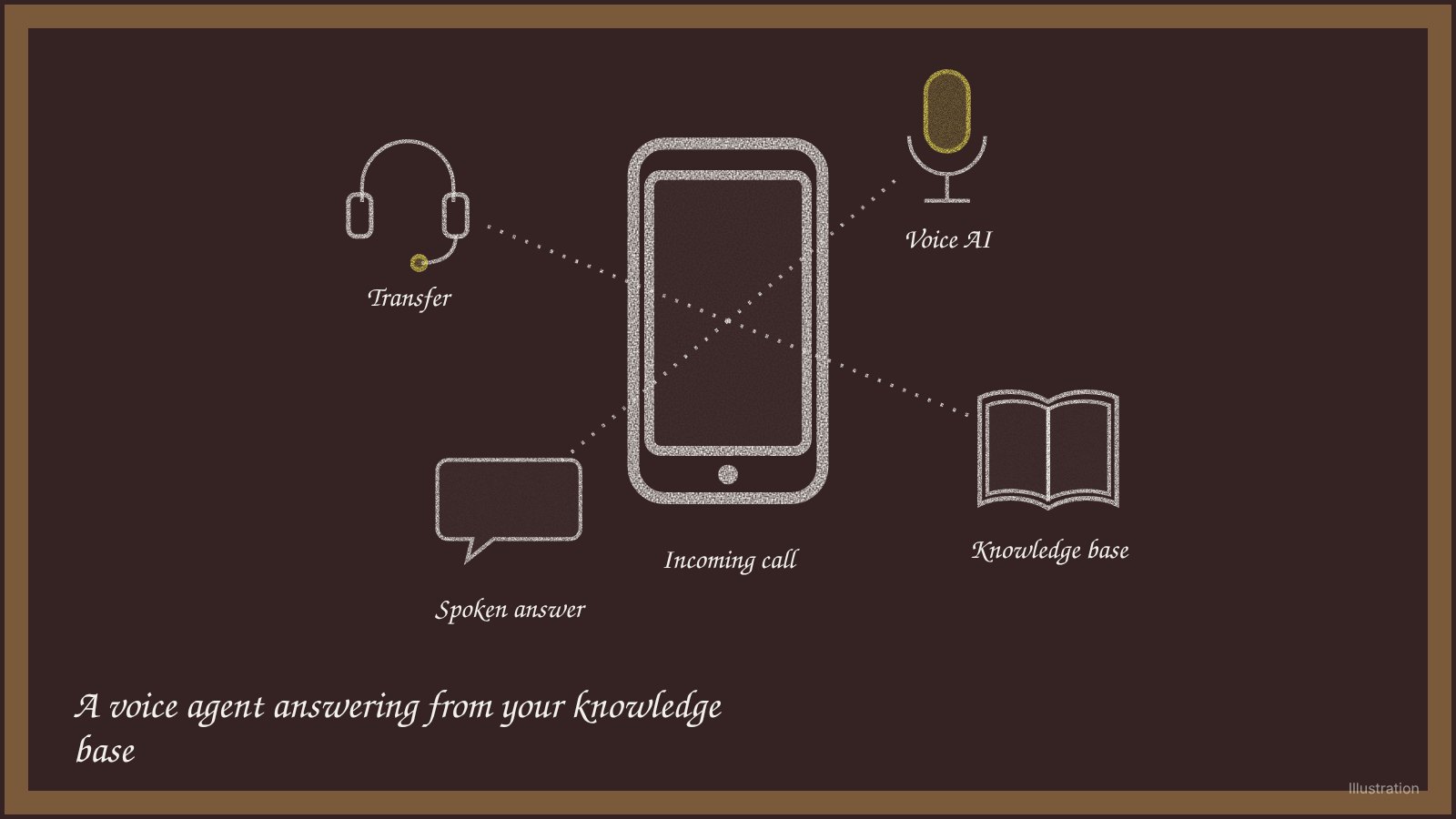
A support phone agent listens to the caller, turns speech into text, finds the answer in your knowledge base and reads it back in a natural voice. Then it checks whether the answer helped. Done well, it works like your best L1 agent on their first day: it knows the documentation, keeps answers short and knows when to pass the call on.
It is not an IVR menu ("press 1 for billing"). The caller just says what they need. It's also not a general-purpose assistant: a good support phone agent answers from your approved content, not from whatever a language model happens to know.
Spoken answers are different from written ones
An answer that works in an email often fails on a call. Voice needs:
- Short answers. A few sentences at most, followed by "Did that answer your question?". Long step-by-step guides belong in a text message or an email.
- No links or formatting. URLs read aloud are useless, and markdown sounds like noise.
- Interruptions. Callers cut in. The agent must stop and listen, without treating every "uh-huh" or "okay" as a new question.
- "Repeat that." On a call there is no scrolling back.
- Correct pronunciation. Product names and acronyms ("SaaS", "SQL") need a pronunciation glossary, or the agent sounds wrong exactly where it matters.
When the call must go to a person
The hand-off rules matter more than the answers. Callers stop trusting a phone agent fast when it won't let them reach a human. Transfer, or offer voicemail, when:
- the caller asks for a person,
- the caller says the answer didn't help,
- the caller sounds upset (frustration can be detected sentence by sentence),
- the agent can't understand the caller.
Outside business hours, a transfer number is no use. Offer voicemail instead, and turn the voicemail into a ticket with a transcript, so it lands in the same queue as everything else.
Getting links and detail to a caller
Many support answers point to a guide. On a call the natural move is a text: "Would you like me to text you the link?". Only send it after the caller says yes, and from the same number they called.
Outbound calls
Some teams also use the phone agent to call customers back, for example to follow up on a ticket. Outbound calling needs tighter limits: only within business hours, a cap per number and per hour, and strict respect for "do not call" requests and opt-outs.
Measuring a phone agent honestly
Track the same things you would for a human agent:
- Resolved without transfer. Callers who confirmed the answer helped.
- Transfers by reason. Asked for a person, not helped, upset, not understood. Each points to a different fix.
- Caller ratings. A short "1 to 5" at the end of answered calls.
- Knowledge gaps. Questions that led to transfers usually point to missing help-centre content.
How TR-AI's phone agent works
TR-AI's phone voice agent (Growth Pro plan) answers calls on your own Twilio number, using the same engine, knowledge and confidence rules as your email and chat answers:
- Setup: enter your Twilio Account SID, auth token and number. Choose a voice, the caller language, a greeting and optional recording-consent text. Set a transfer number and business hours. "Connect number" points the number at TR-AI and shows exactly what changed, and "Try it" lets you type a question to hear what TR-AI would say.
- Answers are shortened for speech (no links or markdown, a few sentences at most) and followed by "Did that answer your question?". Paid web search and live site search are skipped on calls so answers stay fast. Each caller question takes about one AI call. Yes/no, "more detail" and goodbye are handled without AI.
- Call quality: callers can interrupt. Listening noises ("uh-huh", "okay") don't count as new questions, and callers can say "repeat that". You can pick from several speech-recognition models (Deepgram Nova-3 copes best with background noise and with callers who switch language), add up to 3 extra languages, and add a pronunciation glossary.
- Hand-off: callers who ask for a person, say the answer didn't help, sound upset or aren't understood are transferred or offered voicemail. Each caller sentence is scored for frustration: one very angry sentence or two frustrated ones transfer the call.
- Live calls: a live view shows calls in progress with their transcript and how the caller feels, and "Take over" puts a call through to your transfer number straight away.
- Texting links: with "Text links during calls" on, TR-AI offers to text the cited articles, and sends them by SMS only after the caller says yes.
- Voicemail and hand-off tickets: voicemails and hand-offs become tickets in whichever of the 8 supported help desks you use, tagged so TR-AI never answers them itself. Voicemails can be transcribed.
- Outbound calls (optional) are placed only within business hours, at most once a day per number, up to your hourly limit, and never to numbers that opted out.
- Caller ratings at the end of answered calls show as an average on the page.
Twilio bills call minutes to your own Twilio account. The same brand voice settings apply to the phone agent as to written replies.
Before you switch it on
- Fix the top 20 written answers first. If your help centre can't answer a question in writing, the phone agent can't answer it out loud. Run a gap analysis first.
- Start with a narrow window, such as after hours or overflow, before you put it on your main line.
- Write the greeting honestly. Say callers are talking to an automated assistant and that they can ask for a person at any time. That's good practice, and in the EU it's also a legal duty (see the EU AI Act and customer service AI).
- Listen to the first 50 calls. Transcripts show where speech recognition, pronunciation or hand-off rules need work.
A worked example, start to finish
Here's the broadband company with TR-AI's phone agent on overflow and after hours. The names are illustrative.
Set-up. Tomas, the support lead, enters the company's Twilio details in Phone Agent, picks a voice and the caller language, and writes the greeting: "Hi, you're speaking with an automated assistant. Ask me anything, or say 'person' at any time." He sets the transfer number and business hours, adds a glossary entry so "Wi-Fi 6E" is said correctly, turns on "Text links during calls" and "Transcribe voicemail", chooses Deepgram Nova-3 for noisy homes, and tries a question with "Try it" before "Connect number".
18:05. A router question. "My internet keeps dropping." The agent answers from the router article in three sentences, then asks "Did that answer your question?" The caller says "uh-huh… okay… wait, which light?". The listening noises aren't new questions; "which light?" is. The caller says yes, it helped. About one AI call per question; the yes was handled without AI.
18:12. A link. "Can you send me the guide?" The agent offers to text it; the caller says yes; the article arrives by SMS from the same number.
18:20. Frustration. "This is the third time this week and nobody's fixed it!" One very angry sentence is enough: the call transfers to the team. On the live view, Tomas sees the transcript and the caller's mood as the transfer goes through.
18:40. "Person." A caller asks for a person straight away and is transferred.
21:15. After hours. A caller reports a fault. The agent offers voicemail; the transcribed voicemail becomes a Zendesk ticket, tagged so TR-AI never answers it itself.
The next morning. Tomas reads the transfer reasons and the caller ratings average. Four transfers came from questions about a new router model, so he adds an article.
What changed: routine callers answered in a minute, links texted with consent, upset and asking callers transferred quickly, after-hours calls captured as tickets, and a clear list of gaps to fill.
Five more real-world scenarios
1. A caller who switches language
Situation. A caller starts in English and switches to Spanish.
How TR handles it. Deepgram Nova-3 copes with callers who switch language, and you can add up to 3 extra languages.
2. Taking over a live call
Situation. A supervisor sees a call going badly.
How TR handles it. "Take over" puts it through to your transfer number straight away.
3. Follow-up calls
Situation. You want to call customers back.
How TR handles it. Outbound calls are placed only within business hours, at most once a day per number, up to your hourly limit, and never to opted-out numbers.
4. Not understood
Situation. The line is noisy and the agent can't understand.
How TR handles it. The call is transferred or offered voicemail.
5. Call costs
Situation. Who pays for minutes?
How TR handles it. Twilio bills call minutes to your own Twilio account.
Before and after
Before. Fourteen callers in a queue for routine answers, a menu that misroutes, "agent" not understood, and lost after-hours calls.
After. Short spoken answers, texted links, fast transfers for upset callers, voicemail tickets after hours, and transfer reasons pointing to gaps.
How to tell it's working
- Resolved without transfer rises.
- Transfers by reason point to fixes.
- Caller ratings hold steady.
- Voicemails arrive as tickets.
Who it's for
- Consumer services with high call volume.
- Teams that can't staff the phone after hours.
- Support leads who want overflow without hiring.
Mistakes to avoid
- Hiding that it's automated.
- Long spoken answers.
- Making it hard to reach a person.
- Switching the main line on first.
Do it in TicketResolve, step by step
Where: Phone Agent (/dashboard/voice). You'll need: Growth Pro; your own Twilio account and number. Full guides: Phone voice agent, Brand voice and tone and Hand-offs to your team.
- Enter your Twilio details: Account SID, auth token and number. Saving checks them without changing anything.
- Choose voice and language, a greeting and optional recording-consent text.
- Set hand-off: a transfer number and business hours.
- Turn on the extras: text links, voicemail transcription and call-quality settings.
- Add a pronunciation glossary.
- Use "Try it", then "Connect number".
- Listen to the first 50 calls.
How to check it worked: a test call hears your greeting, gets a short answer, and is transferred when you say "person".
Frequently asked questions
Can an AI phone agent replace a support call centre? It can take a share of routine calls, such as order status, how-to questions and opening hours, and pass the rest to people with context. Complex, emotional or high-value calls should still reach a person quickly, and callers should always be able to ask for one.
How does an AI phone agent know what to say? A support phone agent should answer from your own approved knowledge, meaning your help centre, documentation and resolved tickets, and shorten the answer for speech. If it isn't confident, it should transfer the call rather than guess.
Do callers have to be told they are talking to AI? It is good practice everywhere, and in the EU the AI Act requires systems that interact with people to make clear they are AI, unless that is already obvious. A short line in the greeting covers it.
What happens to calls outside business hours? A good setup offers voicemail outside hours and turns it into a ticket with a transcript in your help desk, so it's handled with the rest of the queue.
What does it cost in AI calls? About one AI call per caller question; yes/no, "more detail" and goodbye are handled without AI.
Can callers interrupt? Yes, and listening noises like "uh-huh" don't count as new questions.
When is a call transferred for frustration? One very angry sentence or two frustrated ones.
Are links sent without asking? No. With "Text links during calls" on, links are sent by SMS only after the caller says yes.
Which plan includes it? Growth Pro.
Explore Topics
Written by
Ghulam Shabbir
Content creator and writer sharing insights and stories.