
Your Support Knowledge in Claude, ChatGPT and Cursor: The TicketResolve MCP Server and ChatGPT App
Your team already works in AI tools, and so do your customers. Connect Claude, ChatGPT or Cursor to TicketResolve over MCP to search your knowledge base, test answers and read metrics within scopes you choose, and let customers reach your support as an app inside ChatGPT, read-only and answering from your knowledge.
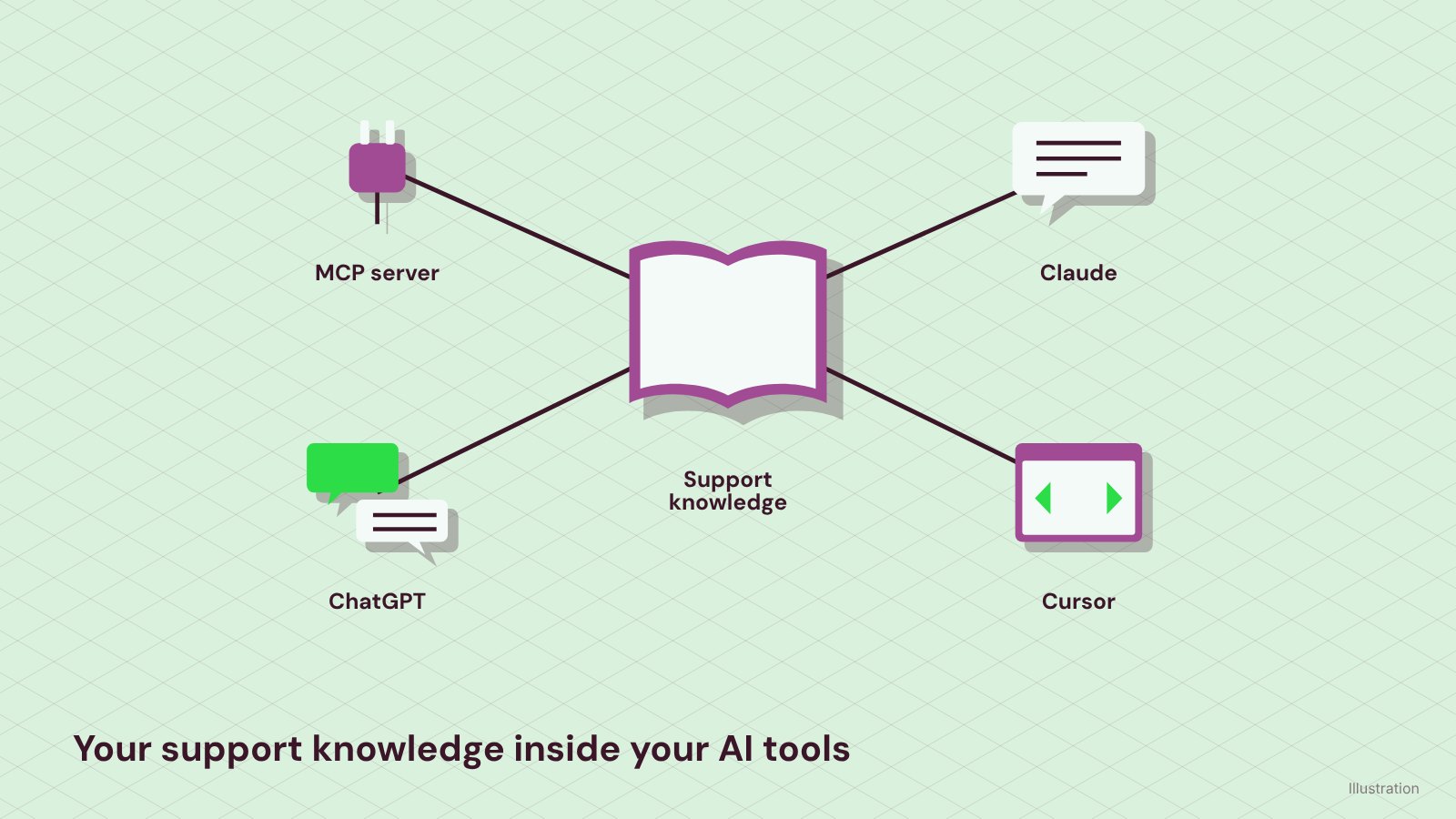
Your team already works in AI tools, and so do your customers. TicketResolve meets both where they are.
Here's a Tuesday morning for the support lead at a project-management software company, Jonas. He spends most of his day in Claude. His usual routine for planning the week's knowledge work:
- Open TicketResolve in a browser; export the knowledge-gap report as CSV.
- Paste it into Claude; ask which topics matter most.
- Ask Claude to draft an article for the top one.
- Copy the draft back into TicketResolve's knowledge base.
- Open TicketResolve's test tool to check how the AI would now answer a sample question.
Five steps, three copy-pastes, two tools. Meanwhile his customers are increasingly asking ChatGPT how to use his product, and ChatGPT answers from whatever it found on the web, including a forum post about a version from three years ago.
First, the basics
- MCP (Model Context Protocol) is a standard way for AI tools to use other software. An MCP server offers tools; an MCP client (Claude Desktop, Claude Code, ChatGPT, Cursor) uses them.
- A workspace API key identifies your TicketResolve workspace. Scopes decide what a key may do.
- A dry run shows what would happen without doing it: here, the answer TicketResolve would give, without posting anything.
- A knowledge gap is a topic customers ask about that your knowledge base doesn't cover well.
- The regression suite re-runs past tickets to check answers haven't got worse.
- A ChatGPT app is something users add to ChatGPT so it can use your service.
- Read-only means it can't change anything. Rate-limited caps how often it can be used.
Why does this matter? People work best in the tools they already use. Letting your team reach TicketResolve from their AI assistant, and your customers reach your support from ChatGPT, removes copy-paste for the team and wrong answers for customers, with the same knowledge and rules everywhere.
The problem, in plain terms
- Teams copy data between TicketResolve and AI assistants.
- AI assistants have no safe access to support data.
- Customers ask ChatGPT, which answers from the web.
- Each channel risks a different answer.
An MCP server for your team
TicketResolve is a Model Context Protocol server. Claude Desktop, Claude Code, ChatGPT, Cursor or any MCP client can connect with a workspace API key, and the key's scopes decide what the tool can do:
- read: search the knowledge base, list recent resolutions, read metrics, list knowledge gaps and known issues
- resolve: get the answer TicketResolve would give to a ticket, as a dry run. Nothing is posted, and nothing is logged as a ticket.
- kb: create a knowledge-base article
- write: run the regression suite
A support lead can ask their AI assistant "which knowledge gaps came up most this week?" and draft the missing article in the same conversation. An engineer in Cursor can check how TicketResolve would answer a question about the feature they just changed.
The MCP server is part of Growth Pro.
A ChatGPT app for your customers
Customers increasingly ask ChatGPT first. With the ChatGPT app, they can add your support to ChatGPT. It answers from your knowledge base and can open a ticket for them.
It's deliberately limited:
- read-only, with no account actions such as refunds or plan changes
- rate-limited
- your knowledge only
The ChatGPT app is available on all plans.
One knowledge base, everywhere
Whether a question arrives by e-mail, chat, phone, Slack, an MCP client or ChatGPT, it's answered from the same knowledge and the same confidence rules, with the same audit trail.
A worked example, start to finish
Here's Jonas's Tuesday, with the MCP server, and his customers with the ChatGPT app. The details are illustrative.
Setup, once. In Settings → API keys, Jonas creates a key with read and kb scopes, nothing else. On the MCP server card he copies the snippet for Claude Desktop, replaces YOUR_TR_AI_API_KEY with the key, and adds it to Claude.
Tuesday 09:00. In Claude, he asks: "Using TicketResolve, which knowledge gaps came up most this week?" Claude uses the read scope: the top gap is "recurring tasks in the mobile app", 37 tickets.
09:03. "Draft an article for that, using our existing articles on recurring tasks as a reference, and add it to the knowledge base." Claude searches the knowledge base (read), drafts the article, and creates it (kb). Jonas reviews it in TicketResolve and edits one step.
09:10. "How would TicketResolve answer: 'How do I make a task repeat every second Tuesday on my phone?'" This needs resolve, which his key doesn't have. Claude says so. He creates a second key with read and resolve, adds it, and asks again. The dry run returns the answer TicketResolve would give, now citing the new article. Nothing is posted; nothing is logged as a ticket.
One conversation, no exports, no copy-paste.
Same week, the ChatGPT app. Jonas turns on Business tools → ChatGPT app, copies the server URL, and adds it to ChatGPT in developer mode to test it. He asks: "Ask [brand] support how to set up recurring tasks on mobile." It answers from the knowledge base, including the new article.
A customer who has added the app asks: "Can you refund my last invoice?" The app is read-only: no account actions. It offers to open a ticket instead, and does when the customer agrees.
Both answers came from the same knowledge and confidence rules as e-mail and chat, with the same audit trail.
Five more real-world scenarios
1. An engineer in Cursor
Situation. An engineer changes how exports work and wants to know how support answers would change.
How TR handles it. With a resolve-scoped key, Cursor gets the dry-run answer TicketResolve would give.
2. Running the regression suite
Situation. After a knowledge-base update, a lead wants to check nothing got worse.
How TR handles it. A key with the write scope can run the regression suite from the assistant.
3. A key with too much access
Situation. Someone creates a key with every scope "just in case".
How TR handles it. The scopes decide what the tool can do; give only what's needed. "read" is enough for questions and analysis.
4. A customer asks for a plan change
Situation. In ChatGPT, a customer asks to upgrade.
How TR handles it. No account actions; the app can open a ticket.
5. A Starter plan
Situation. A Starter workspace wants the ChatGPT app.
How TR handles it. The ChatGPT app is available on all plans; the MCP server is part of Growth Pro.
Good questions to ask through MCP
Once connected, the assistant can combine TicketResolve's data with its own reasoning. Questions that work well:
- "Which knowledge gaps came up most this week, and which existing articles are closest?"
- "What are the open known issues, and which have the most tickets?"
- "How did our automation rate and review rate change this month?"
- "How would TicketResolve answer this customer question?" (needs resolve)
- "Draft an article for the top gap and add it to the knowledge base." (needs kb)
- "Run the regression suite and summarise anything that got worse." (needs write)
The assistant only sees what the key's scopes allow, and every action is recorded in the same audit trail as everything else.
Why the ChatGPT app is read-only
Customers can type anything into ChatGPT, and ChatGPT can't verify who they are the way your own app can. Keeping the app to answering from your knowledge and opening tickets means nobody can talk it into a refund, a plan change or someone else's account details. Anything that needs an action goes to a ticket, where your normal process handles it.
Before and after
Before. Exports, copy-paste between tools, and customers getting three-year-old answers from the web in ChatGPT.
After. A knowledge gap found, an article drafted and added, and a dry-run answer checked in one conversation; customers getting your current answers inside ChatGPT, read-only, with a ticket when they need one.
How to tell it's working
- Knowledge work happens in your team's AI assistant.
- Customers' ChatGPT answers match your knowledge base.
- Keys have only the scopes they need.
Who it's for
- Support leads and knowledge managers who work in AI assistants.
- Engineers who want to check support answers from their editor.
- Customers who ask ChatGPT first.
How it fits with the rest of TicketResolve
The MCP server and ChatGPT app use the same knowledge base, confidence rules and audit trail as every other channel. The regression suite and knowledge gaps are available through scopes.
Choosing scopes
Start small. read covers questions and analysis: searching the knowledge base, metrics, gaps and known issues. Add resolve when someone needs to test answers. Add kb for whoever writes articles. Keep write, which runs the regression suite, for the people who maintain answer quality. Separate keys for separate people make it easy to see who did what and to revoke one without affecting the others.
Mistakes to avoid
- Creating keys with every scope.
- Publishing articles drafted by an assistant without reviewing them.
- Expecting the ChatGPT app to take account actions.
Do it in TicketResolve, step by step
Where: Settings → API keys (/dashboard/settings) for MCP; Business tools → ChatGPT app (/dashboard/business). You'll need: Growth Pro for the MCP server; any plan for the ChatGPT app. Full guides: MCP server: use TR-AI from Claude, ChatGPT and Cursor and Your support answers inside ChatGPT.
- Create an API key with only the scopes the assistant needs.
- Add the server to your assistant: copy the snippet from the MCP server card and replace the key placeholder.
- Ask: for example, which topics to write articles for first.
- Turn on the ChatGPT app under Business tools and copy the server URL.
- Add it to ChatGPT (Settings → Apps & Connectors → Create, developer mode).
- Test it with a question about your product.
- Publish it through OpenAI's app directory when your account has access.
How to check it worked: your assistant returns TicketResolve data within the key's scopes, and ChatGPT answers from your knowledge base.
Frequently asked questions
Which AI tools can connect? Claude Desktop, Claude Code, ChatGPT, Cursor or any MCP client.
What decides what a tool can do? The API key's scopes: read, resolve, kb and write.
Does "resolve" post an answer? No. It's a dry run; nothing is posted or logged as a ticket.
Which plan includes the MCP server? Growth Pro.
Which plans include the ChatGPT app? All plans.
Can the ChatGPT app refund or change plans? No. It's read-only with no account actions.
Can it open a ticket? Yes.
Are answers the same as other channels? Yes. Same knowledge, confidence rules and audit trail.
Is MCP activity audited? Yes. It's recorded in the same audit trail as everything else.
Why can't the ChatGPT app take account actions? ChatGPT can't verify a customer's identity the way your own app can, so actions go to a ticket instead.
Explore Topics
Written by
Ghulam Shabbir
Content creator and writer sharing insights and stories.