
Same Problem, Different Words
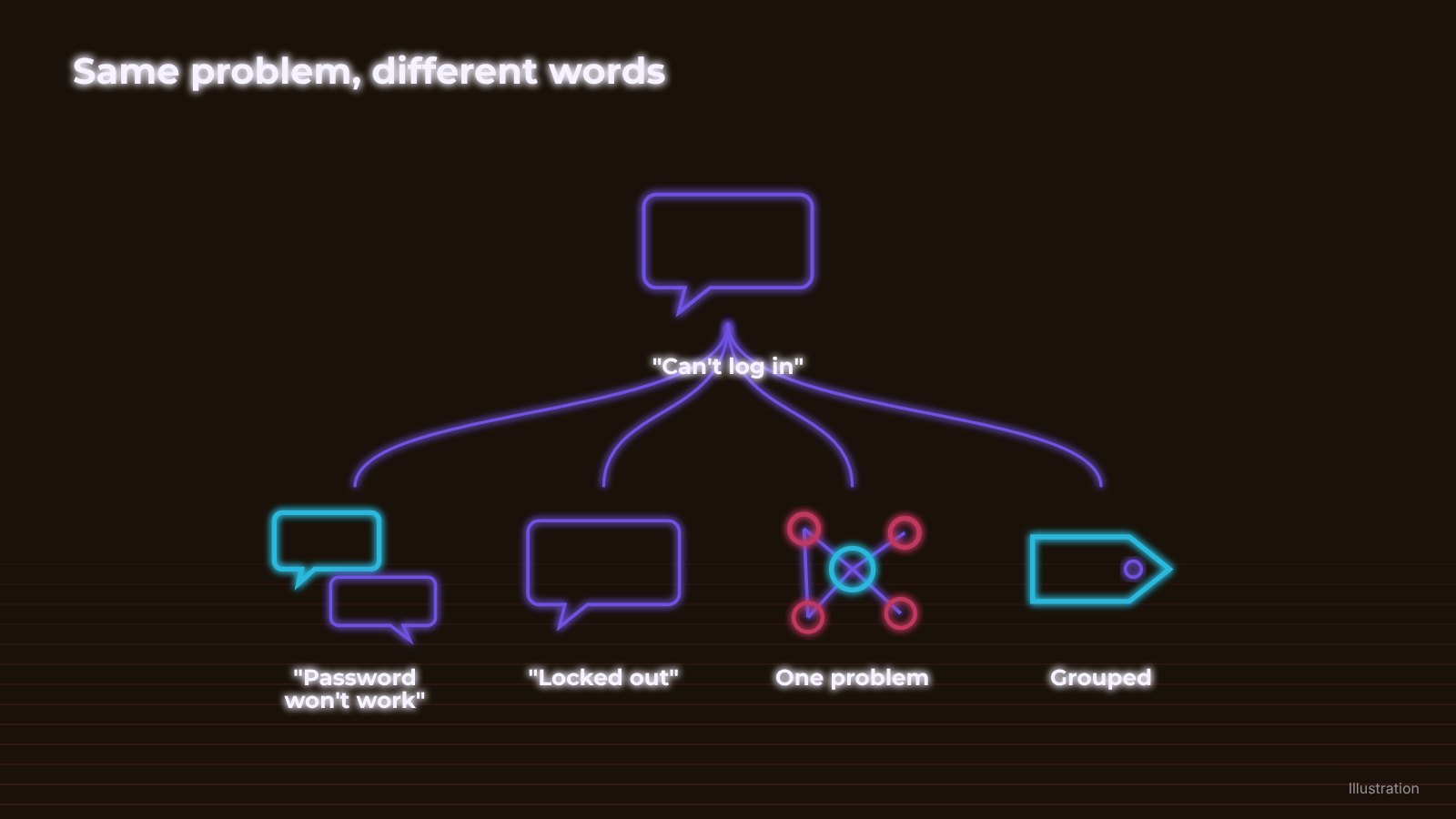
“Our reports page dies when I click download” and “CSV never arrives, the spinner just keeps going” share no words, but both browsers recorded the same 500 and the same timeout. TicketResolve recognises a recurring technical issue when customers describe it differently, connects it to how it was resolved the first time, and refuses to link tickets that only sound alike.
Two tickets, a month apart, from two different customers:
"Our reports page dies when I click download."
"CSV never arrives, the spinner just keeps going."
Nothing in the wording connects them. But both browsers recorded POST /api/exports/:id → 500, followed by the same TimeoutError: export job exceeded 30s. The first ticket was closed with a workaround: export smaller date ranges.
That's not two problems. It's one problem that came back, and the workaround didn't hold.
Here's how the second ticket went at the analytics software company that received it. The agent, Lucy, searched the help desk for "CSV spinner". Nothing useful. She searched "export not working" and got 60 tickets, most unrelated. She escalated to engineering, who spent a morning reproducing it, found the timeout, and then, by chance, someone remembered the first ticket and its workaround. By then the second customer had been waiting two days, and a third had written in with "download button broken on big reports".
First, the basics
- A recurring issue is the same underlying problem coming back, perhaps for a different customer, in different words.
- Technical signals are the facts a ticket carries: error messages and codes, the endpoint and status that failed, linked engineering and known issues, the confirmed root cause, the version and platform.
- An endpoint is a specific API address, such as
POST /api/exports/:id. A status like 500 or 403 says how it failed. - Wording similarity is how alike two tickets read.
- A workaround avoids a problem without fixing it. An engineering fix is meant to remove it.
- A regression is a problem that comes back after it was fixed.
- A known issue is a recorded problem affecting several customers.
- A confidence score says how strongly the evidence supports a link.
Why does this matter? Customers describe the same failure in many ways. If tickets are matched on wording, real recurrences are missed and unrelated ones are merged. Matching on technical evidence finds the problem behind the words, and its history.
The problem, in plain terms
- Search finds words, not problems.
- Recurrences look new, so they're investigated from scratch.
- Look-alike tickets get merged wrongly.
- Workarounds that fail aren't noticed.
- Regressions after a fix aren't recognised.
Evidence first, wording second
TicketResolve compares each ticket's technical signals with your other tickets:
- error messages and codes;
- the endpoint and status that failed;
- the engineering issue and the known issue it's linked to;
- the confirmed root cause;
- the version and platform.
Wording similarity counts only as support. It never links two tickets on its own.
That matters in the other direction too. Say two customers write "Export fails" in almost identical words, but one gets a 500 and the other a 403. They aren't the same problem. Those tickets are recorded as keep separate, so nobody merges them by mistake.
A link that explains itself
Every relationship shows:
- what the tickets share and how much each signal counts;
- how similar the wording is;
- a confidence score and any conflicting evidence.
It also names the kind of relationship:
- same customer or a different one;
- a different product version;
- after a deployment;
- after a workaround;
- after an engineering fix. A same-issue recurrence after a fix is a potential regression.
When the same engineering issue sits behind two tickets that look nothing alike, it's labelled same root cause, different symptoms.
People decide
Relationships start as suggestions, each with the actions that fit:
- link the tickets;
- update the known issue;
- reopen the engineering issue, or open one for a regression;
- add a regression test;
- reproduce it to confirm;
- review the workaround;
- tell support and engineering when several customers are hit.
When you confirm a link, the original ticket's outcome becomes recurring, and the earlier outcome stays in its history. Nothing is merged, no customer is emailed and no engineering status changes on its own.
A worked example, start to finish
Here's the second ticket at the same company, with recurring-issue detection. The details are illustrative.
Day 1, 10:00. Ticket #2 arrives: "CSV never arrives, the spinner just keeps going." The customer's browser diagnostics, sent through TicketResolve Connect, record POST /api/exports/:id → 500 and TimeoutError: export job exceeded 30s.
10:01, a suggested relationship. In Resolution intelligence → Assurance, under Recurring issues, a suggestion links ticket #2 to ticket #1 from last month:
- Shared signals: the same endpoint and status (
POST /api/exports/:id → 500), counted highly; the same error message (TimeoutError: export job exceeded 30s), counted highly; the same product version. - Wording similarity: low. Shown, but it didn't decide anything.
- Confidence: high. Conflicting evidence: none.
- Kind: different customer, after a workaround. Ticket #1 was closed with export smaller date ranges.
Actions suggested: link the tickets; review the workaround; update the known issue; open an engineering issue; add a regression test.
10:10. Lucy confirms the link. Ticket #1's outcome becomes recurring; its earlier outcome, workaround applied, stays in its history. She replies to customer #2 with the workaround while engineering looks: "Exporting a shorter date range works while we fix this; we'll update you."
10:15, a look-alike kept apart. A third ticket, "Export fails", reads almost the same as a fourth ticket, "Export fails for me too". But one recorded a 500 and the other a 403 (a permissions error). They're recorded as keep separate.
10:20, same root cause, different symptoms. Another ticket, "Download button broken on big reports", has no error captured, but it's linked to the same engineering issue Lucy opened at 10:12. It's labelled same root cause, different symptoms.
Week 2. Engineering raises the export timeout and moves large exports to a background job. The fix is verified; a regression test is added.
Week 6. A customer writes: "export spinner forever again." Same endpoint, same timeout, after the engineering fix. The suggestion is labelled a potential regression, with reopen the engineering issue among its actions. Nothing reopens on its own; Lucy confirms, and engineering finds a new code path that skipped the background job.
Five more real-world scenarios
1. Same words, different problem
Situation. Two "Login broken" tickets: one an SSO error, one a wrong password.
How TR handles it. Different error signals: keep separate.
2. Same customer again
Situation. The same customer reports the same timeout two weeks later.
How TR handles it. It's labelled same customer, so you know the workaround didn't last for them.
3. After a deployment
Situation. A failure appears for several customers right after a release.
How TR handles it. The relationship is labelled after a deployment.
4. Several customers hit
Situation. Five customers report the same signal in a day.
How TR handles it. One suggested action is to tell support and engineering.
5. Confirming doesn't email anyone
Situation. An agent confirms a link.
How TR handles it. Nothing is merged, no customer is emailed and no engineering status changes on its own.
How to review a suggested link
A suggestion is only as good as the review it gets. Before you confirm one, take a minute over these questions:
- Which signals carry it? A shared endpoint, status and error message is strong. A shared product version alone is weak; lots of unrelated tickets share a version.
- Is there conflicting evidence? If one ticket has a 500 and the other a 403, or the error appears on a different platform, the link may be wrong. Conflicts are listed for that reason.
- What kind of relationship is it? "After a workaround" means the workaround needs reviewing. "After an engineering fix" means a potential regression and probably an engineering issue to reopen. "Same root cause, different symptoms" means your known issue may need a wider description.
- Does the wording matter here? Low wording similarity with strong technical signals is normal; customers describe the same failure in many ways. High wording similarity with weak signals is the case to be careful about.
- What should happen next? Pick the actions that fit, from updating the known issue to adding a regression test.
If the answer to the first two is uncertain, reproduce it to confirm before linking.
Before and after
Before. Searches for "CSV spinner" and "export not working", a morning reproducing a known problem, a workaround nobody knew had failed, and a third customer already writing in.
After. A link to last month's ticket on shared technical signals, the workaround flagged as not holding, a look-alike kept separate, a different symptom tied to the same root cause, and a potential regression recognised six weeks later.
How to tell it's working
- Recurrences are linked within minutes, not found by chance.
- Workarounds that don't hold are reviewed.
- Wrong merges stop: keep-separate decisions are recorded.
- Regressions are recognised as regressions.
Who it's for
- Support agents handling technical tickets.
- Support leads tracking recurring problems.
- Engineering receiving regressions with evidence.
How it fits with the rest of TicketResolve
Recurring-issue detection is part of Resolution Assurance. It uses Connect diagnostics, known issues, engineering issues and fix verification, and confirmed links update ticket outcomes.
Mistakes to avoid
- Merging tickets on wording alone.
- Ignoring "after a workaround" links. They mean the workaround didn't hold.
- Closing a potential regression without reopening the engineering issue.
Do it in TicketResolve, step by step
Where: Resolution intelligence → Assurance (/dashboard/resolution-intelligence), the Recurring issues filter. You'll need: Resolution Assurance; technical signals from diagnostics, monitoring or engineering links. Full guide: Recurring issues and regressions.
- Open Assurance and filter by Recurring issues.
- Open a suggestion. Read what the tickets share, how much each signal counts, the wording similarity, confidence and conflicts.
- Check the kind: same or different customer, version, after a deployment, a workaround or a fix.
- Confirm the link, or record keep separate.
- Take the actions that fit: update the known issue, reopen or open an engineering issue, add a regression test, reproduce, review the workaround.
- Tell support and engineering when several customers are hit.
How to check it worked: the original ticket's outcome shows recurring, with its earlier outcome in the history.
Read the guide: Recurring issues and regressions.
Frequently asked questions
Can similar wording link two tickets? No. It counts only as support, never on its own.
What signals are compared? Error messages and codes, endpoint and status, linked engineering and known issues, confirmed root cause, version and platform.
What happens to look-alikes? They're recorded as keep separate.
What's a potential regression? A same-issue recurrence after an engineering fix.
What does "same root cause, different symptoms" mean? The same engineering issue sits behind tickets that look nothing alike.
Does confirming merge tickets? No. Nothing is merged.
Does it email customers? No.
Does it change engineering status? No. People decide.
Which signals are strongest? A shared endpoint and status with the same error message. A shared version alone is weak.
What should I do if I'm not sure? Reproduce it to confirm before linking.
Explore Topics
Written by
Ghulam Shabbir
Content creator and writer sharing insights and stories.