
Confirmed, Strongly Supported, Weak or Unknown: Being Honest About Root Causes
Automated root-cause analysis loses engineers the first time a precise-looking “87% likely” turns out wrong. TR Investigate sorts causes into confirmed, strongly supported, weak and unknown, lets only people confirm, turns “unknown” into a to-do list, and shows patterns across investigations.
Automated root-cause analysis has a credibility problem. Tools present a single cause with a precise-looking percentage, engineers find it's wrong once, and from then on nobody reads the report.
The fix isn't better guessing. It's being explicit about how sure you are.
Here's how that credibility gets lost, at a company that sells a fleet-tracking platform. An earlier tool they tried produced reports like:
Root cause: database connection pool exhaustion (87% confidence).
- The first time, the on-call engineer, Leon, spent two hours on the connection pool. The real cause was a third-party map provider timing out.
- The second time, another "86% confidence" report pointed at a release. It was right, but Leon didn't believe it and checked everything else first.
- By the third, nobody opened the reports.
The tool wasn't always wrong. It just never said how it knew, or what it didn't know, so one mistake taught everyone to ignore it.
First, the basics
- A root cause is the underlying reason a problem happened.
- A possible cause is a hypothesis with evidence for and against it.
- Confirmed means a person on your team confirmed it.
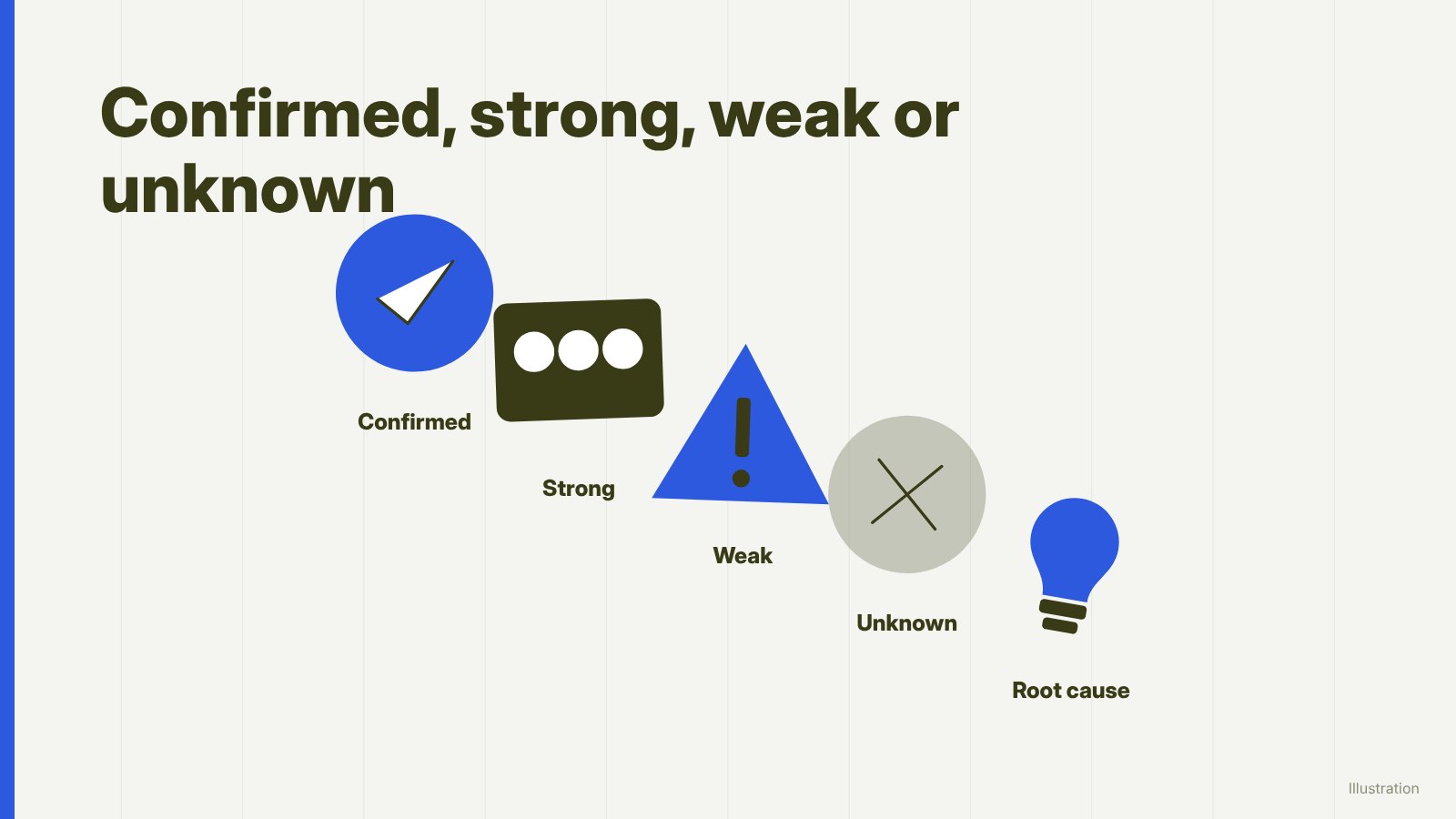
- Strongly supported means strong evidence (direct links, timing, a matching release) but not confirmed.
- Weak means some evidence, moderate or low.
- Unknown means not enough evidence, with what's missing.
- Ruled out means a person decided it wasn't the cause.
- The Root cause explorer shows causes across investigations, by certainty and kind.
Why does this matter? Engineers trust tools that are honest about uncertainty. Saying plainly what's confirmed, what's only supported, and what's unknown (and what would make it known) keeps reports useful even when the evidence is thin, and patterns across investigations show where to invest.
The problem, in plain terms
- A single cause with a precise percentage looks certain.
- One wrong report destroys trust.
- "We don't know" is hidden instead of explained.
- Each investigation is read on its own; patterns are missed.
- Investigations start late, after evidence has faded.
Four classes
| Class | Meaning |
|---|---|
| Confirmed | A person on your team confirmed it |
| Strongly supported | Strong evidence (direct links, timing, matching release) but not confirmed |
| Weak | Some evidence, moderate or low |
| Unknown | Not enough evidence, with what's missing |
Only people confirm. The engine can say "the evidence strongly supports release 2.6.0", but it never promotes its own finding to confirmed.
Make "unknown" useful
"Unknown" is not a failure; it's a to-do list. "No traces for billing-api", "no deployment events from your CI/CD", "the ticket has no request id" each tell someone exactly what to connect or ask for next time.
Look across investigations
One investigation is a story; fifty are a pattern. Count possible causes by kind (deployment regression, application error, API failure, dependency, performance, synthetic failure) and how many were confirmed, strongly supported, weak or ruled out. If deployment regressions keep being confirmed, invest in release checks. If "dependency" keeps being ruled out, stop chasing it first.
Start investigations automatically, carefully
Technical tickets (bugs, outages, performance, integration and data problems) at a severity you choose can open an investigation on their own. That gathers evidence while it's fresh. It doesn't send anything to customers, change anything or call an AI model.
A worked example, start to finish
Here's the fleet-tracking team, with TR Investigate's certainty classes. The details are illustrative.
Setup. The team turns on automatic investigation in TR Investigate → Integrations for technical tickets at high severity.
Wednesday 08:20. A high-severity ticket: "Vehicle positions frozen for 10 minutes." An investigation opens automatically, gathering evidence while it's fresh. Nothing is sent to customers; nothing is changed.
The possible causes.
- Map provider timeouts: strongly supported. Timeouts to the provider started at 08:09, matching the first frozen positions; errors on the map-tiles service; no matching release.
- Release 4.8.1: weak. It went out at 07:50; but it touched billing, not tracking.
- Database connection pool: unknown. Missing: no metrics from the database; connect Prometheus for db pool usage.
08:35. Leon reads the report. No precise percentage, but the evidence is clear. He checks the provider's status page: degraded in Europe. He confirms the cause. Only now does it show as confirmed. The release is ruled out.
Afterwards, the to-do list. The "unknown" on the connection pool tells the team exactly what to connect: database metrics. They connect Prometheus that week.
Two months later, the Root cause explorer. Across fifty investigations:
- Dependency (mostly the map provider): confirmed many times.
- Deployment regression: confirmed a few times, ruled out often.
- Performance: mostly weak.
The team invests in a fallback map provider rather than more release checks. And Leon reads every report, because they've never pretended to be surer than the evidence.
Five more real-world scenarios
1. Strong evidence, no confirmation
Situation. Everything points at a release, but nobody's confirmed it.
How TR handles it. Strongly supported, never confirmed by the engine.
2. Missing request IDs
Situation. Tickets rarely include a request ID.
How TR handles it. "Unknown" says so; ask for it in your diagnostics form.
3. A cause ruled out repeatedly
Situation. "Dependency" keeps being ruled out.
How TR handles it. The explorer shows it; stop chasing it first.
4. Low-severity tickets
Situation. You don't want investigations for every minor bug.
How TR handles it. Choose the severity at which investigations open automatically.
5. Worried about automatic actions
Situation. Someone asks whether automatic investigations change things.
How TR handles it. They don't send anything to customers, change anything or call an AI model.
Before and after
Before. "87% confidence" reports, two hours on the wrong cause, a right report ignored, and nobody reading them by the third.
After. A strongly supported cause with its evidence, a weak release clearly marked, an unknown that became a to-do list, a cause confirmed by a person, and patterns that changed where the team invested.
How to tell it's working
- Engineers read the reports.
- "Unknown" items get connected or asked for.
- Investment follows what's confirmed, not what's suspected.
Who it's for
- On-call engineers and SREs.
- Support engineers running investigations.
- Engineering leaders deciding where to invest.
How it fits with the rest of TicketResolve
Certainty classes run through every TR Investigate investigation, the unified timeline, the knowledge graph and the engineering package. The Root cause explorer shows them across investigations, and Technical intelligence measures root-cause accuracy against confirmed causes.
Why no percentages
A precise percentage implies a precision the evidence rarely has. "87%" sounds measured; it's usually a model's guess. Four plain classes, each defined by what kind of evidence exists, are easier to read and harder to over-trust. And because only people confirm, "confirmed" always means the same thing: someone who knows your system checked.
Turning "unknown" into better investigations
Every "unknown" names something missing: traces for a service, deployment events, a request ID, metrics for a database. Collect them from a month of investigations and you have a prioritised list of what to connect. Fix the most common gap first; the next month, fewer causes will be unknown, and more will be strongly supported or confirmed.
Reading a report in the first five minutes
A report with four classes reads differently from one with a single answer. A short routine helps.
- Look for anything confirmed. If a cause is confirmed, someone already checked; start from there.
- Then read strongly supported causes and their evidence. Check the one thing that would confirm or rule each out: a status page, a release diff, a log line.
- Skim weak causes. Keep them in mind, but don't start with them unless nothing stronger fits.
- Read every "unknown". If one says "no traces for billing-api" and billing is involved, that gap may be hiding the answer. Ask for the missing evidence now, not next time.
- Record what you decide. Confirm or rule out on the Findings tab, so the report, the timeline and the explorer all reflect it.
Using the explorer in a quarterly review
Once a quarter, open the Root cause explorer with engineering and support leads. Look at three things. Which kinds of cause are confirmed most often? That's where prevention pays. Which kinds are ruled out most often? That's where investigations waste time. And which investigations ended mostly unknown? That's where you're missing evidence. Each answer becomes one concrete action for the next quarter: a release check, a dropped assumption, or a tool to connect.
When evidence conflicts
Sometimes a strongly supported cause and a weak one point in different directions, or the timing of a release doesn't line up with when errors started. Don't resolve it by picking the more convenient story. Write down what would distinguish them, check that, and only then confirm one and rule out the other. The report keeps both visible until you do.
Mistakes to avoid
- Treating strongly supported as confirmed.
- Ignoring "unknown" instead of acting on it.
- Reading one investigation when the pattern is in fifty.
Do it in TicketResolve, step by step
Where: TR Investigate (/dashboard/investigate); Root cause explorer (/dashboard/root-causes); automatic investigation in TR Investigate → Integrations. You'll need: monitoring and CI/CD connected for stronger evidence. Full guides: TR Investigate reliability and TR Investigate: from a ticket to a verified fix.
- Turn on automatic investigation for technical tickets at your chosen severity.
- Open an investigation and read each possible cause's class.
- Read "unknown" items and what's missing.
- Confirm or rule out causes on the Findings tab when you're sure.
- Connect what "unknown" asks for.
- Open the Root cause explorer to see causes by kind and class.
- Invest where causes are repeatedly confirmed.
How to check it worked: causes show one of four classes, and only those confirmed by a person show as confirmed.
Frequently asked questions
What are the four classes? Confirmed, strongly supported, weak and unknown.
Who confirms a cause? Only a person on your team.
Can the engine confirm its own finding? No. It can say "strongly supported", never confirmed.
What does "unknown" tell me? What's missing, such as traces, deployment events or a request ID.
What does the Root cause explorer show? Causes across investigations by kind, and how many were confirmed, strongly supported, weak or ruled out.
Can investigations start automatically? Yes, for technical tickets at a severity you choose.
Do automatic investigations change anything? No. They don't message customers, change anything or call an AI model.
Why no percentages? Four evidence-based classes are clearer and harder to over-trust.
What if two causes seem equally likely? Both stay visible with their evidence until a person confirms one and rules out the other.
Where do I turn on automatic investigation? In TR Investigate → Integrations, choosing the severity at which technical tickets open one.
Explore Topics
Written by
Ghulam Shabbir
Content creator and writer sharing insights and stories.