
Industry Starter Packs: A Sensible First Configuration for Ecommerce, SaaS, Fintech, Travel and IT
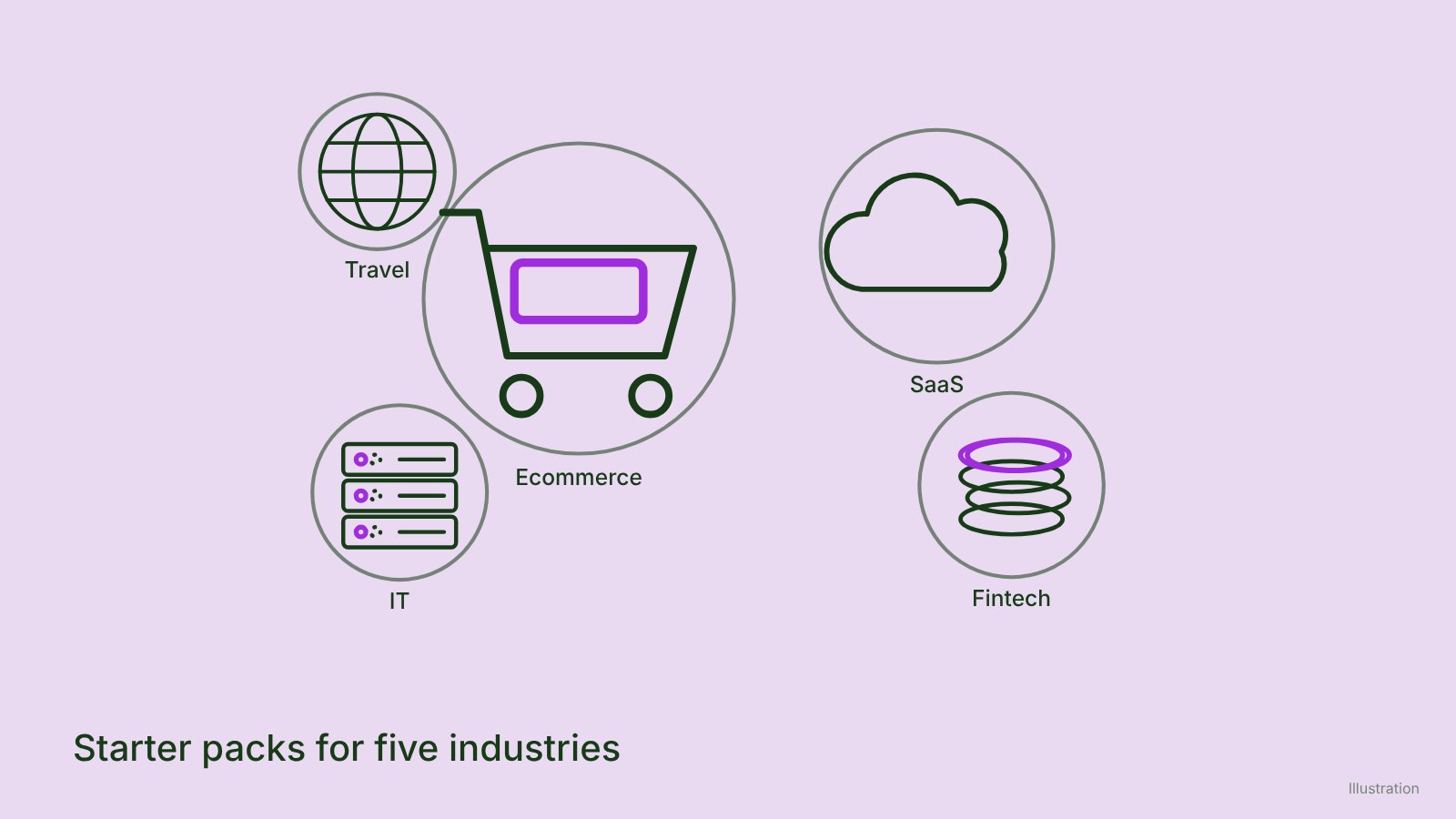
The hardest part of setting up AI support is often the blank page: which escalation rules, which triage intents, what should the bot never do on its own? Industry starter packs give ecommerce, SaaS, fintech, travel and IT helpdesk teams a sensible first configuration, with every procedure off until someone reviews it.
The hardest part of setting up AI support is often the blank page. Which escalation rules make sense? What intents should triage look for? What should the bot never do on its own?
Here's how that blank page looks for a new customer, a 20-person support team at an online furniture retailer, on day one of their TicketResolve trial:
- Escalation rules: none. Should "damaged on delivery" go to a person? Probably. What about "where is my order"? Probably not.
- Triage intents: none. Their tickets are mostly orders, deliveries, returns, assembly and refunds, but the workspace doesn't know that.
- Procedures: none. Should the AI be able to start a return? Issue a refund? Change a delivery date?
- Brand voice: the default.
The team lead spends two days in a spreadsheet writing rules from scratch, borrowing ideas from forum posts. She gets most of it right, but misses that "item arrived broken" and "wrong colour delivered" need a person, because they often lead to refunds.
Industry starter packs give you a reasonable first answer for your kind of business. You keep what fits and change the rest.
First, the basics
- A starter pack (industry template) is a set of settings installed in one go, designed for one industry.
- A procedure is a step-by-step workflow the AI can follow, which may take actions such as starting a return.
- An escalation rule sends certain tickets to a person.
- Triage classifies tickets; intents are the categories it looks for (refund request, delivery question…).
- Brand voice is the tone of the AI's replies.
- Internal-helpdesk mode is for supporting your own employees rather than customers.
- Additive means it only adds; nothing existing is changed or removed.
Why does this matter? Starting from a blank configuration is slow and easy to get wrong. Starting from a sensible default for your industry, where anything that can act is off until reviewed, gets a team live faster and safer.
The problem, in plain terms
- A blank workspace means writing every rule from scratch.
- Industry-specific risks (refunds, disputes, cancellations) are easy to miss.
- Procedures that act are dangerous if switched on unreviewed.
- Installing templates on a live workspace feels risky.
Five packs
- Ecommerce: orders, returns, delivery and refunds
- SaaS: accounts, billing, bugs and integrations
- Fintech: payments, disputes, and more cautious escalation
- Travel: bookings, changes and cancellations
- IT helpdesk: for supporting your own employees instead of customers
What a pack installs
- Procedures for common requests. These are always off until an admin has reviewed and enabled them, because a procedure can take actions.
- Escalation rules for the tickets that should always reach a person in that industry.
- Smart-triage intents, so tickets are classified the way your industry thinks about them.
- Brand-voice defaults as a starting tone.
Safe to install
Installing a pack only adds things:
- Items whose name already exists are skipped.
- The brand voice is only set if you haven't changed it from the default.
- Nothing you already have is changed or removed.
You can install a pack on a workspace that's already live.
The IT helpdesk pack also switches the workspace to internal-helpdesk mode. You set your employees' e-mail domains separately.
A worked example, start to finish
Here's the furniture retailer's day one, with the Ecommerce pack. The details are illustrative.
09:00. The team lead, Rosa, opens Trust & controls → Industry templates and installs Ecommerce.
09:01, what was added.
- Escalation rules for the tickets an online shop should always route to a person. She checks each against their own policy.
- Smart-triage intents for orders, deliveries, returns and refunds, so tickets are classified the way an online shop thinks about them.
- Procedures for common requests such as starting a return, all off.
- Brand voice: set, because hers was still the default.
09:05. She already had one escalation rule she'd written the day before, "Damaged item". The pack's rule with the same name was skipped; hers is unchanged.
09:30, reviewing procedures. She opens the returns procedure and reads each step. She changes the return window to their own 60 days, then enables it. She leaves the refund procedure off: their policy is that a person approves refunds.
10:00, brand voice. She adjusts the tone to match their website: warm, brief, no exclamation marks.
Day 2. Tickets are triaged into the pack's intents. "The sofa arrived with a torn cushion" is classified and escalated to a person, under an escalation rule she checked on day one. "When will my table arrive?" gets an answer from order tracking.
Two days of spreadsheet work became a morning of review, and the tickets that needed a person reached one from the first day.
A different company, IT helpdesk. An IT team installs the IT helpdesk pack. It switches the workspace to internal-helpdesk mode. They set their employees' e-mail domains separately, so only staff tickets are accepted.
Five more real-world scenarios
1. A live workspace
Situation. A SaaS team has run TicketResolve for a year and wants the SaaS pack's intents.
How TR handles it. Installing only adds; existing items with the same name are skipped, and nothing is changed or removed.
2. A customised brand voice
Situation. A team already wrote its own brand voice.
How TR handles it. The pack doesn't change it; it's only set if still the default.
3. A procedure that refunds
Situation. A fintech pack procedure can take a payment action.
How TR handles it. It's off until an admin reviews and enables it.
4. A travel company
Situation. Most tickets are changes and cancellations.
How TR handles it. The Travel pack's triage intents and escalation rules fit bookings, changes and cancellations.
5. Supporting employees
Situation. An IT team supports staff, not customers.
How TR handles it. The IT helpdesk pack switches to internal-helpdesk mode; you set employee e-mail domains.
What makes each industry different
The packs differ because the risks differ:
- Ecommerce is high volume and mostly routine (where is my order, how do I return this), with a smaller set of tickets that involve money or damaged goods. The pack leans on triage to separate the two.
- SaaS tickets mix account and billing questions with bugs and integration problems that often need engineering. Triage intents reflect that split.
- Fintech is where a wrong automated answer costs the most: payments and disputes involve money and regulation. Its escalation is more cautious by design.
- Travel is dominated by changes and cancellations, often time-sensitive, where a slow or wrong answer can mean a missed trip.
- IT helpdesk supports employees, not customers: passwords, access, devices and software requests, with internal-helpdesk mode switched on.
Picking the closest pack and editing it is almost always faster than starting from nothing, even if your business sits between two industries.
Before and after
Before. Two days in a spreadsheet writing rules from scratch, and tickets that needed a person missed.
After. A pack installed in a minute, an existing rule left untouched, procedures reviewed and enabled one by one, and tickets that needed a person reaching one from day one.
How to tell it's working
- Escalation rules catch the tickets that matter in your industry.
- Procedures are enabled deliberately, one by one.
- Triage intents match how your team talks about tickets.
Keeping it yours
A pack is a starting point, not a dependency. Once installed, its rules, intents and procedures are ordinary settings in your workspace. Edit them, switch them off or delete them like anything you created yourself. Installing a pack again later only adds items whose names don't already exist, so your edits stay as they are.
Who it's for
- New TicketResolve workspaces in ecommerce, SaaS, fintech, travel or IT.
- Existing workspaces that want a sensible baseline.
- IT teams setting up an internal helpdesk.
How it fits with the rest of TicketResolve
Packs install procedures, escalation rules, smart-triage intents and a brand voice you can then edit as normal. The IT helpdesk pack turns on internal-helpdesk mode.
What to review first after installing
Not everything in a pack needs the same attention. A useful order:
- Escalation rules, because they decide which tickets reach people. Check each against your own policy.
- Procedures, one at a time, before enabling. Read each step and change values such as return windows or limits to match yours.
- Triage intents, after a few days of real tickets, to see whether they match how your customers write.
- Brand voice, last, because tone is easy to adjust once everything else is right.
Mistakes to avoid
- Enabling every procedure at once. Review each first.
- Leaving pack defaults where your policy differs, such as return windows.
- Forgetting employee domains in the IT helpdesk pack.
Do it in TicketResolve, step by step
Where: Trust & controls → Industry templates (/dashboard/trust). You'll need: admin access. Full guide: Industry templates.
- Open Industry templates.
- Choose your pack: Ecommerce, SaaS, Fintech, Travel or IT helpdesk.
- Install it. It only adds; items with existing names are skipped.
- Review escalation rules against your policy.
- Review each procedure and enable the ones you want. They start off.
- Check triage intents after real tickets arrive.
- Adjust the brand voice.
- For IT helpdesk, set your employees' e-mail domains.
How to check it worked: escalation rules, intents and procedures appear in their usual settings, with procedures off until enabled.
Frequently asked questions
Which industries have packs? Ecommerce, SaaS, Fintech, Travel and IT helpdesk.
What does a pack install? Procedures, escalation rules, smart-triage intents and brand-voice defaults.
Are procedures switched on? No. They're off until an admin reviews and enables them.
Will a pack overwrite my settings? No. It only adds; items with existing names are skipped.
Will it change my brand voice? Only if you haven't changed it from the default.
Can I install on a live workspace? Yes.
What does the IT helpdesk pack do differently? It switches the workspace to internal-helpdesk mode.
Can I edit what's installed? Yes. Keep what fits and change the rest.
What if my business sits between two industries? Pick the closest pack and edit it; you can also install a second pack, since installing only adds.
Why is the Fintech pack more cautious? Payments and disputes involve money and regulation, where a wrong automated answer costs the most.
Is a pack a dependency I have to keep? No. Once installed, everything is ordinary settings you can edit, switch off or delete.
What happens if I install the same pack twice? Only items whose names don't already exist are added; your edits stay.
Do packs change escalation for existing tickets? New rules apply to tickets from then on, alongside your existing rules.
Explore Topics
Written by
Ghulam Shabbir
Content creator and writer sharing insights and stories.