
The Fallback Nobody Tested: Verified Continuity for Business Services
Every continuity plan has a line like “If the payment provider is down, we take orders by phone.” What it rarely says is when anyone last tried it. Business Operations Intelligence now records what keeps each business service going when a provider fails, counts a fallback only after a test confirmed by a second person, and simulates outages across your SaaS stack.
The continuity plan for an online furniture retailer runs to 34 pages. Page 12 says: "If Stripe is unavailable, orders will be taken by phone and charged manually once service resumes." It was written two years ago, approved by the board, and filed.
Then one Friday afternoon Stripe has a regional incident. The operations team opens page 12. Who answers the phones? The sales team, who now work remotely and don't have the order system's phone module. Where do card details go? Not into a spreadsheet, the security team says firmly. How many orders can people realistically take by hand in an hour? Nobody knows. The "fallback" exists on paper and nowhere else.
The outage lasts 47 minutes. The phone fallback never works.
First, the basics
- Business continuity means keeping the business running when something it depends on fails.
- A dependency is something a service needs, such as the payment provider behind Checkout.
- A fallback is the plan B: a second provider, a standby system, a manual workaround like taking orders by phone, or a reduced "degraded" mode.
- RTO is how quickly a service must be back. RPO is how much data you can afford to lose. Maximum tolerable downtime is the point after which the damage becomes serious.
- A tabletop exercise is a meeting where people talk through a scenario. A controlled test actually tries the fallback.
- A simulation works out on paper what would happen in an outage, without switching anything off.
Why does this matter? Many continuity plans have never been tried. When the real outage comes, the untested plan B often fails. Only a recorded, confirmed test tells you whether a fallback really works.
The problem, in plain terms
Continuity plans fail in predictable ways:
- Fallbacks are written, never tested. A plan describes what should happen. Only a test shows what does.
- Readiness is a feeling. "We're covered for a CRM outage" is said with confidence, but nobody can list the gaps behind it.
- Tabletop exercises are mistaken for tests. Talking through a scenario is valuable, but it doesn't prove the fallback works.
- Scenarios aren't joined up. If your identity provider goes down, so do the fallback tools people would log into. Plans that consider one failure at a time miss this.
A fallback is untested until it's been tested
On the Continuity tab, you record what keeps each business service running when one of its dependencies fails. That can be:
- an alternative system, such as a second payment provider;
- a failover, such as a standby database;
- a manual workaround, such as phone orders;
- a degraded mode, such as read-only browsing.
Each one has its procedure, its owner, how fully its data is replicated, and how long it's expected to take.
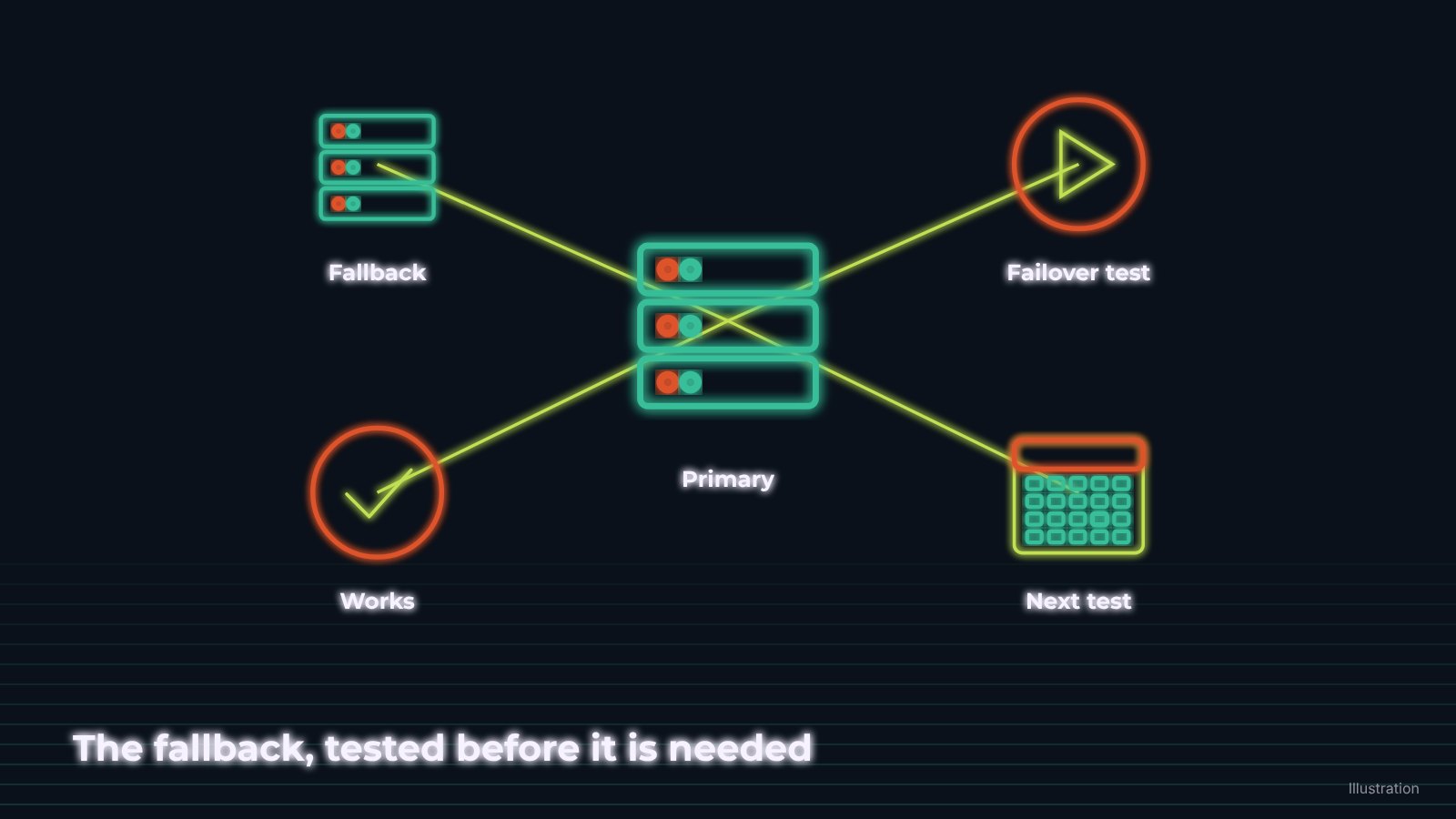
Then it stays untested. It changes only when someone records a controlled test or a real outage, with how long recovery took and what data was lost, and a second person confirms it.
- A tabletop walk-through is kept on record, but never counts as a test.
- If a fallback's latest confirmed test failed, it shows as failed.
- After 180 days without a new test, it shows as stale.
Readiness you can argue with
Each business service gets a readiness level, and every gap behind it is listed:
- recovery objectives (RTO, maximum tolerable downtime) not set;
- an important dependency with no fallback;
- a fallback that's untested, stale or failed;
- tested recovery slower than the RTO, or than the maximum tolerable downtime;
- tested data loss beyond the RPO, or incomplete replication;
- a real outage, from the service's history, that lasted longer than the maximum tolerable downtime;
- real recoveries that took longer than the RTO.
"Ready" means no open gaps: tested evidence for every important dependency.
You can accept a gap you've decided to live with. Give a reason and an expiry, and someone else approves it. It stays visible, marked as accepted, so the decision is recorded rather than forgotten.
Simulate the outage before it happens
You can run twelve scenarios over the dependency graph, including:
- a CRM, help-desk or identity-provider outage;
- a cloud disruption;
- an API deprecation;
- an expired integration credential;
- a database going down;
- data corruption;
- an AI model provider outage;
- a vendor shutting down for good.
For each business service a scenario reaches, the result says whether it:
- continues on a tested fallback within its RTO;
- continues late;
- depends on a fallback nobody has verified;
- stops.
It also lists the customers and open commitments exposed.
Two rules keep the result honest:
- A fallback whose alternative system goes down in the same scenario doesn't count. If your backup help desk signs in through the identity provider that's down, it isn't a fallback for an identity outage.
- When the loss is permanent (a deprecated API, a discontinued vendor), a manual workaround doesn't count. Phone orders can bridge an hour; they can't replace a payment provider for a year.
Every result is labelled SIMULATION and saved with its assumptions. Nothing is switched off.
Five real-world scenarios
1. The phone-order fallback, tested properly
How TR handles it. The retailer records phone orders as a manual workaround for Checkout, owned by the sales lead, expected to take 15 minutes to start. It shows untested. In a quiet hour they run a controlled test: two salespeople take ten test orders through a secure card-entry page. Recovery takes 22 minutes, slower than the 15-minute RTO. A second person confirms the test. Readiness now lists one honest gap, tested recovery slower than the RTO, and a concrete fix: pre-install the phone module.
2. A second payment provider that really works
Situation. The company signs a second payment provider as an alternative system.
How TR handles it. After a controlled failover test, confirmed by the finance lead, Checkout continues in 6 minutes with no data loss. The Stripe outage scenario now shows Checkout continues within RTO. The 34-page plan finally has a line backed by evidence.
3. The identity provider that takes everything down
Situation. The team simulates an identity-provider outage.
How TR handles it. The simulation shows the help desk, the CRM and the backup help desk all stop: the backup also signs in through the identity provider, so it doesn't count. Support, sales and onboarding are exposed, with 38 open commitments. The team adds break-glass local accounts for the support tool and tests them.
4. A vendor going out of business
Situation. A small shipping-label vendor announces it's shutting down in 90 days.
How TR handles it. The vendor shutdown scenario shows Fulfilment stops. The recorded manual workaround (hand-written labels) doesn't count for a permanent loss. The result turns into a project: choose and integrate a new vendor before day 90.
5. The gap the company decides to live with
Situation. The marketing site has no fallback for a CMS outage, and leadership decides that's fine.
How TR handles it. The marketing lead accepts the gap with a reason ("static cache serves the site for 24 hours") and a six-month expiry, and the COO approves it. It stays visible as accepted, and comes back for review when it expires.
Before and after
Before. A 34-page plan, approved and filed, describing fallbacks nobody has tried. Readiness is a confident sentence.
After. Every important dependency has a fallback with an owner, a procedure and a dated, confirmed test result, or an open gap that says why not. Outage scenarios show which services continue, which stop, and who is exposed.
Who it's for
- Operations and business-continuity leads who own the plan and need evidence.
- Service owners who want a clear list of what to fix before the next outage.
- Auditors and risk committees who ask "when was this last tested?"
How it fits with the rest of TicketResolve
Fallbacks attach to the dependencies in the operations twin and business relationships, so scenarios follow the same graph as predictions and recoveries. Real outages come from each service's history, so a real recovery can count as evidence, once confirmed. Exposed customers and commitments come from Customer Success. And readiness feeds the command centre, so continuity gaps sit next to predictions and active recoveries.
Mistakes to avoid
- Counting tabletops as tests. They're useful rehearsals, but they don't prove anything works.
- Forgetting shared dependencies. A fallback that signs in through the same identity provider isn't a fallback for that outage.
- Accepting gaps without expiry dates. Every accepted gap should come back for review.
A worked example, start to finish
Here's how the furniture retailer turns page 12 into a fallback that works.
Week 1, Monday. The operations lead, Sofia, opens Business services → Checkout and sets its objectives: RTO 30 minutes, RPO 5 minutes, maximum tolerable downtime 4 hours. Readiness was unknown before; now it has something to measure against.
Monday, 11:00. On Continuity, she records two fallbacks for the Stripe dependency: Second payment provider (alternative system, owner: payments engineer, expected time 10 minutes) and Phone orders (manual workaround, owner: sales lead, expected time 20 minutes), each with its procedure.
Monday, 11:15. Readiness shows both fallbacks as untested, and lists gaps: no test on record for either.
Tuesday, 10:00. The team runs a tabletop: they talk through the phone-order procedure. They find the sales team has no phone module and that card details have nowhere safe to go. The tabletop is kept on record, but it doesn't validate the fallback.
Week 2. The sales lead gets the phone module installed for six people and agrees a procedure where phone orders are placed as pay by link, so no card details are taken by phone.
Week 2, Thursday, 07:00. In a quiet hour, they run a controlled test: six people take test orders by phone for 30 minutes. Sofia records it: working in 18 minutes, no data lost. The payments engineer, who didn't run the test, confirms it. The phone fallback is now tested.
Week 3. They test the second payment provider the same way: switching takes 9 minutes. Confirmed.
Week 3, Friday. Sofia simulates Payment provider outage. Checkout continues within RTO. The marketing site's newsletter signup relies on an untested fallback, and two customer commitments are exposed. She accepts that risk for 90 days, with a reason; someone else approves it.
Two months later. Stripe has a regional incident on a Friday afternoon. The second provider is switched on in 11 minutes.
How to tell it's working
- Every tier 1 service has objectives, so readiness is never "unknown".
- Fallbacks have a confirmed test in the last year, not just a tabletop.
- Simulations show "continues" for critical scenarios, or the gaps are accepted with an expiry.
Do it in TicketResolve, step by step
Where: Business operations → Continuity (/dashboard/intelligence/business). You'll need: "Manage business operations", and a second person to confirm tests. Full guide: Checking that a business service can keep going.
- Set the objectives. In Business services, give Checkout its RTO, RPO and maximum tolerable downtime. Without them, readiness stays unknown.
- Record the fallbacks. On Continuity, add a fallback for each important dependency: for Stripe, Second payment provider (alternative system) and Phone orders (manual workaround), each with its procedure, owner and expected time.
- Test one, and have someone confirm it. In a quiet hour, run the phone-order test. Then record a controlled test with how long recovery took and what data was lost. It counts once a second person confirms it. Tabletops are kept on record but never validate a fallback.
- Simulate an outage. Pick a scenario, such as Identity provider outage, and read which services continue, continue late, rely on untested fallbacks or stop, and which customers and commitments are exposed. Nothing is switched off.
- Close or accept the gaps. Each gap says what's missing. Fix it, or request to accept the risk with a reason and expiry; someone else approves.
How to check it worked: Checkout's readiness lists only the gaps you've chosen to accept, and the Stripe outage scenario shows continues within RTO.
Frequently asked questions
Can a fallback count as tested without a second person? No. A test or real outage counts only after someone else confirms it.
Does running a simulation switch anything off? No. Simulations only read the dependency graph and are labelled SIMULATION.
Why doesn't a manual workaround count for a vendor shutdown? Because a workaround can bridge a short outage, but it can't replace a permanently lost vendor.
What does "stale" mean? The fallback's latest confirmed test is more than 180 days old.
Does a tabletop exercise count as a test? No. It's kept on record, but only a controlled test confirmed by a second person validates a fallback.
Does simulating an outage switch anything off? No. Nothing is switched off.
Can we accept a gap instead of fixing it? Yes, with a reason and an expiry. Someone else approves it.
Explore Topics
Written by
Ghulam Shabbir
Content creator and writer sharing insights and stories.