
A Fix Is Not a Deploy: Introducing TR Security Intelligence
Most security backlogs are ordered by whoever shouts loudest, and “fixed” means someone closed a ticket because a deploy went out. TR Security Intelligence brings your assets and the findings your scanners already produce into one inventory, ranks them by a risk score you can read, and counts a fix only when a re-scan or a second person proves it.
At a 120-person e-commerce company, Tariq is the only person whose job title includes the word "security". Every Monday he receives three things: a Dependabot e-mail digest with 87 open alerts across 23 repositories, a Snyk report exported to CSV by a developer who set it up last year, and a list of "urgent" items from whichever team lead last read a security news article.
The order he works in is decided by whoever shouts loudest. Last month, the loudest shout was a medium-severity issue in an internal admin tool that a team lead had read about. Meanwhile, a critical vulnerability with a known exploit sat in the public checkout service, sixth page of the Dependabot digest.
Then there's "fixed". On Friday, a developer closes the Jira ticket for a vulnerable image library: "Upgraded, deployed to prod." Three weeks later, a penetration tester finds the old version still running. The upgrade was in the main application, but a background worker had its own copy of the library, pinned in a separate file. The deploy happened. The fix didn't.
First, the basics
- A vulnerability is a weakness attackers could use. A finding is one vulnerability reported by one tool, on one asset.
- A scanner checks code, dependencies or systems for known vulnerabilities. Dependabot and code scanning are GitHub's built-in scanners. Others include Semgrep, Snyk, Trivy, CodeQL and Checkov.
- SARIF is a standard file format many scanners can export. CSV is a plain spreadsheet format.
- An asset is something you protect: a repository, a service, a server.
- Severity is how bad a vulnerability is in general. Known exploited means attackers are actively using it. EPSS (Exploit Prediction Scoring System) estimates how likely it is to be exploited soon.
- An SLA here is the number of days you've decided a finding of each severity should take to fix.
- Verification means proving the fix worked: a complete re-scan no longer reports it, or a second person recorded evidence.
Why does this matter? With limited time, the order you fix things in matters more than how many you fix. And a vulnerability you believe is fixed is more dangerous than one you know is open, because nobody looks at it again.
The problem, in plain terms
- Findings are scattered. Different scanners, different formats, different inboxes.
- Duplicates and noise. The same alert reported again looks like a new problem.
- The order is political. Without a clear score, the loudest voice decides.
- "Fixed" means "a ticket was closed". A deploy is evidence that code shipped, not that the vulnerability is gone.
- Regressions are invisible. When a fixed vulnerability comes back, it's often closed again without anyone noticing it's a repeat.
One inventory, from the scanners you already run
TR Security Intelligence reads open Dependabot and code scanning alerts from your repositories through the read-only GitHub connection TicketResolve already uses, every six hours. Anything else (Semgrep, Snyk, Trivy, CodeQL, Checkov) comes in as SARIF, and the rest as CSV.
Every finding is normalised to the same severities and given a fingerprint from its asset, identifier, package, version and location.
- The same CVE in two repositories is two findings, because it's two fixes.
- The same alert seen again updates the finding instead of duplicating it.
The original scanner record is kept as evidence, with any field that could hold a secret removed first. Secret values are never stored.
A risk score you can read
Every finding gets a score out of 100, and shows exactly where it came from:
- severity;
- whether it's known to be exploited;
- its exploit probability (EPSS), when the source has it;
- how critical the asset is;
- whether it faces the internet;
- whether it's past its SLA.
No black box, no model deciding what matters. Tell it which assets are mission critical and internet-facing, and the findings on them move up.
A fix is not a deploy
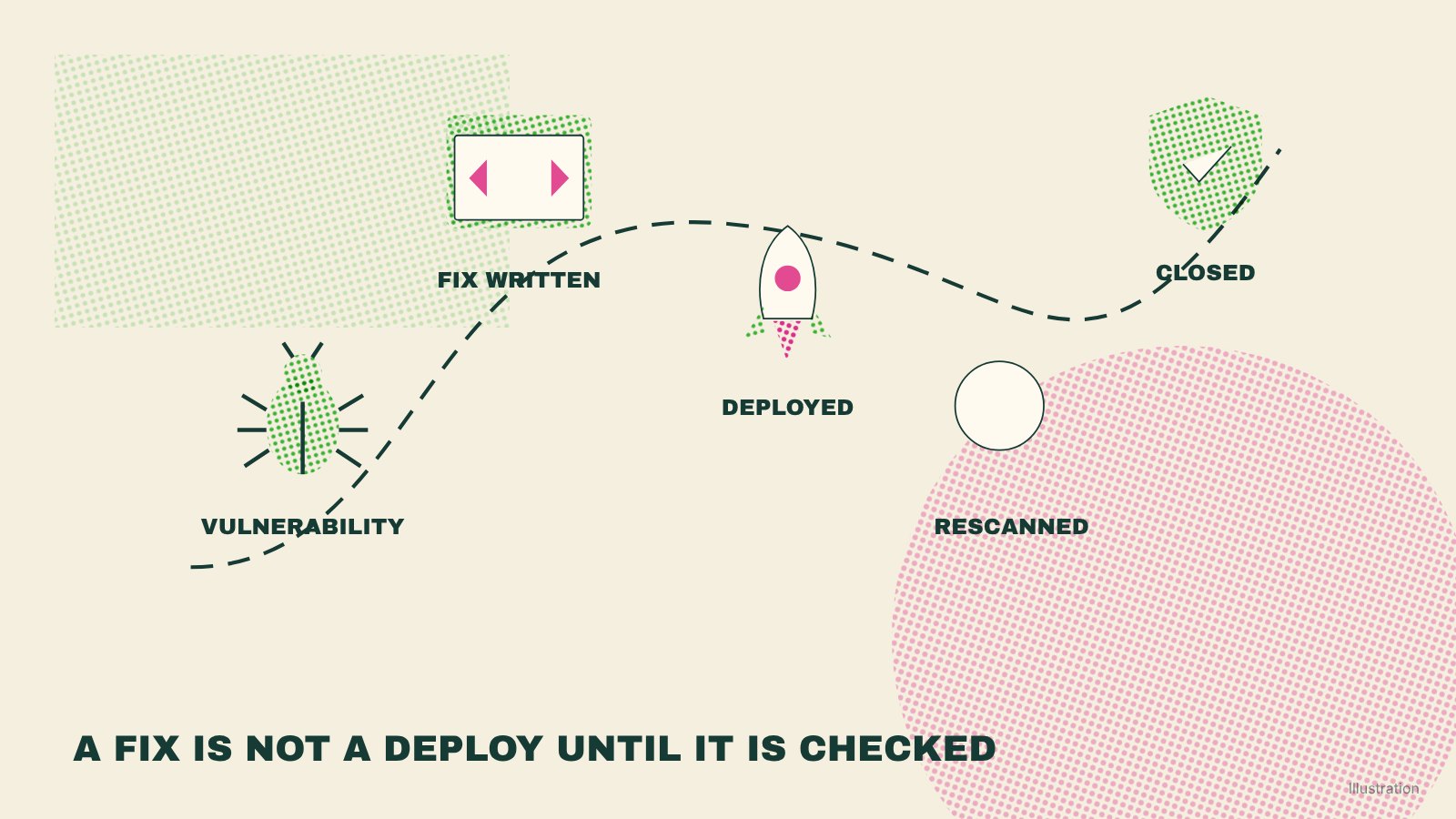
When someone marks a finding fixed, they say what changed: a commit, a pull request, a configuration. Then it waits.
It's verified when the next complete scan from the same source no longer reports it. Or when someone else, with permission to approve security decisions, records evidence that the risk is gone: a re-test, a scan result. The person who fixed it can't verify it, and "deployed" on its own is refused.
If the finding comes back, it's reopened and flagged, so regressions are visible, not quietly re-closed.
The command center
Open findings by severity, known-exploited findings, what's past SLA, fixes awaiting verification, the riskiest assets, found against verified each week, time to a verified fix, and the health of every source. All calculated, with no AI.
A worked example, start to finish
Here's Tariq's first two weeks.
Monday, 09:00. He opens Security → Sources and clicks Read alerts now. It uses the read-only GitHub connection already set up under Engineering intelligence. In Settings he leaves it reading all connected repositories. 87 Dependabot alerts and 14 code-scanning alerts come in. From now on, they're read every six hours.
09:20. He asks the developer who runs Snyk to export a SARIF file. Tariq imports it under Import SARIF or CSV, chooses the asset, and ticks complete scan, because it covers the whole project. That matters: findings missing from a later complete scan will be verified fixed by re-scan.
09:40. In Assets, he describes the important ones: checkout-service is production, mission critical and internet-facing; admin-tools is internal and low criticality. He sets an owner for each.
09:50. In Settings, he sets SLAs: critical 7 days, high 30, medium 90.
10:00. He opens the command center. At the top: the critical vulnerability with a known exploit in checkout-service, score 94. Its inputs are listed: critical severity, known exploited, EPSS high, mission-critical asset, internet-facing. The team lead's admin-tool issue is near the bottom, score 31: medium, internal, low criticality. Nobody has to argue about the order.
Tuesday. The checkout team upgrades the library and marks the finding fixed, with the pull request link. Status: awaiting verification.
Wednesday. Tariq sees the image-library finding from last month is still open in two places: the main app and the background worker, because the same CVE in two places is two findings. The worker's finding had never been closed, because a deploy isn't a fix.
Thursday. The next Dependabot read no longer reports the checkout vulnerability. It's verified fixed by re-scan. The worker team upgrades their pinned copy; the following read verifies that too.
Two weeks later. A dependency update accidentally pins the old checkout library again. The next read reports it. The finding reopens and is flagged as a regression on the command center, instead of appearing as a new alert.
Five more real-world scenarios
1. A fix verified by a person
Situation. A configuration change fixes a finding from a scanner that only runs monthly.
How TR handles it. A colleague with Approve security decisions re-tests it and records the evidence. The person who made the fix can't verify it themselves.
2. "Deployed" as evidence
Situation. A developer tries to verify a fix with the note "deployed to production".
How TR handles it. It's refused. A deploy isn't evidence the risk is gone.
3. The same CVE in many repositories
Situation. A popular logging library is vulnerable in 11 repositories.
How TR handles it. It's 11 findings, one per repository, because it's 11 fixes. Each verifies on its own.
4. A secret in a scanner export
Situation. A CSV export contains a field with an API key.
How TR handles it. Fields that could hold a secret are removed before the record is kept as evidence. Secret values are never stored.
5. Proving progress to leadership
Situation. The CTO asks whether security is getting better.
How TR handles it. The command center shows found against verified each week and time to a verified fix, not tickets closed.
Before and after
Before. Three inboxes, an order set by whoever shouts loudest, and "fixed" meaning a ticket closed after a deploy.
After. One inventory, a readable risk score, fixes that count only when a re-scan or a second person proves them, and regressions flagged when they return.
How to tell it's working
- The top of the list makes sense to the people who own the assets.
- "Awaiting verification" doesn't pile up: fixes are verified by the next scan.
- Time to a verified fix falls, week by week.
- Regressions are caught, not re-closed.
Who it's for
- Small security teams and engineers with security responsibilities.
- Engineering leads who want a fair, explainable order of work.
- CTOs and auditors who need proof, not ticket counts.
How it fits with the rest of TicketResolve
This was the first release of TR Security Intelligence. It uses the read-only GitHub connection from Engineering intelligence. Later releases added risk acceptances, false positives, remediation plans and the AI investigator, then cloud, identity and endpoint connectors.
What isn't built
A security operations center, attack-surface discovery and penetration testing are not built in this release, and we won't pretend they are.
Mistakes to avoid
- Importing partial scans as complete. Only tick "complete scan" when it covers everything, or findings will be verified wrongly.
- Skipping asset descriptions. Without criticality and exposure, scores can't tell checkout from a test tool.
- Verifying your own fix. It needs someone else, or a re-scan.
Do it in TicketResolve, step by step
Where: Security → Sources, Assets and Findings (/dashboard/security/sources). You'll need: the GitHub connection under Engineering intelligence → Code, and a colleague with Approve security decisions for evidence-based verification. Full guides: Bringing in your findings and Fixing and verifying findings.
- Read GitHub alerts. Sources → Read alerts now. It reads open Dependabot and code scanning alerts and repeats every 6 hours. Choose repositories in Settings, or leave it to read all connected ones.
- Import other scanners. Sources → Import SARIF or CSV → choose the asset. Tick complete scan for a full scan, so findings missing from it are verified fixed by re-scan.
- Describe your assets. Assets → set each asset's environment, criticality, exposure and owner.
- Set SLAs. Settings → days to fix per severity.
- Start with the command center. Known-exploited, overdue and highest-risk findings come first. Each score shows its inputs.
- Mark it fixed. Open the finding → say what changed (a commit, pull request or configuration) → Mark fixed.
- Verify. The next complete scan verifies it automatically. Or someone else with Approve security decisions records the evidence.
- Watch for regressions. A finding reported again after it was fixed is reopened and flagged on the command center.
How to check it worked: fixed findings move to verified only after a re-scan or a second person's evidence, and the weekly chart of found against verified starts to bend.
Pricing
It's part of Your Company Data Protection: $500 a month or $4,800 a year per company, added to your TicketResolve plan. No charge per user, asset, finding or investigation, and you can cancel it separately from your plan. It's in the 7-day free trial.
Frequently asked questions
Which scanners does it read? Dependabot and code scanning directly from GitHub, and anything that exports SARIF or CSV.
How often are GitHub alerts read? Every six hours.
Why is the same CVE shown twice? Because it's on two assets, and each needs its own fix.
Can I verify my own fix? No. It needs a re-scan or someone else with evidence.
Does a deploy count as a fix? No. "Deployed" on its own is refused as evidence.
Is AI used to rank findings? No. The score is calculated from listed inputs.
What happens if a fixed finding comes back? It's reopened and flagged as a regression.
Are secrets stored? No. Fields that could hold a secret are removed before the record is kept.
Explore Topics
Written by
Ghulam Shabbir
Content creator and writer sharing insights and stories.